Fireflies vs Otter (2026): Which AI Meeting Assistant Is Better?
Fireflies vs Otter (2026): Which AI Meeting Assistant Is Better?
The modern professional landscape is fundamentally defined by meeting fatigue. As remote, hybrid, and asynchronous work cultures have solidified over the past few years, the sheer volume of digital conversations has skyrocketed. Teams are increasingly buried under hours of video recordings, scattered action items, and unstructured meeting notes. To combat this operational bottleneck, AI meeting assistant software has shifted from a novel luxury into a critical infrastructure component for scaling businesses. These intelligent tools do not just record audio; they capture, transcribe, structure, and analyze organizational knowledge in real time.
Among the prominent platforms leading this conversational intelligence space, Fireflies.ai and Otter.ai stand out as the definitive heavyweights. Both software solutions entered the market as automated transcription tools, but they have evolved along completely divergent paths to solve distinct workplace challenges. Fireflies has engineered its platform into a highly integrated enterprise knowledge hub, prioritizing deep workflow automation, programmatic search layers, and multi-platform CRM synchronization for revenue and engineering teams. Otter has focused heavily on synchronous collaboration, live conversational streaming, and high-velocity transcription dynamics tailored for immediate internal review, media production, and daily standalone productivity.
Selecting the wrong meeting recorder software can lead to fragmented communication loops, dropped action items, or data compliance issues. This comprehensive, head-to-head comparison will dissect Fireflies vs Otter across transcription accuracy, summary quality, integration ecosystems, operational pricing frameworks, and real-world team deployment to help you choose the ultimate tool for your workspace.
Product At a Glance
Fireflies.ai
- Core Philosophy: Centralized conversational intelligence and multi-app workflow automation for scaling revenue, product, and agency teams.
- Interface Layout: Asset-centric dashboard featuring structured workspace directories, search filters, AI prompt layers, and performance analytic tabs.
- Key Strength: Expansive native integration library paired with automated CRM data syncing, custom AI summary structures, and global conversation searchability.
- Primary Limitation: The user interface can feel text-heavy and requires a minor learning curve to configure advanced automation parameters.
Otter.ai
- Core Philosophy: High-velocity live transcription, immediate collaborative text capture, and real-time interactive summaries for teams and individuals.
- Interface Layout: Feed-driven workspace optimized for active note taking, chronological chat updates, and instantaneous review overlays.
- Key Strength: Superior real-time streaming text rendering and live cooperative text annotation, paired with highly responsive in-meeting text editing.
- Primary Limitation: Native integrations with commercial systems like CRMs or advanced developer tools are highly restricted compared to its competitor.
TL;DR
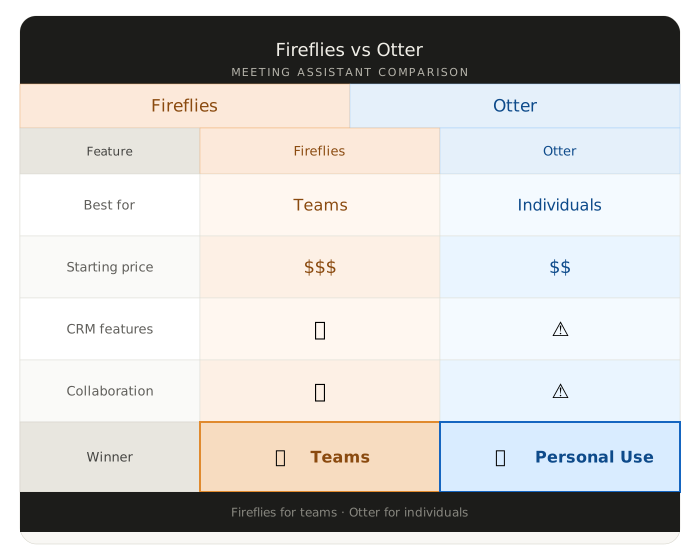
The choice between Fireflies and Otter depends entirely on your operational intent and existing technology stack. Fireflies is an exceptional choice for sales organizations, content agencies, and scaling engineering groups who require comprehensive meeting summaries, custom AI extraction prompts, and deep automation pipelines that automatically push structured meeting data into systems like HubSpot, Salesforce, or Slack. Otter is a highly effective, fast real-time companion built for journalists, solo professionals, and internal operations teams who prioritize instantaneous, live-streaming transcription rendering, active text-highlighting cooperation, and rapid immediate review cycles. If your primary bottleneck is systemic workflow integration and knowledge retention, choose Fireflies. If your primary bottleneck is immediate text access, individual productivity, and live-meeting collaboration, choose Otter.
👉 Automate Your Meeting Notes With Fireflies Free
Quick Facts
- Primary Function: Conversational capture, automated transcription, and structured AI meeting notes execution across digital communication apps.
- Platform Deployment: Highly responsive cloud-based dashboard systems paired with native Google Chrome extensions, calendar integrations, and virtual bot capture options.
- Ecosystem Integration: Fireflies supports over 40+ native platform sync configurations including advanced CRMs, storage hubs, and project engines; Otter treats calendar frameworks and mainstream video conduits like Zoom, Microsoft Teams, and Google Meet as primary targets.
- Technology Foundation: Proprietary acoustic recognition models layered with advanced large language models optimized for commercial summaries, semantic search tracking, and speaker identification.
What Are Fireflies and Otter?
Direct Answer Block: Fireflies.ai and Otter.ai are AI-powered meeting recorder software systems built to automatically join, capture, transcribe, summarize, and archive voice conversations held across web-conferencing software and physical audio uploads. Both platforms deploy intelligent artificial bots to sync with corporate calendars, silently join virtual meeting locations (such as Zoom, Google Meet, and Microsoft Teams), and output complete timestamped text transcripts layered with speaker recognition. However, while Fireflies acts as a comprehensive conversational intelligence asset meant to organize business databases and synchronize client records across third-party tech stacks, Otter acts as a live collaborative note-taking companion optimized for high-velocity real-time text streaming and immediate media review.
Understanding the unique operational layout of both tools clarifies why evaluating them on simple text accuracy fails to tell the whole story. Fireflies treats a meeting as an unrefined data source that needs to be systematically structured and distributed into other business engines. It converts an hour-long customer consultation into clean, actionable data points, such as customer objections, technical project milestones, and clear task deadlines, then pushes those elements directly to tools like Jira, Salesforce, or Trello.
Otter views the meeting as a living, dynamic workspace. It structures its environment around an activity feed where remote teams can chat, drop images inside live call logs, and co-write highlights as the dialogue happens. For modern teams evaluating the full landscape of meeting intelligence software, our Best Meeting AI Tools guide provides a comprehensive comparison of eight leading platforms across transcription accuracy, CRM integrations, and pricing.
Quick Verdict
To instantly navigate the core differences and find the correct software asset for your specific team or personal use case, review this simplified strategic recommendation matrix:
| Situation | Winner |
|---|---|
| Solo Professional | Otter |
| Small Teams | Fireflies |
| Sales Teams | Fireflies |
| Internal Meetings | Otter |
| Collaboration | Fireflies |
| Budget Users | Otter |
Choose Fireflies If:
- You run a revenue-generating sales department or digital agency that requires automated logging of client details directly inside your CRM architecture.
- You want to create custom, reusable AI summary templates that pull specific technical parameters, metrics, or sentiment milestones from every meeting.
- You need to query your entire company’s historic conversation log concurrently using a central, conversational AI search assistant.
Choose Otter If:
- You require real-time text streaming during a live call to annotate, highlight, or add manual content commentary concurrently alongside other participants.
- You operate as a journalist, student, or solo professional who needs a quick, lightweight application for uploading physical voice recordings or phone files for immediate drafting.
- Your workflow centers primarily on rapid internal summaries and straightforward calendar syndication without requiring complex, multi-platform software chains.
Pricing Comparison
Pricing may change over time. Always verify current plans on the official websites before purchasing.
The subscription frameworks for both systems follow distinct allocation structures, directly affecting your team’s long-term software overhead. Analyzing the cost means looking past the base price and understanding usage limits.
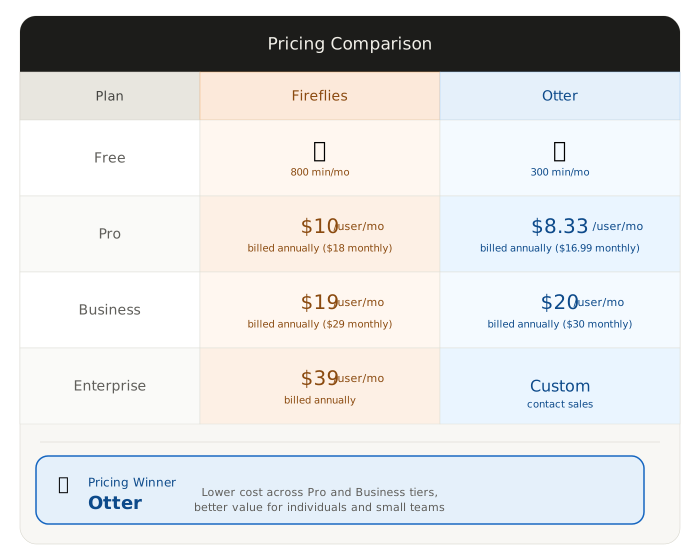
| Plan | Fireflies | Otter |
|---|---|---|
| Free Plan | ✅ 800 mins storage, limited AI tracking summaries | ✅ 300 mins/mo, 30-min scan caps per individual call |
| Pro Plan | Pro ($10/mo billed annually): Unlimited transcription + 8,000 mins storage | Pro ($10/mo billed annually): 1,200 mins/mo, 90-min scan caps, basic imports |
| Business Plan | Business ($19/mo billed annually): Unlimited transcription & storage + Video capture | Business ($20/mo billed annually): 6,000 mins/mo, 4-hour scan caps, team tools |
| Enterprise | Custom Tiers: Advanced administration settings, SSO integration, dedicated pipelines | Enterprise (Custom): Full compliance parameters, centralized organization billing engines |
Who Wins on Pricing?
Otter wins the pricing segment for casual users, individual contractors, and low-volume operators. Its introductory tiers provide highly accessible character allocations that align cleanly with solo professional workflows. The pay-per-seat models remain incredibly predictable if you do not require deep architectural configurations or continuous high-volume retention arrays.
Fireflies wins the pricing segment for commercial teams, sales organizations, and content agencies looking for long-term scalability. While the initial numbers appear similar, Fireflies’ removal of transcription minute caps on its Pro and Business plans offers superior long-term ROI. On the Business tier ($19/month), teams secure unrestricted recording limits alongside video storage parameters. Conversely, Otter caps its monthly usage metrics even on its premium Business tier, meaning high-growth agencies hosting multiple multi-hour customer consultations weekly can burn through their token banks unexpectedly.
🏆 Pricing Winner: Fireflies Reason: Fireflies provides unlimited transcription allocations on its paid tiers, completely eliminating the restrictive monthly minute caps enforced by Otter.
Feature Comparison
Evaluating the core feature modules built into both applications shows how their engineering priorities directly impact your day-to-day administrative productivity.
| Feature | Fireflies | Otter |
|---|---|---|
| Meeting Recording | ✅ Excellent (HD Video + Multi-app bots) | ✅ Very Good (High-fidelity audio bots) |
| AI Summaries | ✅ Excellent (Customizable prompt apps) | ✅ Good (Standardized structured notes) |
| Search Engine | ✅ Excellent (Global platform tracking) | ⚠️ Good (Document-by-document filters) |
| Integrations | ✅ Excellent (40+ Corporate API extensions) | ⚠️ Limited (Calendar and baseline tools) |
| CRM Sync | ✅ Excellent (Automated revenue logging) | ❌ None (Requires manual copy-pasting) |
| Team Collaboration | ✅ Very Good (Channels + Comment threads) | ✅ Excellent (Live text annotations) |
| Speaker Recognition | ✅ Very Good (Smart parsing models) | ✅ Excellent (Highly accurate acoustic logs) |
| Analytics Suite | ✅ Excellent (Sentiment metrics + Talk ratios) | ❌ None (Basic conversational overview logs) |
Deep-Dive Feature Analysis
The Search and Knowledge Management Layer: Fireflies features a global search ecosystem called “Ask Fred.” This conversational interface allows managers to query their entire historical database simultaneously. You can ask, “Show me every client meeting from the last quarter where someone mentioned budget pushback,” and the system pulls the relevant citations across all audio logs. Otter’s search functions primarily on an individual document basis, allowing users to find specific phrases inside an active file cleanly but requiring manual navigation to track concepts across distinct project directories.
Custom AI Note Customization: Fireflies contains a dedicated module called AI Apps, which allows users to build completely personalized post-meeting data extraction templates. You can command the bot to always pull out technical code revisions, extract marketing spend metrics, or list next week’s assignments in a precise, bulleted array. Otter uses an elegant, standardized summary system that outputs an overarching paragraph summary paired with automated action points, providing great speed but offering less structural variation for highly technical teams.
Analytics and Sentiment Tracking: Fireflies includes an analytical engine that measures conversational metrics on every call. It displays talk-to-listen ratios, tracks filler word frequencies, and evaluates the emotional sentiment score of the conversation. This acts as a metrics dashboard for sales training. Otter keeps its focus entirely on textual notes delivery, avoiding conversational tracking dashboards to ensure its environment remains highly streamlined.
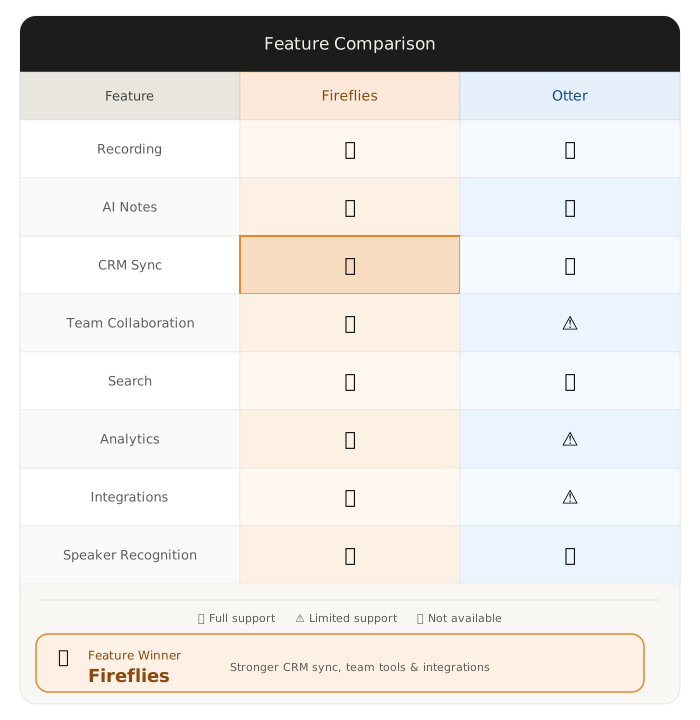
🏆 Feature Winner: Fireflies Reason: Fireflies outpaces Otter by offering a global conversational search engine (“Ask Fred”), custom AI notes templates, and robust meeting analytics.
Meeting Notes Quality
Evaluating the final informational outputs of both platforms reveals distinct strengths in linguistic accuracy and structural curation.
Summary Quality & Structural Curation
Fireflies provides a superior post-meeting structural layout. Its generation matrix splits notes into highly categorized segments: an initial executive overview, a bulleted timeline of key discussion chapters, an automated action-item checklist, and localized keyword tracking maps. Because these assets are fully customizable using their internal prompt engine, the final text reads as if it were drafted by an executive administrative assistant who deeply understands your industry’s internal metrics.
Otter delivers highly responsive, clean summaries that excel at capturing the immediate essence of a conversation. Its “Otter AI Chat” system works alongside the document, allowing you to quickly ask questions about the text and receive rapid answers. The output is tightly integrated with the corresponding timestamps, making it an excellent companion for media teams who need to transform interviews into structured editorial copy quickly.
Transcription Accuracy & Speaker Tracking
When evaluating raw acoustic word-error rates (WER), both tools perform exceptionally well under 2026 standards, but they handle acoustic environments differently. Otter holds a historical advantage when processing clear, fast, single-room speech or physical voice recordings. Its speaker recognition algorithms adjust to tonal shifts quickly, mapping speaker tags with high accuracy.
Fireflies holds an edge when processing diverse, multi-national remote calls featuring overlapping voices, technical jargon, or regional accents. Its language models are highly trained to parse complex industry-specific terms naturally, ensuring that dense development update details or agency marketing jargon avoid the clunky phonetic misspellings seen in older transcription engines.
🏆 Meeting Notes Winner: Fireflies Reason: Fireflies creates deeply structured, highly segmented summaries with built-in actionable checklists that outperform Otter’s standardized prose blocks.
Sales Team Comparison
For performance revenue departments, closing customer accounts requires minimizing manual logging and maximizing active selling time. Fireflies wins the sales category completely.
Fireflies serves as a dedicated piece of sales technology. Its native integration suite allows the bot to connect directly with major CRM tools like HubSpot, Salesforce, Zoho, and Pipedrive. The moment a discovery call ends, Fireflies processes the dialogue, strips away conversational filler, and automatically logs the summary text, action items, and structural transcripts straight into the correct client deal card without requiring a sales rep to open a new tab.
Additionally, sales directors can build automated tracking alerts for specific keywords—such as competitor names or pricing concerns. This allows managers to review sentiment metrics and track script adherence across thousands of remote sales calls simultaneously from a single intelligence hub, offering unparalleled sales coaching capabilities.
Otter can capture sales conversations cleanly, but it lacks the backend CRM automation layers necessary to support high-velocity sales pipelines. A sales rep using Otter must manually copy the text summary, navigate to their customer relationship management software, find the client record, and paste the details in manually. For expanding sales operations where administrative friction directly impacts active conversion rates, Fireflies provides the automated infrastructure required to eliminate data entries completely.
🏆 Sales Team Winner: Fireflies Reason: Fireflies integrates deeply with core CRMs like HubSpot and Salesforce to log call assets automatically, while Otter requires manual transcription copy-pasting.
Remote Team Comparison
For product groups, asynchronous tech organizations, and decentralized creative agencies, success relies on clear documentation and cross-functional visibility.
Fireflies wins for asynchronous knowledge retention and structural documentation. It operates as a searchable textual encyclopedia for your business. When a product manager misses an intensive technical alignment call due to a timezone conflict, they do not need to scroll through a video timeline. They can open Fireflies, utilize the global search layers to isolate specific developer updates, review the automated action-item checklist, and instantly grasp the project status. The platform’s ability to build dedicated “Topic Channels” allows teams to categorize meetings by project, client, or department, ensuring all conversational assets stay organized logically.
Otter wins for live collaboration and synchronous internal team communication. Its workspace layout functions like an active chat ecosystem layered on top of text generation software. During a live brainstorming session or an intensive all-hands update, team members can watch Otter render text in real time and immediately highlight vital phrases, drop images straight into the active stream, and add manual contextual notes cooperatively. This turns the transcript into an interactive, living notebook that grows alongside the conversation, making it an outstanding asset for close team alignments that require immediate group collaboration.
🏆 Remote Team Winner: Fireflies Reason: Fireflies operates as a superior long-term organizational knowledge base with cross-meeting search, beating Otter’s single-document collaboration format.
Best Budget Option
Choosing the most cost-effective solution relies heavily on analyzing your monthly meeting volume and integration requirements.
If you are a solo professional, an independent freelancer, a journalist, or a student who runs basic, standalone meetings and primarily wants a rapid transcription utility, Otter represents the best budget choice. Its Pro tier ($10/month) is highly accessible and delivers highly responsive note-taking tools and file-upload capacities that handle everyday personal productivity requirements smoothly without draining your cash flow.
If you operate as a growing business, an active startup, or a content agency balancing multiple client projects, Fireflies provides the superior long-term financial return on investment. While its pricing numbers appear almost identical on paper, Fireflies’ removal of transcription caps on its paid plans completely changes the value calculation. Securing unrestricted monthly transcription processing means you can invite the bot to every single calendar event without watching a minute counter or managing usage overages, allowing your organization to capture every ounce of business data predictably.
🏆 Budget Winner: Otter Reason: For solo independent professionals and low-volume users, Otter’s lightweight monthly models offer a frictionless, low-cost transcription environment.
Why Most AI Meeting Assistant Reviews Focus On The Wrong Metrics
Standard software roundups tend to evaluate Fireflies and Otter through a highly simplified lens. They spend thousands of words testing raw word-error rates under perfect recording conditions, counting default template lists, and declaring a winner based on arbitrary accuracy marks. This approach misses the fundamental evolution of modern voice-to-text systems.
The true differentiator between Fireflies and Otter is not about transcription accuracy—it is a question of Data Utility vs. Document Immediacy.
Voice data is naturally messy, unstructured, and fleeting. The challenge facing modern organizations is not transforming audio waveforms into words; it is knowledge extraction and systemic distribution.
Fireflies approaches this challenge by treating the meeting as a raw information asset. Its software architecture assumes that the text transcript is merely the starting line. Its engineering focus centers on building a comprehensive relational database out of your corporate dialogue. This is why it invests so heavily in cross-platform API extensions, custom AI prompting blocks, and global search engines. Fireflies wants to turn your conversational history into structured data points that seamlessly populate your secondary work software. It wants to make your business conversational history as searchable and automated as an enterprise database.
Otter treats the meeting as an immediate, focus-driven environment. Its software layout is built on the belief that the true value of an AI transcription assistant is achieved during the conversation and immediately following its conclusion. It prioritizes real-time text rendering speeds, instantaneous chat overlays, and collaborative user interactions inside an active browser tab. Otter is built to optimize the human execution speed within the document workspace to prevent meeting overload.
This is why looking at simple feature checklists is a mistake. Fireflies is the ultimate tool for companies that view meetings as systematic business data that must be structured and automated across an entire technology stack; Otter is the definitive companion for creators who view meetings as immediate collaboration spaces where thoughts must be captured and reviewed instantly.
The Hidden Cost Of Unsearchable Meeting Knowledge
When corporate conversations occur without systematic centralized discovery, an organization incurs a heavy, compounding tax: the hidden cost of unsearchable knowledge. Every week, critical strategic pivots, software deployment technical details, and specific client account requirements are verbalized during video calls, only to immediately evaporate the moment the call disconnects. Without deep indexation, this conversational data becomes entirely dark.
This lack of structural visibility leads directly to systematic meeting overload. Because team members cannot easily verify what was decided during an missed sync, they are forced to attend every surrounding alignment call as a defensive measure to protect their own workflows. When information is locked inside fragmented single-document files or audio recordings, internal knowledge retrieval demands manual inspection. A developer or project manager must manually message colleagues, scroll through long text chat channels, or guess matching keywords across a sea of unorganized text files to re-verify a simple operational directive.
The long-term operational value of an AI meeting engine is verified by its ability to resolve this specific information breakdown. True performance returns emerge when voice recordings are automatically turned into structured, universally searchable database assets. When your entire historical conversation index is queryable simultaneously, the time spent re-confirming past technical agreements falls to zero. Distributed team members gain immediate cross-functional alignment without synchronous interruptions. By making your corporate conversational voice data as searchable as text spreadsheets, organizations can break down data silos, preserve critical business context over multi-year operational runs, and actively protect employee attention spans from calendar bloat.
👉 Try Fireflies Free And Capture Every Meeting Natively
Alternatives
If neither Fireflies’ deep workflow orchestration nor Otter’s real-time note-taking canvas fits your specific remote setup, the modern market contains several alternative options.
Fathom
Fathom is an exceptionally popular alternative that stands out by offering a highly generous, completely free tier for individual professionals that includes unrestricted recording counts without token limits. Fathom operates natively inside Zoom, Microsoft Teams, and Google Meet, featuring a lightweight interface that allows users to click simple sidebar buttons during a live call to instantly highlight and categorize crucial moments. If you want a zero-cost tool for solo use that focuses entirely on simplicity and clean video clipping layouts, Fathom is a top choice. Read our full Fathom Review for a comprehensive analysis.
Avoma
Avoma is a heavy-duty conversational intelligence engine custom-built for scaling B2B SaaS sales teams and enterprise customer success operations. It pairs detailed meeting recording features with advanced algorithmic revenue features—such as deep deal-risk indicators, automatic customer objection tracking maps, comprehensive competitor analysis dashboards, and extensive onboarding coaching tools. It is an exceptional choice if your organization requires enterprise-grade revenue intelligence that goes far beyond standard meeting summarization.
MeetGeek
MeetGeek is an agile, feature-rich alternative that focuses heavily on automated video curation and brand documentation. It records full video call frameworks, uses smart semantic models to extract structural highlights, and automatically generates clean, shareable video snippets that teams can embed straight into project management channels or client dashboards. It is an ideal option for creative groups and product designers who prefer visual video references over extensive text documentation.
Category Winners At A Glance
| Category | Winner |
|---|---|
| Pricing | Fireflies |
| Meeting Notes | Fireflies |
| Collaboration | Otter |
| CRM Integration | Fireflies |
| Sales Teams | Fireflies |
| Remote Teams | Fireflies |
| Ease Of Use | Otter |
| Overall Business Value | Fireflies |
Fireflies captures the majority of category victories because it prioritizes structural data transformation and system-wide automation. While Otter wins on pure interface immediacy and synchronous real-time typing engagement, Fireflies provides superior long-term corporate infrastructure by turning daily spoken dialogue into searchable, integrated business knowledge assets.
If You Need One Recommendation
If you are struggling to choose between these two engines, the framework is straightforward. You should choose Fireflies.ai if you are running a scaling sales team, a digital content agency, or a multi-app development workspace that values long-term text documentation, searchable knowledge repositories, and automated data logging directly inside tools like HubSpot, Salesforce, or Slack.
Conversely, you should select Otter.ai if you operate as an independent freelancer, media producer, or solo operator who prioritizes immediate real-time transcript visualization, quick local file audio uploads, and synchronous in-call note collaborations within a single browser window. Align the application selection with your primary technology bottleneck—unrestricted system data automation versus immediate text document access—and begin scaling your team’s administrative velocity.
Decision Table
| Question | Answer |
|---|---|
| I need my meeting notes to automatically log inside HubSpot. Which tool should I choose? | Fireflies: It features automated native CRM synchronization pipelines built specifically for sales departments. |
| I want my team to cooperatively highlight text during a live call. Which tool does this? | Otter: Its interface is highly optimized for synchronous real-time text streaming and collective editing. |
| I want a tool that lets me search across all historical meetings at once. Which wins? | Fireflies: Its conversational search assistant can query your entire historical voice database simultaneously. |
| I need to transcribe physical audio files recorded on my phone. Which tool handles this best? | Otter: Its file import architecture processes external media uploads cleanly and rendering text rapidly. |
| My budget is tight, and I need unlimited transcriptions for long client calls. Which is better? | Fireflies: Its paid tiers remove transcription minute caps, whereas Otter enforces usage limits even on premium plans. |
Common Questions
1. Is Fireflies more accurate than Otter? Both tools display exceptional transcription accuracy numbers under 2026 baseline metrics. Otter holds a slight advantage when capturing clear, single-room speech or processing individual audio uploads. Fireflies excels at parsing complex multi-national remote calls featuring technical jargon, corporate terms, and varied regional accents, ensuring dense project management acronyms avoid phonetic misspellings.
2. Is Otter worth the extra cost? Yes, Otter’s pricing structure delivers immense value for individual freelancers, media creators, journalists, and solo contractors who require high-speed transcription rendering and responsive note editing features. However, for growing corporate teams and digital agencies, Fireflies often provides a better long-term return on investment due to the removal of strict minute constraints on its paid tiers.
3. Which is better for remote teams? The answer relies on how your team communicates. Otter is the superior asset for synchronous groups who want to actively collaborate, chat, and drop images inside a live transcript during an active discussion. Fireflies is the superior engine for asynchronous organizations that rely on centralized knowledge documentation, automated task tracking, and powerful search capabilities to keep distributed members aligned without forcing them to sit through hours of recorded video logs.
4. Which is better for SEO? For content creators who want to transform voice insights into search engine optimization assets, both tools act as exceptional ingestion layers. Fireflies provides an advantage by offering more robust global search capabilities and custom AI prompt extractions, allowing writers to easily pull clean content blocks out of historical marketing roundtables. For a deeper look at Fireflies’ full feature set, see our Fireflies AI Review.
5. Which tool should beginners choose? Beginners should choose Otter if they prefer a straightforward feed layout that mimics a standard text chat system with zero configuration steps required. Beginners should choose Fireflies if they are building out a commercial business stack and want to set up permanent calendar bots that systematically categorize meeting summaries by project and client directories with minimal manual maintenance.
6. Can these tools record offline meetings? Yes, both applications provide pathways to capture physical interactions. Otter features a highly responsive mobile application for iOS and Android designed to record and transcribe real-time conversations on the go. Fireflies allows users to record offline meetings using its mobile web interface, standalone chrome extensions, or by uploading saved audio files directly into its backend dashboard for processing.
Should You Use It?
Your Ultimate Blueprint for Fireflies.ai You should absolutely add Fireflies to your operational technology layer if you lead a revenue-generating sales department, manage a digital agency with diverse client accounts, or direct an engineering group where conversational documentation directly impacts product deployment. Fireflies functions as an intelligent central brain for your organization’s voice data, ensuring that every insight, commitment, and assignment is structured, logged, and distributed into your primary business applications automatically.
Your Ultimate Blueprint for Otter.ai You should select Otter if you are an independent operator, creator, or operations manager who values live collaboration, instant text accessibility, and streamlined calendar recording utility. Otter serves as a responsive digital notebook that removes the tedious burden of manual note taking, giving your team an immediate interactive space to review text, coordinate highlights, and synthesize conversational outcomes cleanly and affordably.
Also See
- Best Meeting AI Tools — Full 8-platform roundup comparing Fireflies, Otter, tl;dv, Avoma, Fathom, MeetGeek, Krisp AI, and Sembly AI.
- Fireflies AI Review — Deep dive into Fireflies’ CRM integrations, custom AI templates, and pricing tiers.
- Otter.ai Review — Comprehensive analysis of Otter’s live transcription engine, mobile app, pricing limits, and who it is best suited for.
- tl;dv Review — In-depth review of tl;dv, the video-first AI meeting tool ideal for UX researchers and product teams who need timestamped video navigation and multi-meeting reel collections.
- Fireflies vs Fathom — Compare Fireflies against Fathom to understand when enterprise analytics and deep CRM pipelines beat a free unlimited tool.
- Fireflies Alternatives — Full comparison of competing meeting intelligence platforms for teams considering other options.
Bottom Line
The competitive analysis between Fireflies and Otter is resolved the moment you evaluate how your company treats conversational data. Otter stands out as a champion of real-time text visualization and workspace immediacy, providing individuals and internal operations teams with a beautifully streamlined note-taking environment that maximizes daily productivity. Fireflies secures its position as an enterprise leader for conversational intelligence by providing scaling organizations with the advanced CRM automations, global semantic search layers, and custom data-extraction modules required to transform fleeting digital conversations into long-term organizational knowledge assets.
Final Verdict
Both tools receive exceptional scores from Zotopie, reflecting their mature positions in the 2026 market. Otter earns a stellar 4.7/5.0 for Synchronous Collaboration and Ease of Use, solidifying its status as the premier lightweight companion for real-time text access. Fireflies earns a commanding 4.8/5.0 for Workflow Automation and Systems Integration, establishing itself as an essential software asset for high-growth commercial teams that demand complete, cross-platform data synchronization. Analyze your existing technology stack, evaluate your monthly meeting duration volume, and deploy the AI assistant engineered to clear your organizational bottleneck today.