Best Meeting AI Tools (2026): Comprehensive AI Assistant Comparison
Best Meeting AI Tools (2026)
The way we work, communicate, and manage projects has changed forever. In the modern workspace, organizational knowledge is generated constantly through daily conversations. But capturing all of that spoken information used to be a major headache, requiring manual note-taking, fragmented follow-ups, and a lot of administrative busywork.
As teams juggle their schedules across Zoom, Microsoft Teams, and Google Meet, specialized AI software has evolved from a nice-to-have luxury into an absolute necessity.
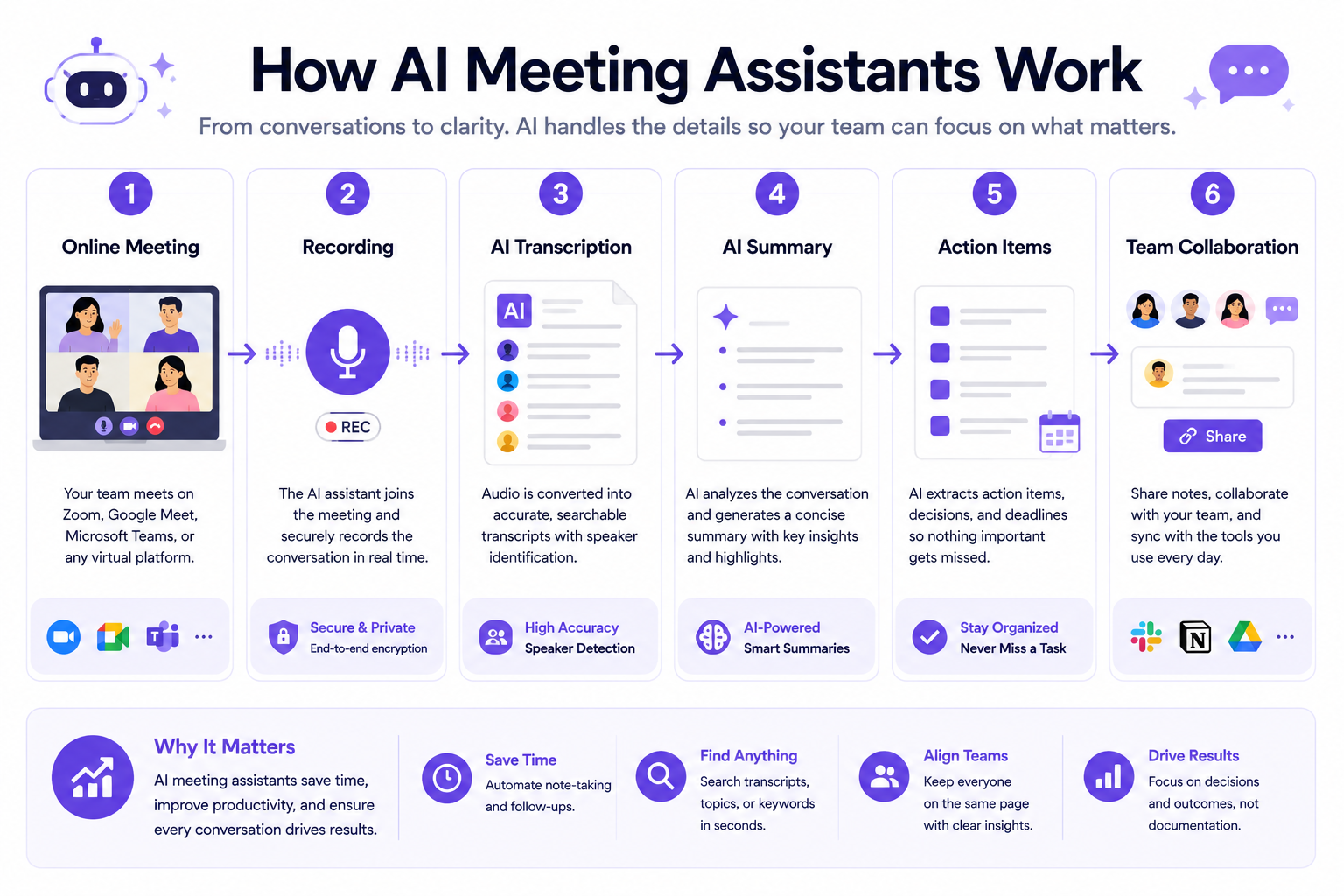
AI meeting assistants and automated transcription tools do much more than simply log conversations. Today, they convert audio into structured data in real time. These tools can recognize who is speaking, pull out action items, highlight important milestones, and generate clean summaries that sync directly with your project management tools.
Choosing the wrong AI meeting assistant can actually slow your team down. A weak transcription engine might misquote a client, while a tool that lacks proper integrations can trap your meeting notes in a silo, far away from your CRM or Slack channels.
In this guide, we break down the top meeting software available today. Based on our analysis of public documentation, technical features, and pricing structures, we evaluate the industry standards to help you select a platform that fits your team size, budget, and workflow needs.
Product At a Glance
The meeting automation ecosystem features distinct platforms tailored to different goals, scales, and budgets. Use this quick reference table to find the tool that matches your primary requirement.
| Need | Recommended Tool | Why |
|---|---|---|
| Best Overall | Fireflies.ai | Offers highly customizable summaries, a massive app directory, and deep conversational search features. |
| Best Free Plan | Fathom | Provides unrestricted recording and transcription for individuals with no hidden cost gates. |
| Best for Sales | Avoma | Tracks buyer intent, pipeline velocity, and script compliance across multiple calls. |
| Best for Video | tl;dv | Indexes generative AI summaries directly to high-definition video clips. |
| Best for Enterprise | Sembly AI | Focuses on risk management, executive summaries, and multi-meeting analytics. |
| Best for Education | Otter.ai | Offers live, scrollable interactive transcripts ideal for lectures and classrooms. |
| Best for Remote Teams | Krisp AI | Operates at the hardware level to provide bidirectional background noise cancellation. |
TL;DR
The selection of an optimal AI meeting assistant depends on your organization’s scale, recording habits, and target integrations. Fireflies.ai is our top overall recommendation for standard operations, scaling startups, and multi-client agencies. It features expansive app directories, custom semantic extraction, and robust background recording across various web conferencing platforms.
If your priority is real-time interactive transcription and live team editing, Otter.ai provides an elegant, feed-driven layout. Product development teams and UX research groups who require high-fidelity video clip indexing should explore tl;dv, while Avoma delivers the necessary analytics for revenue tracking, full sales pipeline visibility, and automated client deal mapping.
Ultimately, Fireflies.ai offers the most balanced feature set for teams that want to automate their post-meeting workflows and connect conversational data directly to their CRM.
👉 Try Fireflies.ai Today →
Recommended for operations managers, scaling teams, and agencies requiring a centralized, automated conversation workspace.
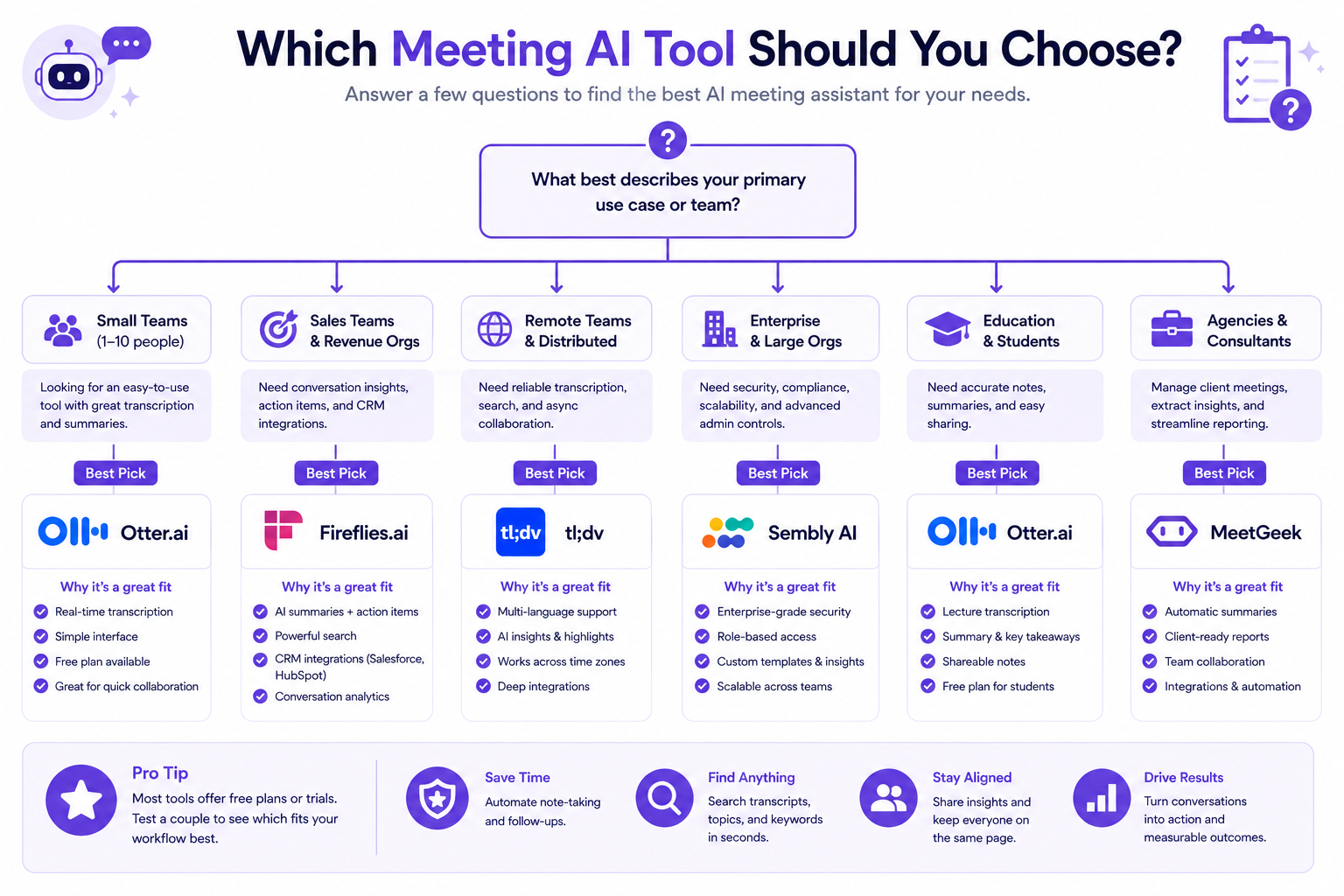
Quick Recommendation Guide
If you need to make a decision quickly, use this simple guide to match your role with the most appropriate tool:
| If you are a… | Choose |
|---|---|
| Small Team | Fireflies.ai |
| Enterprise | Fireflies.ai |
| Sales Team | Avoma |
| Product Research Team | tl;dv |
| Education Professional | Otter.ai |
| Solo Professional | Fathom |
Quick Facts
- Primary Objective: Converting conversational audio into structured text, summaries, and synced database entries.
- Best For: Startups, corporate operations, and sales teams looking to automate post-meeting administration.
- Free Plan Availability: Most platforms offer a free tier (e.g., Fireflies, Fathom, Otter), though storage and AI features are often capped.
- Pricing Starts At: Paid plans generally range from $8 to $25 per user per month.
- Enterprise Plan Availability: Custom enterprise tiers with SSO and SOC 2 Type II compliance are available on platforms like Fireflies and Avoma.
- Mobile App Support: Available on select platforms (Otter, Fireflies) for on-the-go recording and review.
- Offline Recording: Rarely supported by cloud-based bots; requires local hardware solutions like Krisp AI or dedicated dictation tools.
What Are AI Meeting Assistants?
Direct Answer Block: AI meeting assistants are specialized cloud-hosted software applications engineered to capture, transcribe, analyze, and archive acoustic conversation data from digital web conferences and uploaded media files automatically. By combining automated speech recognition (ASR) layers with generative large language models, these tools join online video calls as automated recording bots to systematically identify distinct speakers, index semantic concepts, extract critical action items, and compile concise summaries. Unlike legacy transcription recorders, an AI meeting assistant transforms conversational audio into a structured text database, syncing insights directly with secondary project management tools, corporate communication grids, and enterprise CRM directories.
To evaluate these applications accurately, it helps to look at how they eliminate data silos. In standard business practices, conversational data generated within a strategy session is historically lost immediately upon call termination unless a participant manually compiles extensive notes. This creates clear data gaps, leading to misaligned follow-ups, undocumented client requests, and lost context across async teams.
An AI meeting assistant solves this by processing the audio continuously. It builds an unedited text record synchronized with time-stamped markers. By translating this unstructured conversation into relational data points, teams can search past discussions, query specific keyword criteria across historical months, and verify client mandates with absolute certainty.
For modern departments balancing high content velocity alongside software automation, understanding the exact feature sets of these recording engines ensures that internal documentation is accurate, secure, and efficient.
How We Evaluated These Tools
To construct a comprehensive, objective evaluation baseline that sidesteps promotional vendor claims, this guide analyzes individual software architectures against eight core operational pillars:
- AI Transcription Quality: The baseline precision of the automated speech recognition engine. We assess how well it handles diverse regional accents, complex technical vocabulary, background noise, and rapid conversational overlapping.
- Meeting Summaries & Generative AI: The structure and utility of the post-meeting documentation. We look at whether the platform delivers generic text blocks or highly customizable, query-enabled summary templates that fit different business frameworks (like BANT sales frameworks or agile standups).
- Speaker Recognition (Diarization): The platform’s accuracy in isolating distinct voice signatures across multi-user environments, mapping names correctly to conversational lines even when participants share a single physical microphone.
- Search & Data Analytics: The depth of the internal indexing engine. We analyze whether users can easily locate past discussions using advanced filters, global keyword trackers, and sentiment metrics.
- Integrations & CRM Syncing: The connectivity of the platform’s API and pre-built integrations. We evaluate how smoothly text insights and action items push to workspaces like Slack, Salesforce, HubSpot, Notion, Jira, and Asana without manual copy-pasting.
- Ease of Use & Bot Reliability: The daily, frictionless configuration of the platform. We track the onboarding requirements for non-technical team members and how consistently the automated recording bots join scheduled calendar invites.
- Pricing & Value Scalability: The total cost of ownership across scaling team seats. We evaluate functional inclusions, storage limits, hidden AI credit systems, and feature gates separating free sandboxes from premium corporate subscriptions.
- Privacy & Data Governance: The platform’s adherence to global regulatory frameworks, including SOC 2 Type II audits, HIPAA mandates, and GDPR parameters. This ensures enterprise intellectual properties remain confidential and protected from public language model training loops.
Best Meeting AI Tools
Evaluating software options in 2026 requires looking past simple transcription accuracy to examine how custom features fit into specific operational workflows, team structures, and compliance mandates.
1. Fireflies.ai
Fireflies.ai functions as a centralized conversational intelligence workspace, prioritizing deep multi-platform recording flexibility, expansive application directories, and highly customizable AI summaries.
Overview
Fireflies.ai operates with an infrastructure-first mindset, positioning its software as a comprehensive database gatekeeper for your organization’s conversations. The platform deploys automated recording bots (“Fred”) that sit natively inside your Google or Outlook calendar and autonomously enter web calls across Zoom, Microsoft Teams, Google Meet, and Webex. It focuses heavily on converting voice data into structural assets that flow directly into your external tech stacks.
Why We Recommend It
We recommend Fireflies because it acts as a true conversational database rather than just a simple transcription logger. It gives teams the ability to search across months of meetings for a single keyword, completely transforming how institutional knowledge is stored and retrieved.
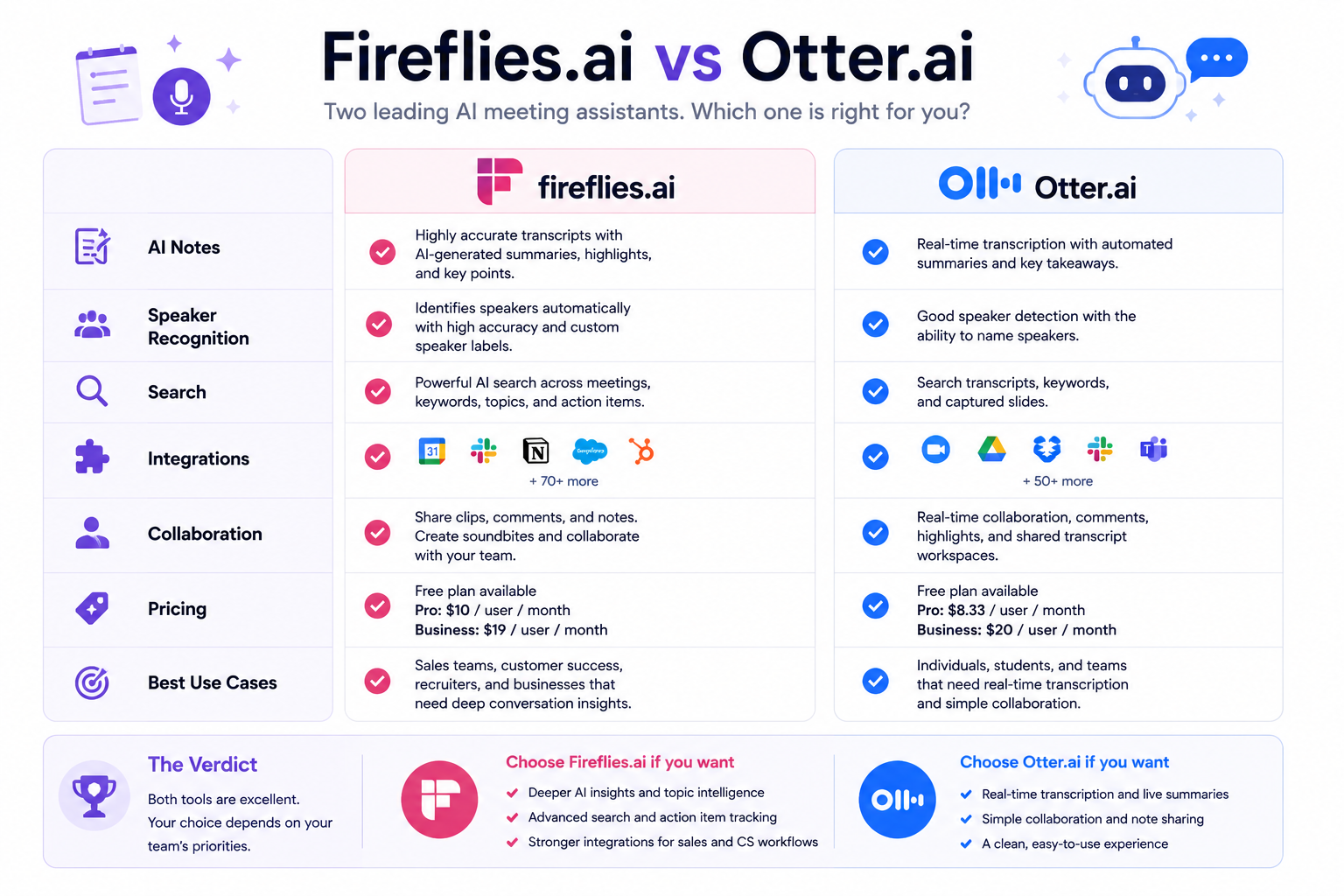
Strengths vs. Otter.ai
Unlike Otter.ai, which focuses heavily on real-time text visualization and consumer-style feeds, Fireflies is built for workflow automation. It has a much deeper integration directory and superior AI summarization tools that can be customized to match specific CRM fields. Otter is great for viewing a live transcript as someone speaks, but Fireflies is better at turning that transcript into actionable, long-term business data.
Strengths vs. tl;dv
While tl;dv excels at video snippet sharing and visual curation, Fireflies is superior for text-based knowledge management. tl;dv is heavily tied to the video recording itself, whereas Fireflies allows you to quickly skim, search, and manipulate the text data across the entire organization, saving time when you do not want to re-watch a clip.
Ideal Customer Profile
The ideal user is an operations manager, agency director, or startup founder who wants their team’s knowledge automatically logged into Notion, Salesforce, or Slack without manual data entry. It is perfect for teams scaling up their sales or customer success departments.
When Fireflies is NOT the Best Choice
Fireflies is not the best choice if you need to record offline, in-person meetings without a digital calendar link. It is also not suited for organizations that strictly ban cloud-based audio processing for extreme compliance reasons. If you just want a quick, free transcript of a casual chat without needing CRM connections, the AI credit limits on the free plan might make a simpler tool more appealing.
Key Features
- AI Super Summaries: Generates multi-part post-meeting documentation, containing action items, chronological outlines, and searchable keyword arrays.
- AskFred Chat Assistant: An interactive conversational bot layered over individual transcripts, enabling users to query the call text directly (e.g., “Draft a follow-up email based on the pricing feedback”).
- Custom AI Topic Trackers: Allows administrators to establish custom semantic filters that track and aggregate trends across all company calls.
- Expansive Integration Directory: Features pre-built synchronization linking data straight into over 40 external directories, including Salesforce, HubSpot, Slack, Notion, Asana, and Jira.
Pricing Summary
According to information available at publication time.
- Free Plan: Includes limited transcription credits, 800 minutes of total storage, and basic web-conferencing connectivity.
- Pro Plan ($10/user/month annually or $18 monthly): Unlocks unlimited transcription, 8,000 minutes of storage, AI Super Summaries, CRM integrations, and advanced download features.
- Business Plan ($19/user/month annually or $29 monthly): Expands capabilities to include unlimited storage, full video recording, conversational intelligence analytics, and team workspaces.
- Enterprise Plan ($39/user/month annually): Adds HIPAA compliance, SSO/SCIM integration, custom data retention policies, and dedicated account management.
Verdict
Fireflies.ai remains our primary recommendation for corporate teams requiring an automated conversation database that integrates directly into CRMs and custom apps. Its technical depth, query flexibility, and robust application directory make it an outstanding foundation for building unified organizational knowledge bases.
2. Otter.ai
Otter.ai focuses on live acoustic transcription fidelity, collaborative real-time interactive text workspaces, and feed-driven dashboard layouts.
Overview
Otter.ai approaches conversation tracking through real-time text visualization. Rather than requiring users to wait for a call to end before generating report documents, Otter.ai processes audio feeds dynamically. It builds a live scrollable transcript directly inside its user dashboard as participants speak. This design prioritizes immediate text review, inline commenting, and interactive team editing during the active call.
Best For
Media production teams, journalists, educational lecture halls, individual research professionals, and standalone creators who require immediate text verification and live interactive workspaces.
Key Features
- Otter Live Notes: Generates a real-time, word-for-word scrollable text stream during live events, allowing remote team members to view and highlight text as it occurs.
- OtterPilot Automation: Programmatically scans your calendar to join, record, and take notes across Zoom, Microsoft Teams, and Google Meet simultaneously.
- Live Interactive Outline Module: Compiles an automated running summary column alongside the active transcript, updating discussion milestones dynamically.
- Automated Screenshot Capture: Detects and embeds presentation slide screenshots directly into the transcript text block whenever a user shares a screen during a conference.
Strengths
- Unrivaled live transcription feedback speed, displaying words near-instantly.
- Excellent inline text interaction tools, letting teams tag colleagues, add images, and adjust copy choices directly inside the live stream.
- Clean, consumer-friendly interface layout that mirrors a traditional social media feed, requiring almost zero user training.
Weaknesses
- The free tier imposes strict limits, including a rigid 30-minute cap per conversation and an allowance of only 3 lifetime audio file imports.
- Native CRM data automation pathways are comparatively limited, focusing heavily on primary platforms without the extensive peripheral app directory found in enterprise tools.
- The platform operates strictly via cloud upload, barring offline processing for highly confidential mandates.
Pricing Summary
According to information available at publication time.
- Basic Plan (Free): 300 monthly transcription minutes, capped at 30 minutes per meeting. Limited to 3 lifetime file imports.
- Pro Plan ($8.33/user/month annually or $16.99 monthly): 1,200 monthly minutes, 90 minutes per meeting, 10 file imports per month, and advanced export options.
- Business Plan ($20/user/month annually or $30 monthly): 6,000 monthly minutes, 4 hours per meeting, unlimited imports, and team admin controls.
Verdict
Otter.ai is a highly reliable selection for teams who prioritize live, real-time collaboration and immediate text verification over deep backend data automation. Its scrollable interface and inline capture features make it an outstanding companion for educational settings and creative writing workshops.
3. tl;dv
tl;dv coordinates its user experience completely around video-first asset curation, mapping timestamped summaries directly onto indexed video clips for quick visual reference. Read our full tl;dv Review for a comprehensive breakdown of its video clipping tools, multi-meeting reel collections, pricing, and ideal use cases.
Overview
The platform name “tl;dv” (Too Long; Didn’t View) directly reflects its software core. Recognizing that text transcripts often fail to communicate vocal intonation, facial expressions, and live user interface struggles, tl;dv treats video files as the primary source of truth. The application records full high-definition web call video screens across Zoom, Google Meet, and Teams, using its textual summaries as interactive timeline shortcuts to navigate through the raw video content.
Best For
Product managers, user experience (UX) researchers, customer discovery teams, and software development departments that manage high-volume user testing interviews and require shareable video snippets.
Key Features
- Timestamped Video Hyperlinks: Links generated AI summaries directly to corresponding video milestones, enabling users to click a text line and watch that exact moment in the call instantly.
- Video Snippet Curation: Provides single-click video clipping controls, allowing users to trim a multi-hour call down into brief, shareable user feedback highlights.
- Multi-Meeting Reel Collections: Enables teams to aggregate separate video snippets from different user calls into a single cohesive portfolio stream.
- Multi-Platform Localization Engine: Natively transcribes, translates, and maps dialogue footprints across more than 30 global languages concurrently.
Strengths
- Exceptional tool for visual evidence presentation, allowing product directors to share raw video feedback clips directly with developers with zero manual trimming required.
- Generous unstructured recording architecture allows startup teams to record unlimited video call sessions on the free tier.
- Highly responsive, modern interface that prioritizes swift video playback and cross-team link distribution.
Weaknesses
- The free tier enforces a 3-month deletion policy on recordings and hard-caps AI summaries at 10 for the lifetime of the account.
- The automated summary structures skew toward high-level behavioral overviews rather than structured, multi-tier corporate task lists.
- Heavy video asset density demands robust internet browser rendering capabilities, which can introduce minor playback delays on older hardware.
Pricing Summary
According to information available at publication time.
- Free Plan: Unlimited recording and transcription, but recordings delete after 3 months, and AI summaries are capped at 10 lifetime uses.
- Pro Plan ($18/user/month annually or $29 monthly): Unlocks unlimited AI summaries, infinite storage retention, global search, and CRM integrations via Zapier.
- Business Plan ($59/user/month annually or $98 monthly): Delivers advanced sales coaching insights, native Salesforce/HubSpot sync, and customizable sales playbooks.
Verdict
tl;dv is an outstanding utility for research-heavy and product-driven organizations that rely on qualitative visual evidence over text density. Its video snippet curation model turns raw video catalogs into organized operational insights efficiently.
4. Avoma
Avoma targets full-lifecycle conversational intelligence, combining pre-meeting scheduling frameworks with specialized deal-tracking filters for sales and revenue pipelines.
Overview
Avoma moves beyond simple post-call transcription by covering the entire operational interaction cycle. The platform coordinates structural tasks before, during, and after meetings occur. It embeds cooperative agenda-drafting tools directly inside the calendar invitation system, ensuring that calls open with clear target metrics before its underlying ASR and LLM layers begin processing the conversational data stream.
Best For
Account management groups, sales teams, corporate revenue operations, and customer success departments that need to track buyer intent metrics across multi-stage business deals.
Key Features
- Full Deals Dashboard Analytics: Aggregates conversation insights across full multi-call sales lifecycles, illustrating risk flags, account momentum, and drop-off trends.
- Pre-Meeting Agenda Collaboration Hub: Provides shared templates inside calendar modules to ensure teams define discussion objectives collectively before recording bots launch.
- Compliance Tracking & Scorecards: Measures how closely sales representatives adhere to explicit compliance criteria, product phrasing benchmarks, or regulatory disclosures during pitches.
- Advanced Conversation Dynamics Analytics: Logs and charts precise team talking-to-listening ratio balances, average monologue durations, and question-frequency parameters.
Strengths
- Outstanding architectural capability for revenue managers who need high visibility across complex, multi-brand client engagement streams.
- Deeply integrated pre-call planning structures that actively prevent disorganized, unstructured business meetings from occurring.
- Highly specific structural keyword trackers calibrated to identify purchase intent, pricing objections, and competitive comparisons natively.
Weaknesses
- The comprehensive revenue tracking metrics and deep sales-specific reporting layouts offer very little functional utility for standard internal engineering groups or creative studios.
- The pricing framework sits at a premium tier compared to generalized transcription tools, requiring substantial enterprise budget justification.
- The interface architecture can feel overly dense and metrics-focused for casual users who simply want straightforward text transcripts.
Pricing Summary
According to information available at publication time.
- Starter Plan ($24/user/month): Unlocks basic AI notes, baseline transcript structures, and standard calendar syncing features.
- Plus Plan ($49/user/month): Grants full advanced summary templates, multi-language support, custom vocabulary adjustments, and foundational integrations.
- Business Plan ($79/user/month): Delivers advanced conversational analytics, monologue tracking, compliance scorecards, and premium CRM data flows.
Verdict
Avoma is a highly specialized, powerful tool for customer success departments and revenue operations managers who view conversation data as a direct component of pipeline velocity. Its deal intelligence dashboards turn standard call logs into strategic asset metrics.
5. Fathom
Fathom prioritizes a low-friction, developer-friendly model for growing teams, offering full-featured basic recording alongside single-click highlight tags that eliminate post-meeting notes.
Overview
Fathom entered the market with a user-centric design approach, establishing popularity by offering a robust standalone recording application with an exceptionally generous free tier. The platform coordinates its features around individual productivity. Its desktop application interface rests transparently alongside web conference windows, allowing users to manually apply highlight labels (such as Action Item, Insight, Feedback) in real time with a single click as the meeting unfolds.
Best For
Freelance consultants, independent agencies, remote production teams, and scaling startups looking for a direct, cost-effective tool with deep CRM integration.
Key Features
- One-Click Real-Time Tagging: Provides floating on-screen buttons during calls, letting users flag conversational categories instantly so the system compiles custom lists automatically.
- Automated CRM Sync Block: Maps, formats, and pushes finalized meeting text notes straight to appropriate deal fields inside Salesforce, HubSpot, and Close CRM programmatically.
- Instant Post-Call Draft Generation: Compiles clean email summaries immediately upon meeting conclusion, ready to copy and distribute to clients with a single click.
- Full-Featured Free Individual Tier: Grants individual operators complete access to unrestricted recording, transcription features, and core highlight frameworks.
Strengths
- Extremely generous single-user pricing model that provides immediate commercial utility without mandatory subscription commitments.
- Outstanding formatting consistency when mapping notes directly to standard sales CRM deal pipelines.
- Minimal processing lag, with summary reports and shared link directories rendering within seconds of call termination.
Weaknesses
- The platform currently lacks the ability to capture and transcribe Zoom chat logs natively, which can result in lost context if important links are shared via text during a call.
- Team-based features, centralized administrative controls, and shared global search functionality require paid subscription upgrades.
- The software relies heavily on a dedicated desktop companion application for full feature synchronization, which can clash with strict corporate device administration policies.
Pricing Summary
According to information available at publication time.
- Free Plan: Permanent free access providing unrestricted meeting recording, text transcription, instant summaries, and basic CRM integrations for individuals.
- Premium Plan ($16/user/month annually or $20 monthly): Adds advanced AI action items, custom meeting bots, and conversational meeting assistants.
- Team Edition ($15/user/month annually or $19 monthly, min 2 users): Unlocks shared global search, team playlists, custom vocabulary, and SSO.
Verdict
Fathom provides exceptional value for single operators, independent agency leads, and small sales teams that need to update pipeline deals without data-entry delays. Its intuitive single-click tagging system turns live conversations into structured action plans effortlessly.
Who Should Choose Each Tool?
Before diving into the detailed comparisons, here is a quick look at the ideal user profile for the top five platforms on the market:
Fireflies.ai: Choose Fireflies if you are an operations manager, agency director, or startup founder who wants a centralized, searchable database of every company conversation. It is the best choice for automating workflows and pushing data to your CRM.
Otter.ai: Choose Otter if you are a journalist, student, or media professional who needs to see a live transcript unroll in real time. It is perfect for collaborative editing during a live session.
tl;dv: Choose tl;dv if you are a UX researcher or product manager. If your team relies heavily on watching user reactions and sharing quick video clips with developers, this video-first platform is the right fit.
Avoma: Choose Avoma if you manage a sales team or revenue operations. It is designed to track deal momentum, script compliance, and buyer intent over a long sales cycle.
Fathom: Choose Fathom if you are a solo consultant, freelancer, or member of a small team. Its generous free plan and intuitive single-click tagging system make it an easy, low-friction entry point into AI meeting assistants.
Comparison Table
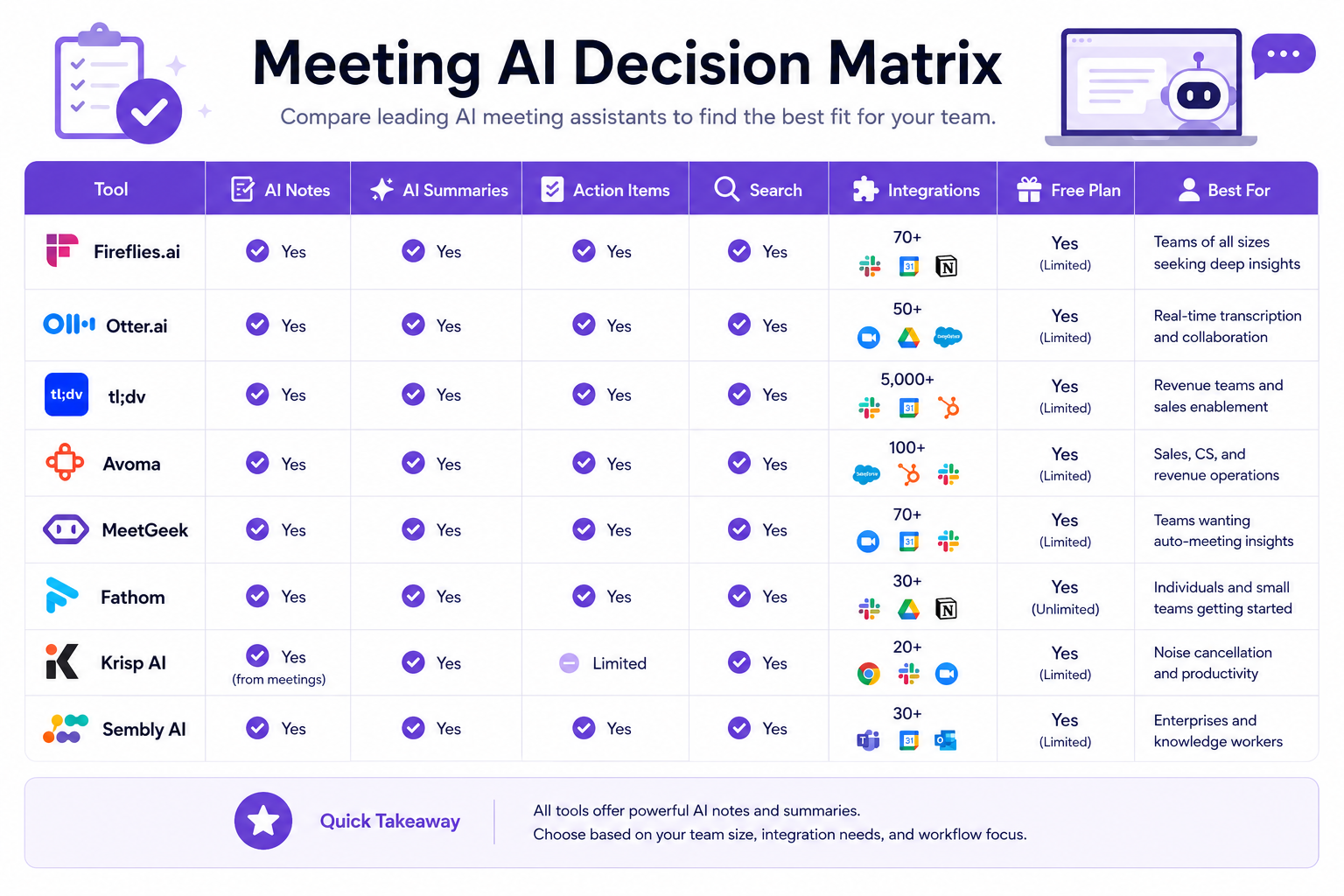
To facilitate rapid technical evaluation, the following matrix contrasts the core architectural features, target applications, and pricing tiers of the primary meeting platforms head-to-head based on information available at the time of writing:
| Tool | Best For | Free Plan | AI Notes | Action Items | Integrations | Pricing (Starting) | Overall Recommendation |
|---|---|---|---|---|---|---|---|
| Fireflies.ai | Startups & Agencies | ✅ Yes | Custom Outlines | Automated List | Over 40 CRM/PM Apps | From $10/mo | Highly Recommended |
| Otter.ai | Media & Lectures | ✅ Yes | Real-time Stream | Interactive Tags | Baseline CRM Apps | From $8.33/mo | Recommended for Live Text |
| tl;dv | UX & Product Teams | ✅ Yes | Video Timestamps | Highlight Snippets | Core CRM/PM Apps | From $18/mo | Recommended for Video |
| Fathom | Freelancers & Sales | ✅ Yes | Standard Layout | Single-Click Tags | Primary CRM Apps | Free to $15/mo | Recommended for Solo Users |
| Avoma | Revenue & Success | ❌ No | Pipeline Matrix | Script Tracking | Advanced CRM Sync | From $24/mo | Recommended for Sales |
| MeetGeek | Project Workflow | ✅ Yes | Trigger Outlines | Push Rule Tasks | Slack & PM Portals | From $19/mo | Recommended for Automation |
| Krisp AI | Remote Workers | ✅ Yes | Local Botless | Basic Summaries | System Audio Level | From $12/mo | Recommended for Audio |
| Sembly AI | Risk Management | ✅ Yes | Executive Cards | Risk Grid Matrix | Enterprise Stacks | From $15/mo | Recommended for PMs |
Use Case Recommendations
Best for Small Teams
Small teams require agile software assets that adapt to evolving project definitions without demanding manual configuration or massive enterprise budgets. For this environment, Fireflies.ai or Fathom is highly suitable. Fathom provides zero-cost individual recording limits that help bootstrap startups save capital. Conversely, Fireflies.ai lets small teams construct a permanent, searchable company knowledge framework easily, ensuring that early-stage operational data is preserved securely as the company scales.
Best for Enterprise
Enterprise systems require strict adherence to data governance parameters, encrypted data channels, and single sign-on (SSO) validation safeguards alongside site-wide user provisioning. In this sector, Fireflies.ai serves the workspace directly. Its Enterprise tier provides the SOC 2 Type II assurance models, HIPAA compliance frameworks, and custom API configurations needed to safely process high-volume conversation streams across multiple corporate divisions simultaneously without exposing proprietary intellectual property.
Best for Sales Teams
Revenue teams do not need generic textual overviews; they require deep semantic tracking engines calibrated to map customer intent metrics, pricing frictions, and competitor mentions directly to specific pipeline deal phases. For this specialized track, Avoma is commonly chosen. Avoma provides revenue managers with comprehensive deal intelligence dashboards that cross-analyze call logs over a multi-month lifecycle, highlighting account risk factors automatically and pushing detailed meeting notes straight into Salesforce.
Best for Agencies
Marketing and creative agencies balancing diverse client portfolios require an administrative environment that segregates client files cleanly, automates post-meeting notes, and distributes task timelines to external project boards rapidly. For this workflow, MeetGeek is often highly effective. MeetGeek’s programmatic notification rules can be configured to automatically dispatch customized post-call summary sections straight to designated Slack channels and Trello lists based on specific client keyword markers, eliminating post-call manual follow-up delays.
Best for Education
In instructional workspaces, student lecture environments, and academic research settings, the core requirement centers on capturing dense, continuous lecture dialogue with high typographic layouts in real time. For this use case, Otter.ai is highly practical. Its scrollable live stream dashboard lets students highlight text strings, apply comments collectively, and view dynamic outline structures as the instructor speaks, converting raw acoustic lecture feeds into interactive collaborative learning channels.
Best for Remote Teams
Distributed team members operating out of unpredictable acoustic environments—such as home offices, public cafes, or remote technical centers—confront the constant challenge of disruptive background noise. For these distributed professionals, Krisp AI is an essential technical application layer. By operating natively at the device operating system audio level, it purifies outbound microphone streams and inbound speaker feeds simultaneously, ensuring professional call quality regardless of real-world acoustic chaos.
Best for Startups
Startups iterating on initial product designs require rapid customer feedback loops and high visual evidence presentation to guide software engineering. tl;dv provides massive value here. Because tl;dv indexes generative AI summaries directly to high-definition video clips, product managers can quickly trim and share a 30-second video of a user struggling with a UI layout directly with the development team, communicating complex feedback instantly.
Alternatives
If a generalized, bot-driven AI meeting assistant does not perfectly align with your current operational tech stack or data security parameters, several specialized alternative application classes provide unique value configurations across the Zotopie content network:
- Native Platform Transcription: Major conferencing platforms like Zoom and Microsoft Teams now include native, built-in AI summary tools on their premium corporate tiers. While these tools lack deep CRM integration and cross-platform flexibility, they eliminate the need to procure third-party software entirely.
- Comprehensive Custom CRM Modules: Commercial pipeline tools (such as native AI extensions within Salesforce Einstein or HubSpot Conversation Intelligence) allow sales operations to capture customer dialogue directly inside their central sales portal natively.
- Text Forensics and AI Detection: If your team’s objective focuses primarily on auditing written documentation for structural text authenticity rather than capturing live audio feeds, exploring software suites detailed in our comprehensive Best AI Detection Tools guide provides the necessary verification frameworks.
- Looking for specific feature comparisons? Explore our dedicated analysis of Fireflies Alternatives to evaluate how different AI recorders handle privacy and API flexibility.
Decision Table
Use this operational diagnostic framework to map your specific organizational requirements with the correct verification engine immediately:
| Question Parameter | Recommended Platform Pathway |
|---|---|
| I need to search across our company’s full historical call catalog to isolate explicit keyword markers across the past year. | Fireflies.ai: Its centralized global search architecture scans the entire historical workspace directory concurrently to surface keyword records. |
| Our security board completely blocks external virtual recording bots from joining our internal web conferencing links. | Krisp AI: It installs directly as a local hardware audio driver, processing noise isolation and offline notes locally on the host device safely. |
| We conduct high-volume user testing interviews and need to export brief, shareable video snippets for our development team. | tl;dv: It indexes timestamped generative AI summary milestones directly to corresponding high-definition video clips for rapid video curation. |
| I need to track sales team compliance and script adherence regarding explicit regulatory pricing disclosures during pitches. | Avoma: Its specialized conversation dynamics module logs vocabulary patterns and compliance scorecards across all active team seats. |
| I am a solo freelance consultant looking for an immediate, zero-cost standalone recorder that links with HubSpot CRM. | Fathom: Its individual tier offers unrestricted recording, transcription features, and direct CRM data mapping with no hidden cost gates. |
| We want to automate post-meeting team assignments by pushing custom summaries to explicit Slack channels using keyword rules. | MeetGeek: Its programmatic meeting workflow engine lets users build target notification rules that trigger immediately upon call completion. |
| I manage an executive project board and need a tool that isolates explicit spoken verbal promises and files them into a risk grid. | Sembly AI: Its automated commitment matrix evaluates spoken agreement vectors, creating structural overview grids for leadership review. |
| Our remote team needs a live scrollable transcript inside our workspace so team members can edit and comment inline during the call. | Otter.ai: Its real-time text engineering pipeline renders live, scrollable word streams dynamically during active call feeds. |
Common Questions
1. Are AI meeting assistants secure for confidential business meetings?
When deploying meeting assistants in a corporate environment, security is a valid concern. Enterprise-grade tools (like Fireflies.ai and Avoma) typically secure data transfers via encrypted channels (HTTPS/TLS) and maintain SOC 2 Type II compliance. Some also offer GDPR compliance and HIPAA add-ons on their enterprise tiers. However, free consumer-level tools may lack these safeguards. Always review the vendor’s documentation regarding data retention and verify whether your conversational data is used to train public AI models. If your organization requires absolute confidentiality, you must implement strict administrative controls or consider offline, local-processing alternatives.
2. How accurate are AI meeting assistants with technical language?
Based on available product specifications and technical documentation, modern AI meeting engines demonstrate high consistency when processing standard business copy and typical corporate vocabulary. However, accuracy thresholds can exhibit minor variations when platforms encounter highly non-standard computer programming syntax, dense legal references, or specialized pharmaceutical jargon. Platforms like Fireflies.ai and Otter.ai address this constraint by allowing administrators to upload custom vocabulary dictionaries, mapping unique brand phrases and product terms programmatically to optimize speech-to-text accuracy.
3. Do AI meeting assistants require separate recording bots for every conferencing platform?
Most premium conversational intelligence software suites deploy a versatile virtual recording architecture designed to navigate cross-platform calls automatically. A user simply links their centralized Google Calendar or Microsoft Outlook directory to the software dashboard once. The backend systems programmatically scan incoming calendar invites and autonomously route the recording bot to join Zoom, Microsoft Teams, Webex, or Google Meet links without requiring manual per-call adjustments.
4. Can AI meeting software differentiate between overlapping speakers?
Modern conversational intelligence tools employ advanced acoustic processing models known as diarization algorithms to isolate distinct speaker signatures. When multiple participants interact during a call, the software analyzes individual vocal frequencies, spatial audio cues, and conversational cadences to attribute text lines to the correct individual. While highly effective in structured remote calls where each user has a dedicated microphone, speaker attribution accuracy can drop if multiple human participants share a single physical microphone room without individual device logging.
5. What happens if a business meeting exceeds standard time limits?
Processing limits rely completely on an organization’s specific pricing bracket and account tier. Free or basic sandboxes across the marketplace enforce strict session caps—such as Otter.ai’s 30-minute individual meeting gate or MeetGeek’s monthly minute boundaries. If a session crosses these software parameters, the recording bot will disconnect programmatically or halt data logging. Upgrading to professional or team brackets removes these limits, providing unrestricted recording durations to support lengthy board strategy sessions.
6. Can AI meeting assistants process pre-recorded audio or video files?
Yes, the majority of professional conversational software suites feature direct media upload channels built into their main user canvas. In addition to recording live web conferences, users can drag and drop historical media files (such as .mp3, .mp4, .wav, or .m4a records) straight into the platform dashboard. The cloud-hosted servers parse the uploaded acoustic files through their standard speech-to-text classifiers, rendering matching summaries, action lists, and interactive text transcripts identical to live call reports.
7. How do video-centric meeting tools differ from text-first assistants?
Text-first tools (like Otter.ai or Fireflies.ai) focus their computational processing on building highly indexable, searchable text databases optimized for CRM distribution and documentation density. Video-centric platforms (like tl;dv) treat video streams as the absolute source of truth. They use generative text lines primarily as interactive timestamp markers, allowing product researchers or UX designers to click a text highlight and watch the exact video snippet of a customer’s real-time interface interaction or vocal frustration.
8. Can an AI meeting assistant operate without a visible bot joining the call?
Standard software recorders require a virtual guest profile to enter the conferencing room to capture the audio/video stream data. If an organization’s strict corporate privacy parameters bar these external virtual entities entirely, users must deploy hardware-level system utilities like Krisp AI or Fathom’s native integration options where applicable. Because Krisp AI operates locally as an audio driver on the host machine, it can capture audio lines and compile offline notes locally without routing a visible recording bot into the web conference participant list.
Should You Use AI Meeting Assistants?
The decision to incorporate an AI meeting assistant into your operational tech stack should align directly with your organization’s administrative scale, communication velocity, and tool deployment habits.
If your daily operations involve managing multiple client briefs, coordinating distributed remote teams, or inputting high-volume client feedback into secondary tracking directories like Salesforce or Jira, deploying a conversation intelligence tool provides a clear competitive advantage. It systematically eliminates the operational drag of manual note-taking, protects valuable corporate data from being forgotten, and turns casual verbal agreements into clear, searchable database updates that hold teams accountable.
However, if your group operates under intense device security lockdowns that completely prevent external virtual bots from entering web links, or if your team rarely manages distributed video conferences, manual summary logging or native platform recorders remain the more appropriate alternative path. Utilizing these tools effectively requires an initial commitment to integrating them properly into your existing CRM pathways to realize their full return on investment.
Bottom Line
Resolving your selection within the meeting automation landscape requires matching software capabilities directly with your organization’s day-to-day data pipelines. Otter.ai remains an exceptional utility for live, text-centric collaboration and real-time interactive feed updates, making it a natural companion for fast-paced editorial rooms and educational lecture spaces.
For research-driven product groups and UX design teams, tl;dv transforms raw visual files into organized customer insight snippets by linking timestamped outlines straight to high-definition video clips.
Fireflies.ai establishes its position as a highly capable conversational workspace by equipping teams with the extensive app integration directories, customizable generative summary profiles, and global keyword filters required to convert unstructured conversation data into an organized, automated knowledge base.
👉 Try Fireflies.ai Today →
Create a centralized, searchable database of your organization’s conversations and automate your post-meeting workflows securely.
Final Verdict
The optimal software path depends completely on your team’s size, industry requirements, and target tech stack connections. For single operators, independent consultants, and early-stage startup groups looking to balance costs while securing robust CRM updates, Fathom provides direct value through its generous free single-user layout.
For corporate operations, scaling agencies, and cross-functional teams that require centralized conversation databases, flexible generative prompts, and extensive app automation, Fireflies.ai delivers the necessary infrastructure foundation to secure and scale organizational intelligence. Assess your team’s conferencing habits, identify your primary CRM or project directory connections, and deploy the specialized meeting assistant built to optimize your workspace communication today.
Internal Link Opportunities
Build topical authority and expand your understanding of modern enterprise software layers by exploring our specialized analysis assets across the Zotopie network:
- Fireflies Review: Read our comprehensive standalone analysis of Fireflies.ai to examine its underlying data structures, security posture, and custom prompt configurations in detail.
- Otter.ai Review: Read our deep-dive analysis of Otter.ai — evaluating its live transcription speed, mobile recording quality, hidden pricing limits, and how it serves students, journalists, and small teams.
- Fathom Review: Explore our comprehensive review of Fathom — the best free AI meeting assistant for freelancers, consultants, and sales professionals who need unlimited recording without monthly caps.
- tl;dv Review: Explore our comprehensive review of tl;dv — the best video-first AI meeting assistant for UX researchers and product teams who need timestamped clip navigation and multi-meeting reel collections.
- Fireflies Alternatives: Explore our technical comparison guide evaluating alternative conversation tracking engines tailored specifically for varying team scales and privacy needs.
- Fireflies vs Otter: Discover exactly how the market’s two biggest platforms compare regarding live transcription speeds versus backend CRM automation paths.
- Fireflies vs Fathom: Our head-to-head comparison of Fireflies.ai and Fathom — analyzing when enterprise analytics and deep CRM pipelines justify upgrading from Fathom’s unlimited free plan.
- Best AI Detection Tools: Review our holistic industry index ranking the top verification applications to ensure text accuracy across your organization’s digital asset pipelines where contextually relevant.
Backfill Recommendations
To construct a complete topical cluster and reinforce organizational authority within the Meeting AI software vertical, Zotopie should prioritize the development of the following future content assets:
- Otter.ai Review: ✅ Published — A deep-dive analytical product review evaluating Otter’s live audio processing metrics, typographic layout velocity, and interactive collaborative workspace configurations.
- Fireflies.ai vs Otter.ai (The Head-to-Head Architectural Audit): A rigorous comparison page comparing conversational intelligence data routing frameworks against real-time scrollable text pipelines for corporate procurement directors.
- Fathom vs tl;dv (The Product Team Selection Guide): A specialized comparison asset evaluating single-click desktop highlight tagging systems against high-definition visual timeline video clip hyperlinking models for UX research groups.