Fireflies AI Review (2026): Is It Worth It for Meeting Notes?
In the modern corporate and startup ecosystem, synchronous remote communication has emerged as both a necessity and a significant productivity drain. Professionals find themselves trapped in back-to-back video calls, attempting to engage with team members or clients while simultaneously scrambling to scribble down action items, deadlines, and strategic insights. When manual note-taking falls short, critical decisions are misremembered, tasks slide through the cracks, and hours are wasted syncing up on information that was already discussed.
At the intersection of collaborative workflows and natural language processing stands Fireflies AI.
Positioned as an omnipresent automated intelligence layer for your corporate voice conversations, Fireflies AI deploys virtual agents directly into your meeting rooms to record, transcribe, search, and analyze data in real time. However, entering 2026, the marketplace for conversational artificial intelligence is intensely competitive. Native video conferencing tools like Zoom and Microsoft Teams have aggressively integrated built-in recording assistants, specialized boutique plugins offer streamlined zero-dollar transcription alternatives, and cross-channel workspace tools are attempting to capture market share.
In this exhaustive Fireflies AI review for 2026, we dissect the platform’s core multi-network recording pipeline, audit its actual translation and indexing accuracy, evaluate its true software pricing tiers, and benchmark it directly against top-tier industry alternatives like Otter and Fathom to determine if it is the best AI meeting assistant for your tech stack.
Fireflies AI At a Glance
Before we analyze the underlying natural language processing infrastructure, here is a high-level operational synthesis of where Fireflies AI currently stands in the B2B software market:
- Best For: Fast-scaling B2B sales operations, recruitment teams, decentralized remote agencies, and consultants who manage a high volume of client interactions across multiple overlapping video platforms.
- Pricing: Free plan ($0), Pro ($18/month), Business ($29/month), and custom structured corporate Enterprise pricing tiers.
- AI Meeting Score: 4.7 / 5
- Pros: Native deep integration with 40+ popular CRMs and webapps, flawless multi-language support across dozens of dialects, highly customizable AI prompt templates, and advanced centralized search metrics.
- Cons: Monthly storage capacities can feel constrained on lower tiers, video-capturing metrics require mid-tier scaling, and the presence of a virtual bot participant can occasionally disrupt external client dynamics.
TL;DR
Quick Access
Need an AI meeting assistant for recording, transcription, and meeting summaries?
Quick Facts
| Attribute | Value |
|---|---|
| Category | AI Meeting Assistant & Conversation Intelligence Software |
| Starting Price | $18 / month (Pro Plan) |
| Free Plan | Yes (Limited monthly credits, basic text logs) |
| Best Alternative | Fathom or Otter |
| Target Users | Founders, SaaS companies, sales teams, recruiters, agencies, consultants |
| Founded | 2020 |
What Is Fireflies AI?
Fireflies AI is an automated meeting intelligence platform that records, transcribes, summarizes, and analyzes conversations from online meetings.
Company Overview
Launched in 2020 by founders Krish Ramineni and Sam Udotong, Fireflies AI was engineered to bridge the operational divide between conversational speech and structured workplace databases. Rather than requiring users to manually extract notes and enter data points into project systems, the technical objective was to transform spoken words into a searchable text bank automatically. Over the past several years, the engineering architecture has graduated from simple transcription scripts into a comprehensive conversational intelligence ecosystem utilized globally by scaling remote teams, venture funds, and digital marketing agencies.
Core Functionality
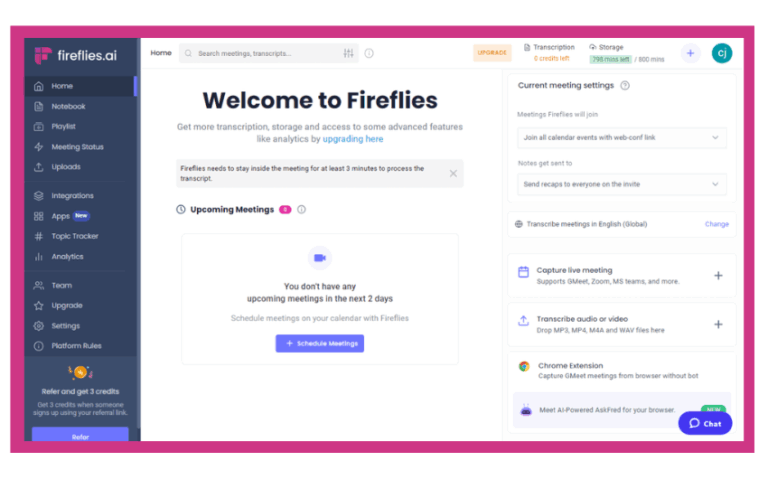
The application operates on an autonomous background script infrastructure. When configured, Fireflies links directly with your digital office calendar (such as Google Calendar or Microsoft Outlook). It actively monitors your scheduled agenda lines — scanning for invitation tokens from video platforms including Zoom, Google Meet, Microsoft Teams, Webex, and Skype.
Once an engineering match is detected, the software automatically dispatches a synthetic participant (typically labeled Fred, the Fireflies AI Notetaker) directly into the video chat queue at the designated start time. The virtual bot records the incoming audio and video feeds, streams the raw telemetry safely back to the core cloud processing network, executes highly advanced text-to-speech modeling loops, and spits out clean, structural breakdowns inside your user dashboard within minutes of the call’s conclusion.
Target Users
- Sales Operations & High-Volume Account Executives: Reps looking to log deep customer requests, handle pricing negotiation documentation, and automatically populate customer relational structures without manual entries.
- Recruitment Teams & HR Professionals: Talent acquisition specialist corps who need to archive long candidate interviews, capture qualitative background histories, and share short assessment clips across internal evaluation boards.
- Remote Agencies & Software Consultancy Practices: Services businesses tracking overlapping, moving technical parameters across distinct clients, utilizing text history to insulate their projects from scope creep.
- Project Managers & Operations Leads: Technical controllers responsible for assigning individual action items, identifying operational roadblocks, and logging timelines across cross-functional remote sprints.
Key Features
Fireflies AI has systematically expanded its utility matrix well beyond simple voice processing. Let us audit the foundational functional modules available inside the modern operational workspace.
Meeting Recording
Fireflies functions as a centralized capturing system for your remote speech files. The application doesn’t just pull audio; it captures high-resolution video streams along with multi-channel sound feeds to guarantee individual speaker separation remains structurally pristine. If you manage impromptu calls that are not logged on a primary work calendar, the dashboard includes a single-click “Instant Invite” widget to drag the virtual bot into an active meeting room dynamically. For offline workflows, users can upload raw pre-recorded audio or video extensions — such as .mp3, .wav, or .mp4 files — straight into the parallel cloud processing engine.
Automatic Transcription
The transcription core utilizes deeply trained neural network layers optimized for multi-party conversational pacing. The tool avoids standard processing drop-offs by filtering out transitional filler expressions — such as “um,” “ah,” or “like” — to keep the resulting reading paths exceptionally clean. Crucially for global agency environments, Fireflies reads over 60 distinct international languages and contextual accent dialects natively, adjusting its vowel matching automatically without requiring manual software reboots.
AI Summaries
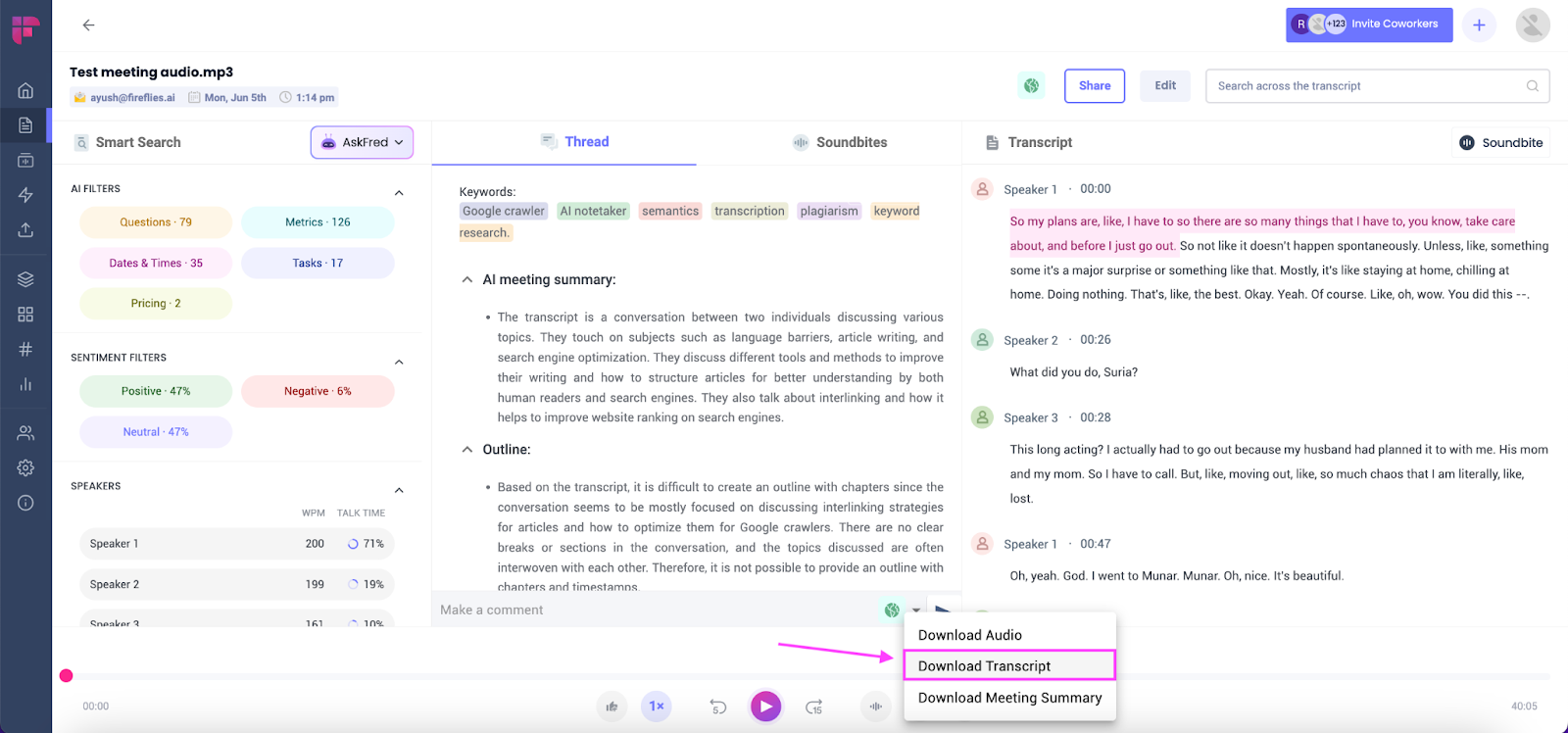
The true workflow leverage of Fireflies is powered by its specialized generative layer, Ask Fred. Instead of forcing you to read a massive 4,000-word block of raw text documentation, the platform synthesizes your conversation into structural executive breakdowns. The summaries are organized into clear sections: a macro narrative paragraph summarizing the conversation, a list of action items assigned to specific people, an inventory of explicit project deadlines, and a structured outline of the topics discussed. Users can also write custom prompt criteria, directing the internal AI model to extract specific points, such as “List all objections raised regarding our software pricing architecture.”
Search Across Meetings
When your company accumulates hundreds of hours of historical video calls, tracking down past decisions can be impossible. Fireflies solves this issue via its “Smart Search” engine matrix. Users can issue multi-meeting global keyword queries to search across their entire company call library instantly. Additionally, the dashboard features quick-click “AI Filters,” allowing editors to isolate every moment across last month’s calls where metrics like “Metrics,” “Pricing,” “Deadlines,” “Questions,” or “Action Items” were spoken by any participant.
CRM Integrations
To prevent manual data-entry bottlenecks, Fireflies features one of the most expansive native integration layers in the modern B2B software market. The application plugs directly into industry-standard Customer Relationship Management architectures, including HubSpot, Salesforce, Pipedrive, Copper, and Zoho CRM. The moment the processing server completes an article pass, it updates the corresponding contact card or deal page within your CRM automatically, attaching the summary transcript and call link straight to the timeline.
Team Collaboration
The collaborative interface functions like an advanced document workstation. Teams can highlight explicit string fragments inside a transcript, add context-driven comments, and generate a shareable “Soundbite” — a snippet of the audio call that can be dropped into Slack channels, Notion boards, or internal documentation arrays. The tool also features adjustable access rules, ensuring that specific internal channels remain private to executives while others are shared universally across departments.
How Well Does Fireflies AI Work?
Evaluating the operational capability of a conversational assistant requires analyzing how its mathematical transcription layers handle real-world speech imperfections under pressure.
Strengths
- Unrivaled Integration Versatility: The primary competitive advantage of Fireflies is its ability to serve as a unified bridge across your entire business ecosystem. Whether your technical sales team fields a call on Zoom, your marketing group jumps on a Google Meet, or your operations department holds a sprint on Microsoft Teams, Fireflies standardizes everything into a singular data model.
- High-Resolution Structural Search: The internal filtering algorithms are remarkably sharp. Being able to toggle an option to instantly review every question asked by a client across 50 separate consultation calls saves hours of manual review time.
- Custom Enterprise Templates: The ability to configure a custom prompt template and enforce it globally across your sales floor guarantees that your standard operating summaries maintain absolute stylistic consistency.
Weaknesses
- The Virtual Bot Presence Issue: Because Fireflies operates by inserting a visible bot participant named “Fireflies.ai Notetaker” directly into the room layout, it can occasionally introduce subtle friction. In delicate enterprise procurement negotiations or sensitive legal discovery calls, external clients may feel uncomfortable seeing an automated recording bot, requiring you to explain your internal documentation practices.
- Variable Accuracy on Highly Technical Terms: While standard business prose and conversational vocabulary process with strong consistency, the accuracy can drop when facing niche jargon. If your development teams are discussing highly advanced software parameters or intricate legal terminology, the system can mishear complex strings, requiring manual editing inside the dashboard.
- Minute Limitations on Core Plans: The entry plans place hard caps on the total transcription minutes and storage arrays allocated to an account, which can cause scaling teams to hit feature limits unexpectedly during busy months.
Best Use Cases
Fireflies AI is exceptionally optimized for B2B sales team training, scaled candidate screening processes, recurring remote client consultation updates, and agile project task tracking workflows.
Pricing
Pricing may change over time. Always verify the latest plans and limits on Fireflies AI’s official website before purchasing.
Fireflies AI organizes its access tiers using a per-user monthly subscription structure, allowing businesses to add user seats as their teams scale.
| Plan | Price | Key Features |
|---|---|---|
| Free Plan | $0/month | Limited credits, standard text summaries |
| Pro Plan | $18/month | 8,000 mins storage, core CRM channels |
| Business Plan | $29/month | Unlimited storage, custom AI templates |
Free Plan
- Cost: $0 / month.
- Allocations: Limited monthly meeting credits.
- Feature Scope: Basic audio recording capabilities across main video platforms with standard text transcript logs. Does not include video recording capabilities, custom AI templates, or automated CRM integration pipelines.
Pro Plan
- Cost: $18 / user / month ($10/user/month if billed annually).
- Allocations: 8,000 total minutes of historical audio storage per seat.
- Feature Scope: Unlocks complete AI summary generation access, smart structural search criteria filters, manual file upload arrays, and core workplace platform integrations (such as Slack, Notion, and basic CRMs).
Business Plan
- Cost: $29 / user / month ($19/user/month if billed annually).
- Allocations: Unlimited historical minute storage pools.
- Feature Scope: Designed for scaling mid-market enterprises. Unlocks full video recording mechanics, access to the Ask Fred conversational AI assistant module, custom summary template prompts, conversational sentiment metrics, and priority support queues.
Enterprise Plan
- Cost: Custom corporate pricing.
- Feature Scope: Geared toward global enterprise conglomerates and compliance-heavy networks. Unlocks specialized single-tenant dedicated deployments, custom single sign-on (SSO/SAML) enforcement layers, HIPAA and SOC 2 security governance matrices, and a dedicated platform success manager.
Value for Money
For growing B2B sales agencies or multi-client consulting operations, the $19—$29 premium annual investment per user seat provides incredible value for money, easily paying for itself by eliminating hours of manual note-taking and operational data logging. For low-volume freelancers who only manage one or two calls a week, the free tier or a simpler native recording solution may suffice.
Pros and Cons
To assist product teams running software stack audits, here is an itemized analysis of Fireflies AI’s primary operational advantages and challenges:
| Pros | Cons |
|---|---|
| Unified Cross-Platform Capture: Standardizes notes across Zoom, Meet, Teams, and Webex calls into a single dashboard. | Intrusive Bot Presence: Requires a synthetic bot user to sit visibly within your meeting rooms. |
| Expansive CRM Automation: Automatically updates sales cards and timelines within HubSpot and Salesforce. | Niche Jargon Errors: Accuracy can decline when facing deep medical, legal, or programming engineering scripts. |
| Powerful Multi-Call Search: Instantly queries thousands of hours of historical audio across your whole organization. | Feature Segmentation: Highly advanced video metrics and custom templates require upgrading to the Business tier. |
| Deep Multilingual Coverage: Accurately processes over 60 international languages and distinct accent patterns. | Metered Storage Limits: Entry plans carry clear, rigid minute caps that limit long-term archiving. |
| Interactive Soundbites: Easily cuts out specific audio segments to share across internal communication loops. | Manual Correction Required: Complex multi-party conversations often require minor transcript cleanups. |
Who Should Use Fireflies AI?
Matching your company’s day-to-day communication workflow to Fireflies’ structural strengths is the key to maximizing software ROI.
Sales Teams
Sales development operations and account executives should implement Fireflies to streamline their administrative pipelines. Instead of attempting to navigate an intake call while tracking pricing objections, sales reps can focus entirely on customer engagement. The software handles all background notes, then syncs the conversation directly to your central CRM account. This creates an objective record for engineering teams to reference when reviewing customer specifications before delivery.
Recruiters
For talent sourcing and HR operations, Fireflies acts as a highly reliable interview archival network. When interviewing multiple candidates for an active engineering or management role, it can be difficult to keep individual qualifications organized. Fireflies archives the entire question stream, allowing hiring managers to clip specific “Soundbites” of a candidate explaining their technical background and share those media files directly with internal department heads for rapid review.
Agencies
Digital agencies running multi-client creative or technical campaigns can leverage Fireflies to protect their operations from scope creep. When a client casually requests a feature addition or project shift mid-call, having an explicit, timestamped text transcript ensures that all verbal agreements remain clear and verifiable.
Remote Teams
Decentralized remote teams operating across distinct time zones can use Fireflies as an asynchronous alignment library. If an engineer in a European time zone misses an all-hands product meeting held in San Francisco, they do not need to wait for a live catch-up call. They can simply open the Fireflies dashboard, read the concise summary outline, or use Smart Search to isolate every moment where their explicit product feature module was discussed.
Consultants
Independent contractors, corporate advisors, and legal consultants can utilize Fireflies to build structured case history records. The application allows you to transform fluid advisory sessions into an indexed reference archive, making it simple to pull up past advice or recommendations weeks down the line without needing to manually log every conversation.
Fireflies AI vs Otter
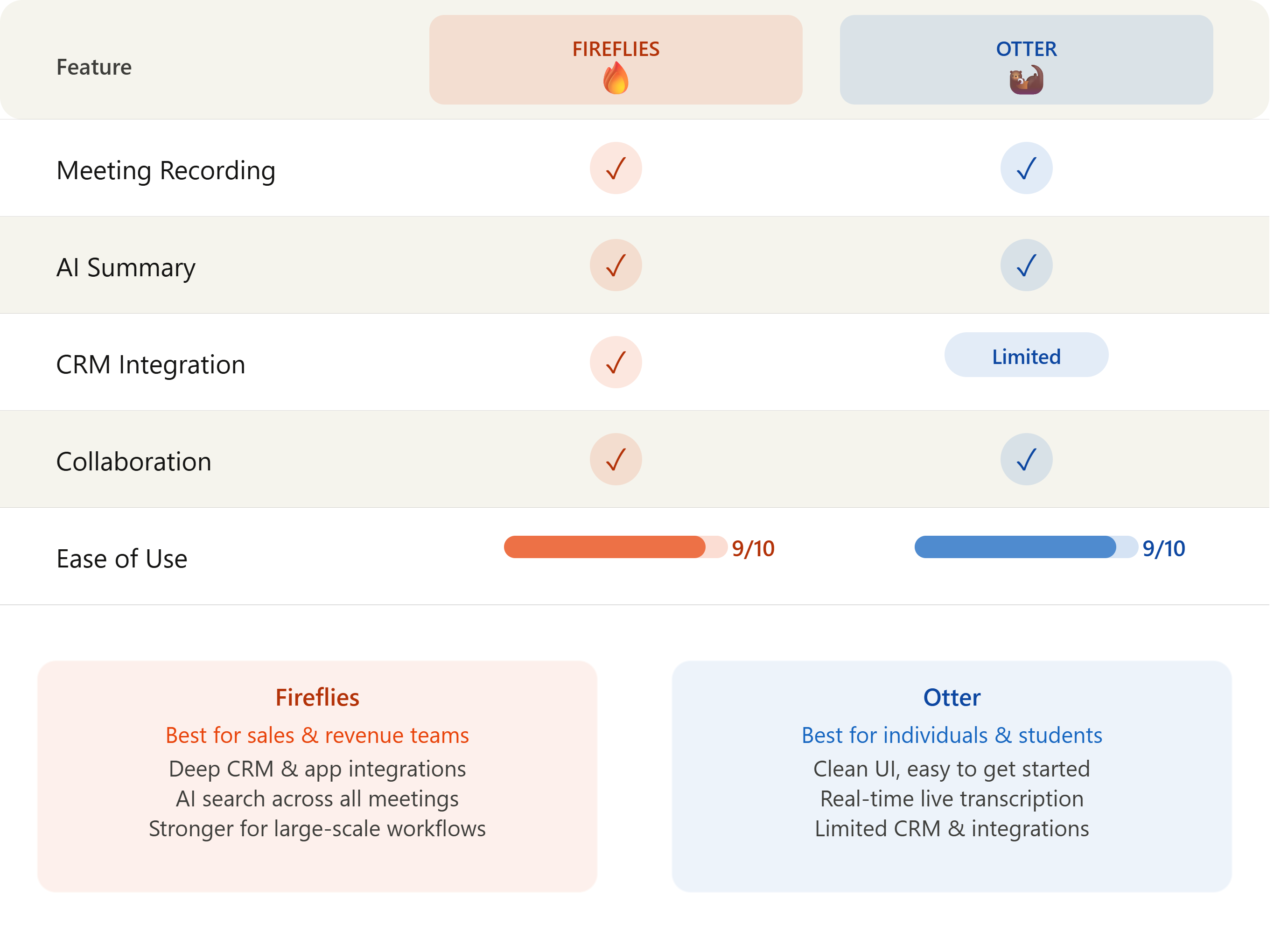
The automated transcription landscape is heavily shaped by the market competition between Fireflies AI and Otter.ai.
| Feature | Fireflies AI | Otter.ai |
|---|---|---|
| Primary Structural Focus | B2B CRM Integration & Enterprise Workflows | Live, Real-Time Transcription & Mobile Capture |
| Platform Compatibility | Universal (Zoom, Meet, Teams, Webex, Uploads) | Strong focus on Zoom, Meet, Teams, and Mobile App |
| Linguistic Reach | High (60+ International Languages) | Restricted (Optimized heavily for English) |
| CRM Pipeline Automation | Advanced (HubSpot, Salesforce, Pipedrive) | Limited / Standard Export Frameworks |
| Search Infrastructure | Global Multi-Call Deep Matrix Search | Standard Folder & Single-Call Keyword Matching |
- Linguistic Scope: Fireflies AI is explicitly engineered for international operations, managing over 60 languages and localized dialects natively. Otter is heavily optimized for English prose, meaning its transcription accuracy drops significantly when handling global accents or secondary languages.
- Operational Alignment: Otter operates primarily as a real-time dictation engine, making it excellent for journalists, students, or live workshop environments where watching a real-time text scroll is essential. Fireflies functions as an enterprise post-call analytical pipeline built to feed data directly into corporate CRMs and internal databases.
- The Verdict: If you are an individual creator, an English-centric writer, or require a dedicated mobile application for live field dictation, choose Otter. If your company runs localized multi-language sales teams, requires strict CRM pipeline automation, and needs to search data across thousands of corporate meetings simultaneously, choose Fireflies AI.
Fireflies AI vs Fathom
The corporate meeting notes market features another significant design variance when comparing Fireflies to Fathom.
- Integration Infrastructure: Fathom functions primarily as a lightweight desktop client that hooks cleanly into Zoom, Google Meet, or Microsoft Teams to provide seamless personal note-taking. Fireflies operates as an infrastructure-level cloud application, offering extensive API endpoints and broader database integrations.
- Pricing Mechanics: Fathom is highly popular due to its generous, feature-rich free tier for individual users, which provides unlimited recording minutes without premium paywalls. Fireflies limits its free tier to brief evaluations, locking its custom generative templates and automated pipeline features behind paid software tiers.
- The Verdict: If you are an individual founder or a small boot-strapped team looking for a free, simple tool to record video calls without a visible bot presence, choose Fathom. If you manage an agency or enterprise corporation that requires visual semantic tracking, conversational sentiment analytics, and deeply automated project workflows across multiple user seats, choose Fireflies AI.
Best Fireflies AI Alternatives
If Fireflies AI’s visible bot participant or credit allocations do not fit your company’s communication style, look at these leading conversational intelligence alternatives:
1. Otter
The premier choice for real-time dictation and English-focused conversation processing. It features an exceptional mobile app layout, making it a favorite for journalists and individual professionals who require fast live-transcription feeds. See our full Otter.ai Review for a detailed breakdown of its features, pricing limits, and who it is best for.
2. Fathom
The strongest alternative for individual professionals and bootstrapped remote teams. Fathom’s free tier offers unlimited meeting recordings and automated note-taking tools without a visible bot participant, making it highly competitive for standard user setups. See our full Fathom Review for a detailed breakdown of its free plan, CRM integrations, and privacy standards.
3. tl;dv
A fantastic, creator-friendly alternative that focuses heavily on video clipping and visual bookmarking. It allows users to easily tag key moments during a call and compile video highlights, making it perfect for UX researchers and product development teams conducting qualitative user testing. See our full tl;dv Review for a detailed breakdown of its video-first model, timestamped AI summaries, multi-meeting reel collections, and pricing.
Decision Table
| Question | Answer |
|---|---|
| Does Fireflies AI work on phone calls? | Yes, via direct dashboard audio file uploads or integrations with specialized VoIP phone providers. |
| Can I stop the bot from joining a meeting? | Yes, you can manually toggle calendar settings to dictate exactly which meetings the bot joins. |
| Is Fireflies AI secure for private corporate data? | Yes, it features SOC 2 Type II governance matrices and supports strict single sign-on (SSO) layers. |
| Does Fireflies detect different speakers? | Yes, it separates distinct speakers automatically by parsing individual voice frequencies. |
| Can I create custom templates for notes? | Yes, but this requires a Business or Enterprise tier subscription. |
Common Questions
Is Fireflies AI safe for sensitive corporate data? Yes. Fireflies AI enforces strict cloud security standards, including full data encryption both in transit and at rest. The platform is SOC 2 Type II certified, fully compliant with GDPR privacy standards, and provides dedicated HIPAA-compliant data routing for healthcare enterprises on custom corporate plans.
How do I delete the Fireflies bot from an active video call? If you enter a meeting room and decide you do not want to record the conversation, you can open your meeting dashboard or participant panel, locate the “Fireflies.ai Notetaker” user card, and click remove or kick. The virtual agent will leave the video room immediately and stop processing the conversation.
Can Fireflies analyze text sentiment? Yes. Once you upgrade to the Business plan, the software unlocks advanced conversation analytics. The processing engine analyzes structural voice patterns, tracking the ratio of talk time between speakers, calculating overall call sentiment (Positive, Neutral, Negative), and flagging signs of frustration or buying intent.
Does Fireflies require software downloads? No. Fireflies AI is a fully cloud-hosted web application. It connects directly to your calendar or video platform via API access streams, meaning your team does not need to download local plugins or desktop executable files to run the system.
How accurate is the transcription engine? Under normal conversational conditions with clear audio inputs, Fireflies routinely delivers strong transcription accuracy. Precision can decrease slightly if speakers use highly dense, localized industry terminology, talk over one another simultaneously, or use low-quality microphone inputs.
Should You Use Fireflies AI?
Bottom Line
Fireflies AI remains an industry-leading application for robust conversational data archiving and B2B workflow automation. Its ability to serve as a universal repository for corporate speech across multiple software systems makes it an exceptional tool for scaling agencies and sales organizations. However, if your business operates on a strict $0 budget or relies on highly sensitive client interactions where a visible recording bot could disrupt the call dynamic, alternative workflows may be more appropriate.
Choose Fireflies AI if…
- You manage a fast-scaling agency or sales department that requires deep CRM pipeline integrations with HubSpot or Salesforce.
- Your organization operates globally across multiple languages and accents, requiring robust multi-language transcription and search tools.
- You need to query and analyze data across thousands of historical corporate meetings simultaneously.
Choose Otter if…
- Your workflow centers primarily on real-time, English-only dictation, and you need a high-quality mobile application for live field recording.
Choose Fathom if…
- You are an individual founder or operate a bootstrapped startup looking for a free option to record standard video calls without a visible bot presence.
Try Fireflies AI
If your team spends hours taking meeting notes manually, Fireflies AI can automate transcription, summaries, and action items while integrating with your existing workflow.
Final Verdict
Fireflies AI has successfully positioned itself as a critical operational layer for modern digital workspaces. Rather than treating video calls as disposable ephemera, it transforms spoken words into a searchable, structural corporate asset. By combining multi-platform recording bots with advanced multi-language processing and deep CRM pipeline automation, it provides an exceptional return on investment for data-driven, fast-moving organizations.
Who Should Use Fireflies AI?
- Scaling B2B sales teams looking to automate their CRM data entry.
- Decentralized remote agencies managing multiple parallel client channels.
- Recruitment groups that require cross-functional interview snippet sharing.
- Consultants who need a highly reliable historical interaction archive.
Who Should Avoid Fireflies AI?
- Solo freelancers who only manage one or two casual calls a week.
- Creative teams that rely on heavily visual, dynamic brainstorming sessions rather than structured text goals.
- Professionals dealing with highly confidential procurement pipelines where clients object to external bot presence.
How Fireflies AI Fits in Your Meeting Intelligence Stack
Fireflies AI works best as the knowledge-capture layer in a broader meeting intelligence workflow. Here is how it connects with the rest of the Meeting AI ecosystem:
- Choosing the right platform: If you are still evaluating your options, see our Best Meeting AI Tools guide, which compares Fireflies against Otter.ai, tl;dv, Avoma, Fathom, MeetGeek, Krisp AI, and Sembly AI across transcription accuracy, CRM integrations, and pricing.
- Fireflies vs Otter: The most common comparison question in the Meeting AI space. Our Fireflies vs Otter breakdown explains exactly when to choose each platform — Fireflies for CRM automation and asynchronous knowledge retention, Otter for live real-time transcription and synchronous team editing.
- Fireflies vs Fathom: For a direct comparison against Fireflies’ strongest simplified competitor, see our Fireflies vs Fathom breakdown — covering when enterprise analytics and deep CRM pipelines justify switching from Fathom’s unlimited free plan.
- Otter.ai Deep Dive: For a comprehensive review of Fireflies’ primary competitor, see our Otter.ai Review — covering live transcription accuracy, mobile recording, pricing limits, and ideal use cases.
- tl;dv Deep Dive: For teams that need to share video evidence with developers and stakeholders rather than text summaries, see our tl;dv Review — covering its video-first model, timestamped AI summaries, multi-meeting reel collections, and when it outperforms text-first platforms like Fireflies.
- Exploring alternatives: If Fireflies’ bot presence or credit model does not fit your workflow, see our Fireflies Alternatives page for a full evaluation of competing platforms.