Fireflies.ai vs Fathom (2026): Which AI Meeting Assistant is Best?
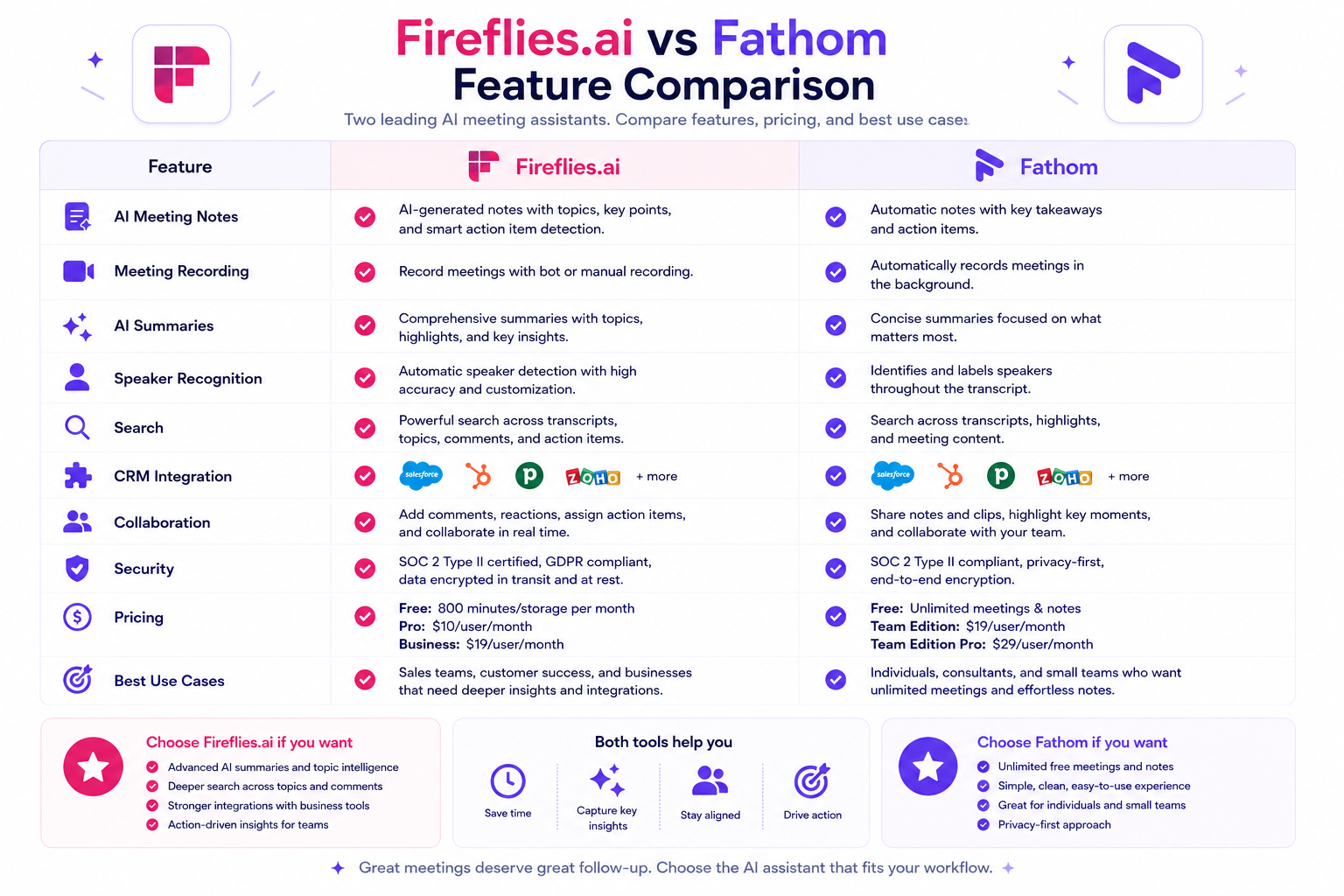
Fireflies.ai vs Fathom (2026)
Choosing the best AI meeting assistant has become a critical decision for professionals looking to optimize their daily workflows. With virtual meetings remaining the cornerstone of modern business communication, manual note-taking is increasingly viewed as an inefficient use of time. Two platforms have established themselves as dominant forces in this space: Fireflies.ai and Fathom. Both tools are designed to join your video calls, record audio and video, generate real-time transcripts, and produce structured AI summaries. However, they approach this objective with completely different product philosophies, pricing strategies, and target audiences.
This in-depth comparison will look past marketing promises to examine how Fireflies.ai and Fathom perform in real-world environments. Because both platforms are highly capable, the question is rarely which tool is universally superior, but rather which tool aligns with your specific operational needs, software stack, and budget constraints. We will dissect their features, user experiences, core strengths, and noticeable limitations to help you make a definitive purchasing choice within a few minutes.
Quick Verdict
For professionals seeking a rapid decision, the choice between these two platforms typically hinges on team size, budget, and required integration depth. Fathom is the premier choice for individual freelancers, consultants, and smaller teams who require a straightforward, highly dependable tool with a remarkably generous free tier. Fireflies.ai is the superior selection for growing companies, sales organizations, and large enterprises that demand deep conversational analytics, advanced workspace customization, extensive third-party app integrations, and native support for offline audio uploads.
TL;DR
Fireflies.ai and Fathom are both exceptional AI note-takers, but they serve distinct operational profiles. Fathom focuses on maximizing individual productivity by offering an incredibly robust free plan that features unlimited recording minutes, clear transcripts, and automated meeting summaries for Zoom, Google Meet, and Microsoft Teams. It prioritizes a frictionless user interface and seamless, fast note generation.
Fireflies.ai operates as a comprehensive conversational intelligence ecosystem. While it offers a basic free tier, its true power is unlocked on its paid plans, which introduce deep team analytics, sentiment tracking, custom topic configurations, global workspace search capabilities, and over 40 native integrations with CRMs, project management systems, and storage tools. Fireflies.ai also supports the transcription of pre-recorded audio and video files, a feature notably absent from Fathom’s free offering.
Choosing between them is a matter of determining whether you need a streamlined, budget-friendly personal utility (Fathom) or a heavy-duty, data-driven team knowledge hub (Fireflies.ai).
Quick Recommendation Guide
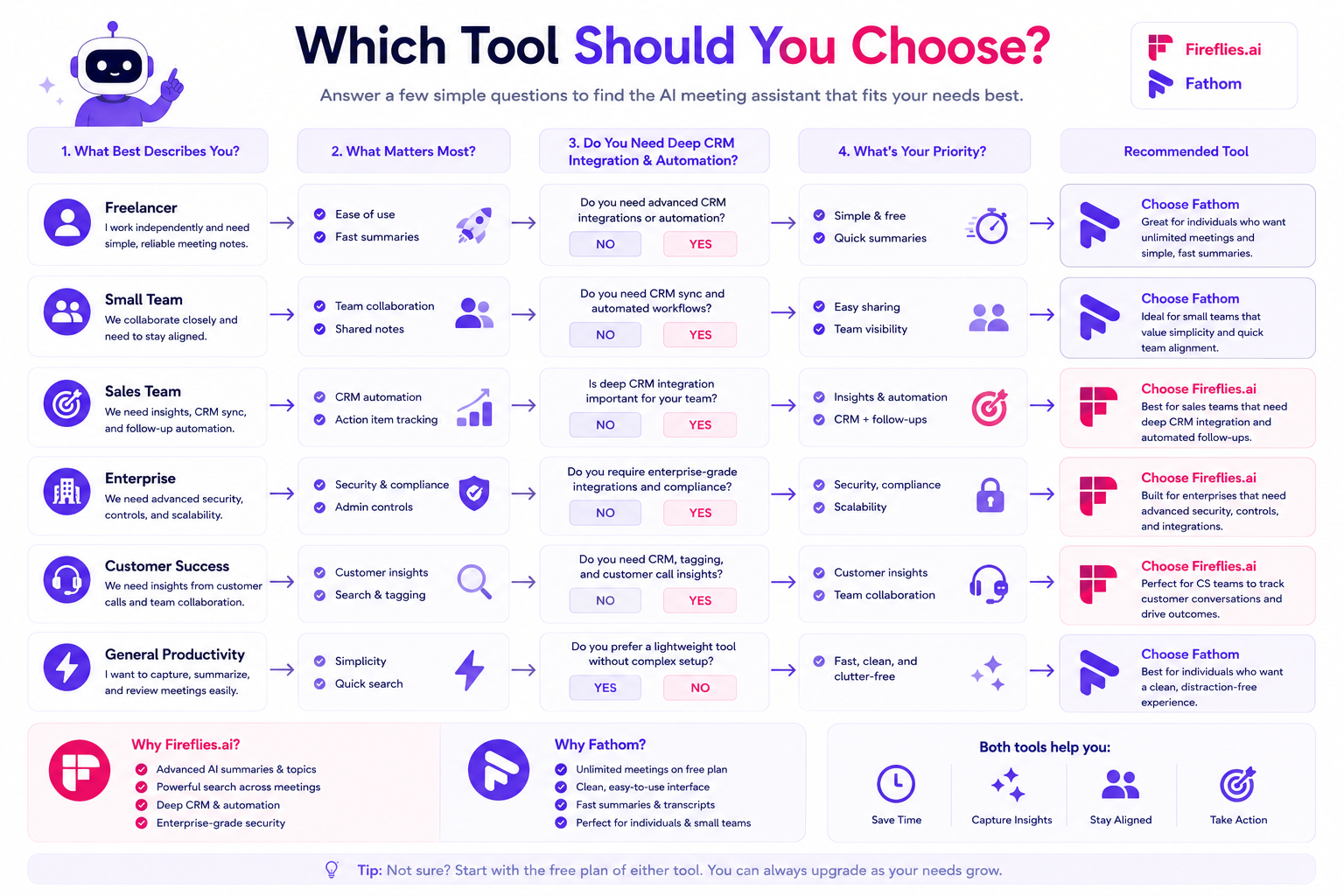
Use this targeted guide to see which tool matches your specific professional role and organizational structure:
| If you are a… | Recommended Tool | Core Reason |
|---|---|---|
| Freelancer / Consultant | Fathom | The unlimited free plan provides unparalleled value without restrictive monthly minute caps. |
| Small Independent Team | Fathom | Offers an intuitive, low-maintenance setup that requires zero administrative oversight. |
| Sales Team / SDR / AE | Fireflies.ai | Advanced conversational analytics track competitor mentions, customer sentiment, and talk-to-listen ratios. |
| Large Enterprise | Fireflies.ai | Enterprise-grade administrative permissions, custom compliance setups, and robust multi-workspace management. |
| Customer Success Team | Fireflies.ai | Simplifies tracking historical client sentiments and customer issues across dozens of historical call transcripts. |
| Marketer / Content Creator | Fireflies.ai | Native support for uploading pre-recorded audio/video files for fast transcription and content repurposing. |
Quick Access: Learn More About Fathom
Product At a Glance
The following comparison table breaks down how Fireflies.ai and Fathom evaluate across core performance pillars and functional requirements.
| Performance Pillar / Requirement | Fireflies.ai | Fathom |
|---|---|---|
| Best Free Plan | ❌ Limited (800 total minutes, limited summaries) | ✅ Excellent (Unlimited minutes, full summaries) |
| AI Notes & Summaries | ✅ Very Good (Highly customizable via AskFred) | ✅ Excellent (Very fast, highly structured templates) |
| CRM Integration | ✅ Excellent (Deep syncing across 15+ CRMs) | ✅ Very Good (Flawless HubSpot/Salesforce integration) |
| Meeting Search | ✅ Excellent (Global cross-meeting search & filters) | ✅ Very Good (Global search available on Team plans) |
| Team Collaboration | ✅ Excellent (Soundbites, channels, team metrics) | ✅ Very Good (Shared team folders and clip playlists) |
| Mobile Support | ✅ Yes (Dedicated iOS and Android mobile apps) | ❌ No (Requires desktop browser or desktop app) |
| Enterprise Features | ✅ Excellent (Custom data retention, API, SOC 2) | ✅ Very Good (SOC 2, domain restrictions, team billing) |
| Ease of Use | ⚠️ Moderate (Feature-rich, requires a learning curve) | ✅ Excellent (Highly intuitive, near-zero learning curve) |
| Audio/Video Uploads | ✅ Yes (Supports MP3, MP4, WAV, M4A, etc.) | ❌ Limited (Primarily relies on live call capturing) |
What Are the Biggest Differences?
Direct Answer: The biggest difference between Fireflies.ai and Fathom lies in their structural scope and business models. Fathom functions as a highly streamlined, platform-agnostic desktop tool built to optimize individual call workflows for free, charging primarily when users need automatic CRM syncing or centralized team infrastructure. Fireflies.ai functions as a centralized, cloud-based conversational intelligence platform built from the ground up for team data analysis, supporting deep metric tracking, extensive multi-app automation pipelines, and standalone audio file uploads on structured subscription tiers.
While Fathom focuses on simplicity and speed—delivering pristine summaries seconds after a meeting finishes without forcing the user through complex dashboards—Fireflies.ai acts as a complete knowledge repository. Fireflies allows organizations to run advanced search queries across thousands of historical corporate minutes, track individual representative performance metrics, use an interactive AI assistant (AskFred) to draft post-meeting emails or blog posts, and connect meeting insights to peripheral tools like Asana, ClickUp, Slack, and specialized data warehouses. Fathom is a utility for focusing during live conversations; Fireflies is an asset for company-wide intelligence management.
Feature-by-Feature Comparison
To fully evaluate these tools, we must analyze how they perform when executing specific technical tasks in daily business scenarios.
1. Recording Capabilities
Both tools utilize virtual note-taking bots that join your calendar events across Zoom, Google Meet, and Microsoft Teams. Fathom relies on a native desktop application (available for macOS and Windows) or specialized browser extensions. When a meeting begins, Fathom launches a visible side panel or an unobtrusive desktop widget that allows you to control the recording directly. Fathom streams audio and video smoothly, capturing high-definition video recordings that are stored securely in your dashboard.
Fireflies.ai operates entirely in the cloud. It monitors your calendar and dispatches its bot, named “Fred,” to enter the video conference link. Because it is completely cloud-based, you do not need to install local software on your computer. Additionally, Fireflies.ai excels by offering standalone audio and video file uploading. If you record an interview on an external device or download a webinar recording, you can drag and drop the file into Fireflies to generate a complete transcript and summary. Fathom does not easily support this workflow for independent files, restricting its core utility to live virtual calls.
2. Transcription Accuracy
Transcription precision is critical for any AI meeting assistant. According to information available at the time of writing, both platforms leverage advanced, custom-tuned Large Language Models (LLMs) alongside specialized speech-to-text engines to deliver high accuracy rates, typically hovering around 90% to 95% under optimal audio conditions.
Fathom handles conversational accents and overlapping dialogue exceptionally well. It cleans up the transcript automatically by stripping out filler words, ensuring that the resulting document reads naturally. Fireflies.ai is equally accurate and provides a highly detailed transcription dashboard where users can click any word to listen to the exact corresponding audio timestamp. Fireflies also allows you to build a custom dictionary. If your business regularly uses obscure product names, proprietary software jargon, or unique acronyms, you can log them into Fireflies to ensure the transcription engine recognizes them perfectly on future calls.
3. AI Summaries
Fathom provides some of the fastest post-meeting summary generation in the software industry. Within seconds of clicking “End Meeting,” Fathom outputs a neatly formatted document containing key discussion categories, thematic summaries, and clearly assigned action items. It leverages structural templates tailored to specific meeting contexts (such as Sales Discovery, Product Synch, or Management Check-ins), making the output immediately actionable.
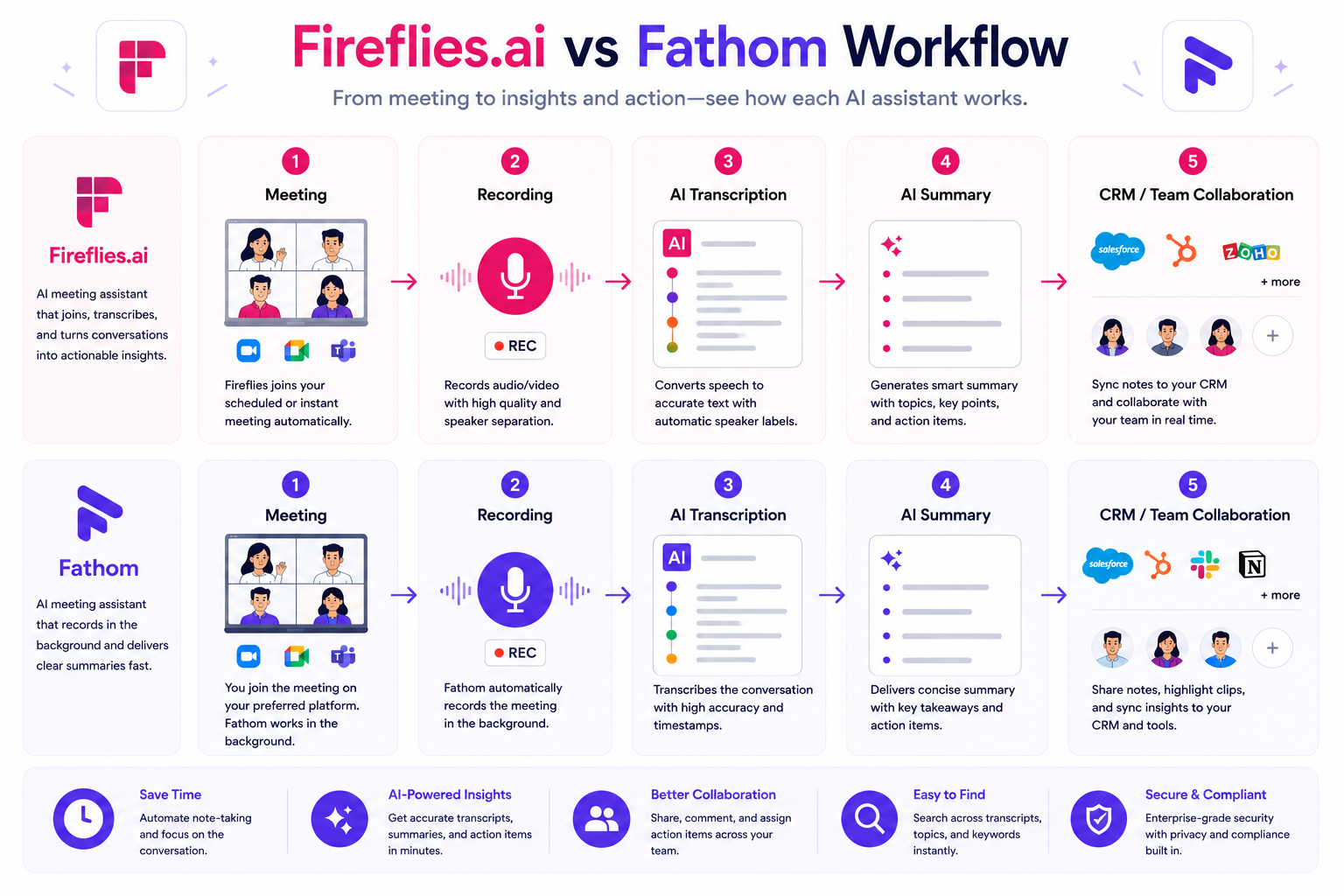
Fireflies.ai approaches summaries with a higher degree of customization. In addition to standard bulleted recaps, Fireflies features “Super Summaries,” which allow users to customize the exact structure of the AI’s output. Furthermore, Fireflies integrates “AskFred,” an interactive AI chat assistant powered by ChatGPT. Users can chat with their meeting transcript natively—asking questions like “What was the client’s explicit reaction to our pricing proposal?” or “Draft a follow-up email to John summarizing our technical requirements”—and receive custom-generated copy instantly.
4. Speaker Recognition
Speaker diarization—the technical process of partitioning an audio stream into distinct segments tied to specific individuals—is executed cleanly by both platforms. Fathom analyzes the calendar invitees and cross-references them with the audio streams during Zoom or Meet calls to label speakers accurately. If an uninvited guest joins, Fathom labels them clearly as an external participant, allowing you to manually rename them post-call if desired.
Fireflies.ai handles speaker tracking directly through its cloud processing system. On its dashboard, each speaker is assigned a unique color profile and an isolated text block, making it simple to scan long transcripts visually. If Fred joins a large boardroom meeting where multiple people are sharing a single microphone, both tools will face standard physical limitations, but for traditional distributed virtual calls, their speaker separation capabilities are neck-and-neck.
5. Action Items Extraction
Isolating next steps is one of the primary reasons companies adopt AI note-takers. Fathom handles this through its real-time highlighting system and automated summary engine. If you click a highlight button during a call, Fathom guarantees that moment will be cataloged under your highlights folder. Its automated summary also features a dedicated “Action Items” section at the top of the page, accurately pairing verbs with names (e.g., “Sarah to send updated contract by Thursday”).
Fireflies.ai relies on its advanced AI filters to parse action items procedurally. It reviews the entire text structure looking for commitment indicators. It then compiles these points into a centralized action checklist within the meeting dashboard. From there, users can configure Fireflies to push those tasks directly to external project management tools like ClickUp, Asana, Todoist, or Trello, ensuring that meeting decisions are instantly translated into your company’s actual operational pipeline.
6. Meeting Search Functionality
As your company accumulates hundreds of call recordings, finding historical data becomes a significant challenge. On Fathom’s free plan, search is restricted to individual meeting logs. However, if you upgrade to Fathom Team Edition, you unlock global search. This enables you to search a client name or project term across all meetings recorded by anyone on your team, immediately surfacing the exact files and lines where that term was spoken.
Fireflies.ai provides an incredibly robust global search infrastructure across all its paid tiers. It includes a feature called “Topic Tracker.” Users can define explicit tracking rules for keywords, categories, or concepts. For example, you can track every time a competitor’s name is uttered, every mention of the word “pricing,” or specific product feature complaints. Fireflies will map these metrics across all historical company data, allowing managers to view macro-level conversational trends over months or quarters without opening individual files.
7. CRM Integration
For sales organizations, CRM automation is often the deciding factor when purchasing software. Fathom premium integrations are tightly optimized for major platforms like HubSpot, Salesforce, and Close. Fathom identifies participants via email matching, logs the call activity, attaches the structured summary, and embeds a direct link to the video recording directly within the contact’s CRM page. The sync is fast and requires zero manual click-throughs from sales representatives.
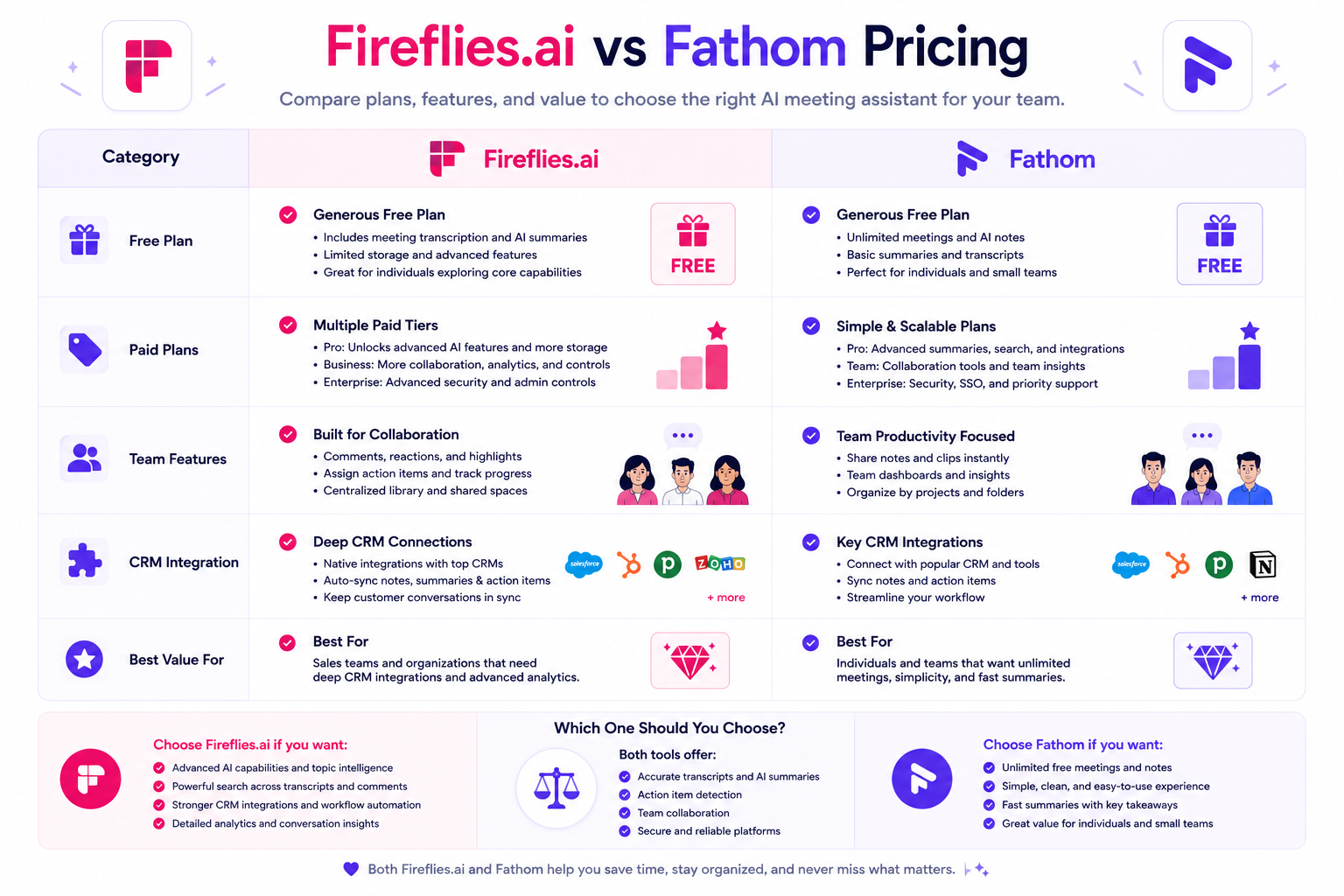
Fireflies.ai offers a significantly wider net of native CRM integrations. It connects natively with over 15 distinct CRM systems, including HubSpot, Salesforce, Freshsales, Zoho CRM, Pipedrive, Copper, and Insightly. Fireflies also goes a step further by allowing deep field mapping, meaning its AI can parse specific components of a conversation and route that text block directly into a custom field on a lead profile, providing a massive advantage for complex, data-heavy enterprise sales stacks.
8. Workflow Automation
Fathom approaches automation primarily through native app linkages and a robust Zapier connector. For most users, sending a meeting summary automatically to a designated Slack channel or a Notion database is the extent of their automation requirement, and Fathom executes this flawlessly.
Fireflies.ai views automation as a core product pillar. Beyond Zapier, Fireflies features native integration setups with popular team collaboration apps, webhooks, and direct developer API access. You can configure complex routing logic: for example, if a client expresses high frustration (detected via Fireflies’ native sentiment analysis engine), Fireflies can instantly trigger a high-priority webhook that flags the account manager in Slack and generates an internal ticket in Jira simultaneously.
9. Team Collaboration
Fathom supports team collaboration via shared team folders and the creation of clip playlists. If a customer success manager captures an exceptional product testimonial, they can clip that 30-second video segment and drop it into a shared “Customer Praise” playlist that the entire company can access. The interface makes reviewing these highlights simple.
Fireflies.ai treats collaboration like an internal podcast network for your company. It allows users to create custom “Soundbites” from audio recordings, group meetings into distinct internal organizational channels (e.g., #Marketing, #Engineering-Syncs), and leave time-stamped comments directly on the audio timeline. Team members can tag colleagues within the transcript to ask questions, creating an interactive collaborative environment directly inside the meeting asset itself.
10. Security & Privacy Compliance
Data security is a non-negotiable requirement for enterprises deploying AI software. Fathom has established a highly reputable standing here by obtaining SOC 2 Type II certification. More importantly, Fathom has maintained a strict data pledge: they do not sell your personal data, and they explicitly state that your private meeting transcripts, videos, and audio streams are never used to train external large language models or foundational AI systems.
Fireflies.ai matches these rigorous standards. It is also SOC 2 Type II certified, GDPR compliant, and HIPAA compliant (offering specialized business associate agreements for medical and healthcare clients on custom enterprise tiers). Fireflies provides extensive administrative controls, allowing data compliance officers to set strict workspace data retention policies, toggle automatic deletion periods, and restrict which users have permission to download or share meeting audio files outside the organization.
11. Ease of Use and Onboarding
Fathom is widely considered the most user-friendly tool in the meeting assistant category. Its signup-to-execution pipeline takes less than three minutes. The application interface avoids technical clutter, relying on clear icons and intuitive navigation patterns. Because the core user experience doesn’t overwhelm you with analytical tracking or complicated routing frameworks, individual professionals can operate it successfully without consulting IT guides or reading documentation.
Fireflies.ai features a denser, more complex dashboard ecosystem due to its immense feature depth. New users will need to spend time configuring their bot behavior settings, setting up custom integrations, and learning how to filter data effectively using topic trackers and AskFred commands. While the learning curve is entirely manageable, it does require a deliberate investment of time, making it feel more like an enterprise software deployment than a lightweight personal productivity utility.
Pricing Comparison
Understanding the structural costs of these platforms ensures you select a sustainable option for your business scale.
Pricing may change over time. Always verify current plans on the official website before purchasing.
Fathom Pricing Structure
Fathom’s business model relies on keeping its core experience entirely accessible for individual users while charging for advanced organizational features:
- Fathom Free: Includes unlimited meeting recordings, unlimited transcription minutes, basic AI-generated summaries, and manual video clipping. There are no monthly limits on call volume or call duration.
- Fathom Premium (Approx. $15 - $19/mo per user): Unlocks advanced, fully customizable AI summary templates, native CRM syncing capabilities (HubSpot, Salesforce), Zapier access, and hidden Fathom branding on shared links.
- Fathom Team Edition (Approx. $20 - $25/mo per user): Designed for corporate teams; adds global search functionality across all team members’ transcripts, centralized corporate billing, access controls, and custom keyword alerts.
Fireflies.ai Pricing Structure
Fireflies.ai utilizes a traditional SaaS tier structure based on feature access and cloud storage capacity:
- Free Plan: Includes limited transcription minutes per month (typically around 800 total minutes), basic search functionality, and 3 channels of storage. Summaries are basic, and advanced tracking tools are locked.
- Pro Plan (Approx. $10 - $18/mo per user): Offers unlimited transcription minutes, 8,000 minutes of cloud storage per user, access to standard summaries, smart search filters, tracking keywords, and native integrations with project management tools.
- Business Plan (Approx. $19 - $29/mo per user): Designed for fast-growing companies; unlocks video recording capability, unlimited storage, AskFred AI chat assistant functionality, native CRM integrations, conversational analytics tracking, and team coaching metrics.
- Enterprise Tier: Custom pricing; adds dedicated compliance tools, custom data retention policies, HIPAA-compliant support pipelines, dedicated accounts management, and custom API configurations.
Pros and Cons
Reviewing an objective list of advantages and disadvantages highlights where each software solution thrives or encounters friction.
Fireflies.ai Pros & Cons
| Pros | Cons |
|---|---|
| Deep Conversational Analytics: Tracks performance metrics, speaker talking rates, and client sentiment scales over time. | Complex Free Tier: The free tier features restrictive monthly minute caps and limited summary utility. |
| File Upload Support: Allows seamless drag-and-drop transcription for pre-recorded audio and video files. | Steeper Learning Curve: The vast array of settings, filters, and AI features can feel overwhelming to casual users. |
| Massive Integration Net: Links natively with over 40 distinct CRM, project management, and workspace applications. | Video Locked to Higher Tiers: Video recording and processing features are restricted to more expensive paid plans. |
| AskFred AI Chat: Interactive AI companion allows you to chat with your meeting data to generate custom copy instantly. | More Expensive for Teams: Equipping a large department with full feature access requires a higher monthly software spend. |
Fathom Pros & Cons
| Pros | Cons |
|---|---|
| Unbeatable Free Tier: Unlimited recording and transcription minutes with zero artificial monthly caps. | No Standalone Uploads: Designed almost entirely around live video conferencing; does not support easy offline file processing. |
| Extreme Speed: Post-meeting summaries and interactive transcripts are delivered almost instantaneously. | No Native Mobile App: Cannot be used natively to record offline boardroom or in-person interactions on your phone. |
| Frictionless User Interface: Clean, highly minimalist design patterns require zero technical training to master. | Basic Analytics Data: Lacks high-level conversational coaching data or automated sentiment tracking features. |
| Strict Privacy Blueprint: Absolute commitment to ensuring user transcripts are never utilized to train external AI models. | Bot Entrance Control: Requires manual entry permission from meeting hosts if you are not the primary calendar organizer. |
Who Should Choose Fireflies.ai?
Fireflies.ai is the clear recommendation for users who view their meetings as a massive data engine that needs to be mined, analyzed, and integrated deeply into a complex corporate workflow.
If you are a Sales Manager overseeing a team of account executives, Fireflies provides invaluable coaching data. You can quickly see if your representatives are listening more than they are talking, track how often prospects bring up pricing objections, and receive immediate alerts when a primary competitor is mentioned on a discovery call. The ability to automatically push structured call summaries into complex custom fields across specialized CRMs ensures absolute data accuracy for your sales pipelines.
Similarly, Enterprises and Medical Institutions that require absolute regulatory compliance, custom API access to route data to internal private cloud storage systems, or HIPAA validation will find Fireflies.ai’s enterprise infrastructure to be a necessary fit. It is also the ideal choice for Content Creators, Researchers, and Journalists who regularly conduct offline interviews or capture audio via external recording equipment, as its seamless drag-and-drop file transcription dashboard processes historical files quickly and accurately.
Who Should Choose Fathom?
Fathom is the absolute recommendation for professionals who want a highly effective, incredibly fast AI note-taker that works reliably without complicating their digital lives or straining their budget.
If you are a Freelancer, Independent Agency Owner, or Consultant, Fathom’s free plan is a massive operational asset. It allows you to protect your business by maintaining precise historical records of every client interaction and technical agreement without forcing you into a paid monthly software subscription. The speed with which Fathom processes notes allows you to instantly email high-quality recaps and action items to your clients before they even leave their desks.
Fathom is also the perfect fit for Small to Medium-Sized Businesses that prioritize software simplicity. If your team uses Zoom, Google Meet, or Microsoft Teams for standard collaborative check-ins and simply wants an easy way to ensure action items are never forgotten or lost, Fathom eliminates the risk of user adoption failure. Its intuitive buttons, minimalist layout, and simple file-sharing mechanics ensure that every employee can utilize it successfully from day one without requiring formal software training or IT assistance.
Decision Table
Use this focused question-and-answer rubric to rapidly identify which software platform aligns with your exact operational criteria.
| Feature Criterion | Winner | Core Explanatory Fact |
|---|---|---|
| I need a tool that is completely free with no minute limits. | Fathom | Fathom offers unlimited live call recording and transcription on its standard free tier; Fireflies caps free usage strictly. |
| I need to upload MP3 or MP4 files recorded offline. | Fireflies.ai | Fireflies features a cloud upload interface for pre-recorded files; Fathom is built strictly around live virtual call capture. |
| I want to chat with my meeting notes to draft custom emails. | Fireflies.ai | Fireflies includes AskFred, an interactive chat companion that converts meeting transcripts into custom written assets. |
| I need a tool with an incredibly fast, simple interface. | Fathom | Fathom is designed for speed and simplicity, delivering formatted notes seconds after a call with minimal dashboard navigation. |
| I need to track data trends and competitor keywords across 500+ calls. | Fireflies.ai | Fireflies features advanced Topic Trackers and conversational analytics dashboards designed for macro data mining. |
| I want a tool that explicitly promises not to train AI on my data. | Fathom | Fathom features a clear security pledge guaranteeing your internal meeting data is never used for foundational model training. |
| I need deep integration with niche CRMs like Zoho or Pipedrive. | Fireflies.ai | Fireflies natively integrates with over 15 distinct CRM setups; Fathom focuses primarily on HubSpot, Salesforce, and Close. |
| I want to capture high-definition video recordings easily for free. | Fathom | Fathom provides full video and audio tracking natively on its free tier; Fireflies restricts video processing to high paid tiers. |
Common Questions
1. Do Fireflies.ai and Fathom work on Microsoft Teams and Google Meet?
Yes, both platforms offer full, native compatibility across the big three video conferencing networks: Zoom, Google Meet, and Microsoft Teams. They sync with your Google or Outlook calendar and dispatch their respective virtual recording bots to enter the call link automatically based on your customized user preferences.
2. Can I use Fathom or Fireflies to record in-person conversations?
Fireflies.ai is highly capable of handling in-person meetings because it offers dedicated mobile applications for both iOS and Android devices, allowing you to record live conversations directly from your smartphone. It also allows you to upload audio files recorded on external microphones. Fathom does not currently offer a standalone mobile app for live, offline audio recording and is built almost exclusively around web-based video conferencing platforms.
3. Will my clients know they are being recorded by these tools?
Yes. Both tools enter the call as visible participants (e.g., “Fathom Notetaker” or “Fireflies.ai AI Assistant”). Depending on your specific regional compliance settings and localized privacy legislation, you may also be required to provide explicit notification to external participants or display a recording disclosure notice at the start of your calls.
4. Can I prevent the AI bots from joining specific private meetings?
Absolutely. Both platforms feature highly granular calendar configurations. You can set the software to join every meeting on your schedule, only meetings where you are the explicit host, only meetings with external email domains, or only calls that you manually toggle via your dashboard before the session begins. You can also evict the bots from a live room at any moment if a sensitive topic arises.
5. Which tool has the more accurate transcription engine?
Both tools leverage advanced linguistic processing software and score very similarly in objective tests, typically yielding between 90% and 95% accuracy under standard conditions. Transcription quality is highly dependent on individual hardware choices, background ambient noise, and internet connection stability rather than differences in the software algorithms themselves.
6. Do I need to be a software developer to set up these integrations?
No. Both Fireflies.ai and Fathom feature native, one-click authorization pipelines for popular software applications like HubSpot, Salesforce, Slack, and Notion. You simply log into your respective account through their settings portal to establish a secure link. No coding expertise or custom API configuration is necessary for standard setups.
7. How does Fathom make money if its free tier is unlimited?
Fathom generates revenue by selling its Premium and Team Edition tiers. While individual note-taking features are free, organizations pay a monthly subscription fee to unlock automated CRM syncing capabilities, global multi-transcript searching, centralized company folder organization, custom keyword alerting systems, and specialized corporate billing portals.
8. Can I edit the AI-generated summaries if they make a mistake?
Yes, both platforms feature integrated text editors directly within their post-call dashboards. If the AI misspells a proprietary technical term, assigns an action item to the wrong individual, or misinterprets a complex sentence block, you can quickly type manual corrections directly into the interface before exporting or syncing the notes to external tools.
Bottom Line
Selecting the ideal AI meeting assistant requires balancing your operational scale against your feature requirements. There is no forced universal winner between Fireflies.ai and Fathom because they target entirely different budget philosophies and team sizes.
If your primary objective is to find a reliable, secure, and completely frictionless personal assistant that records your daily client meetings and creates clean summaries without costing you a dime, Fathom is the clear and logical choice. Its unlimited free tier provides immense value for individual contributors, consultants, and small teams who want to stay focused during live calls without worrying about artificial minute limits or complex feature dashboards.
If your objective is to build a centralized data knowledge hub for a growing company, standardize a data-heavy sales pipeline, or track deep behavioral metrics across a large department of account executives, Fireflies.ai is worth every penny of its subscription fee. Its extensive native integrations, audio file upload interface, custom topic trackers, and interactive AskFred AI companion make it an incredibly powerful corporate asset for long-term data analysis and organizational transparency.
Final Verdict
Fathom and Fireflies.ai represent two of the absolute finest implementations of artificial intelligence in the modern productivity software space. Fathom wins decisively on pure usability, onboarding speed, and economic value for independent professionals. Fireflies.ai wins decisively on integration depth, analytics capacity, and multi-format flexibility for enterprise workflows. By mapping your specific team layout, preferred software connections, and budget parameters against the detailed feature breakdowns highlighted in this guide, you can confidently adopt the tool that will permanently eliminate manual note-taking from your business routine.
Internal Link Opportunities
- Read our complete Fathom Review for a deep dive into its standalone features and user experience.
- Explore our full Fireflies.ai Review to understand its enterprise capabilities and metric dashboards.
- See how Fireflies compares to other market leaders in our Fireflies.ai vs Otter.ai head-to-head analysis.
- Check out our detailed Otter.ai Review for a deep look into mobile-first transcription options.
- Read our tl;dv Review to see how video-first timestamped navigation and multi-meeting reels compare to text-first tools like Fireflies and Fathom.
- Review our definitive curation of the Best Meeting AI Tools to see how the entire software ecosystem ranks across different industries.
Backfill Recommendations
To further enhance your team’s digital productivity and data optimization, we highly recommend exploring these practical guides:
- How to Choose the Best AI Meeting Assistant: A frameworks-driven analysis helping organizations weigh the financial and technical trade-offs between lightweight transcription utilities and heavy conversational intelligence platforms.
- CRM Workflow Automation Guide: Practical methodologies for using AI tools to automatically map, clean, and populate customer dialogue records inside Salesforce and HubSpot to ensure flawless data hygiene.
- AI Meeting Privacy and Compliance Best Practices: An objective look at global data security requirements, encryption frameworks, and localized recording consent legislation when deploying automated bots within corporate workspaces.