Fathom Review (2026): Features, Pricing, and Alternatives
Fathom Review (2026)
The software landscape for meeting assistants has grown rapidly, making it harder to choose the right tool for your daily calls. Finding a reliable AI note-taker that consistently joins meetings, records high-quality audio, and generates accurate summaries is a priority for many professionals. Fathom has built a strong reputation in this space, particularly because it offers a highly capable free version.
In this comprehensive review, we will examine Fathom’s current capabilities, how it fits into your daily routine, and whether it holds up against strong competitors in the market. We will break down its core features, pricing structure, privacy standards, and ideal use cases to help you decide if it is the right addition to your software stack.
Modern knowledge workers spend a significant portion of their week in virtual meetings. The administrative burden of documenting these conversations, assigning action items, and updating CRM systems often leads to burnout and fragmented data. AI meeting assistants promise to solve this problem by automating the transcription and summarization process. Fathom has emerged as a major player by focusing heavily on UX simplicity and offering a core experience that doesn’t charge users for basic minutes. This review provides an objective analysis of whether Fathom delivers on its promises or if alternative platforms offer a more robust solution for your workflow.
Product At a Glance
Here is a quick overview of where Fathom excels and where it falls short, designed to help you quickly understand if it matches your specific requirements.
| Need / Recommendation | Assessment |
|---|---|
| Best Free Plan | ✅ Excellent |
| Best for Freelancers | ✅ Excellent |
| Best for Sales Teams | ✅ Very Good |
| Best for CRM Syncing | ✅ Very Good |
| Best Mobile Recording | ❌ Not Available |
| Best Enterprise Choice | ⚠️ Fireflies.ai or Otter.ai may offer deeper team analytics |
| Overall Usability | ✅ Excellent |
TL;DR
Fathom is a straightforward, highly effective AI meeting assistant that records, transcribes, and summarizes video calls across platforms like Zoom, Google Meet, and Microsoft Teams. It distinguishes itself by offering an incredibly generous free tier that includes unlimited recording and transcription, making it a favorite among freelancers, small agency owners, and independent consultants. The tool is designed to eliminate manual note-taking, allowing participants to remain fully engaged in the conversation rather than distracted by typing.
For paid users, Fathom introduces advanced features such as automatic CRM syncing for Salesforce and HubSpot, team-wide keyword tracking, and advanced formatting for summaries. The interface is clean, modern, and easy to navigate. You do not need technical expertise to get started; the onboarding process takes just a few minutes, and the bot integrates smoothly into your calendar to join calls automatically.
However, Fathom is not without its limitations. It currently lacks a dedicated mobile app for recording in-person conversations, and its team analytics features, while improving, are not as deep as some legacy competitors. Despite these minor drawbacks, its commitment to user privacy—specifically its pledge not to train external AI models on your private meeting data—makes it a secure and reliable choice for most standard business needs.
Quick Access: Learn More About Fathom
Quick Facts
- Supported Platforms: Zoom, Google Meet, Microsoft Teams
- Free Plan: Yes, includes unlimited recording and transcription
- Languages Supported: 28+ languages including English, Spanish, French, and German
- Key Integrations: HubSpot, Salesforce, Slack, Notion, Google Docs, Zapier
- Privacy Standard: SOC 2 Type II compliant; explicit policy against training AI on user data
- Desktop App: Available for Windows and macOS
- Mobile App: Not currently available for standalone recording
- Summary Formats: Multiple templates available (Chronological, Action Items, Sales, etc.)
- Clip Sharing: Yes, allows generating short video clips from longer meetings
What Is Fathom?
Direct Answer: Fathom is a free AI meeting assistant that automatically joins your video conference calls, records the audio and video, provides a real-time transcript, and generates an organized summary immediately after the call ends. It is designed to replace manual note-taking and streamline the process of sharing meeting outcomes with team members and syncing data to CRM platforms.
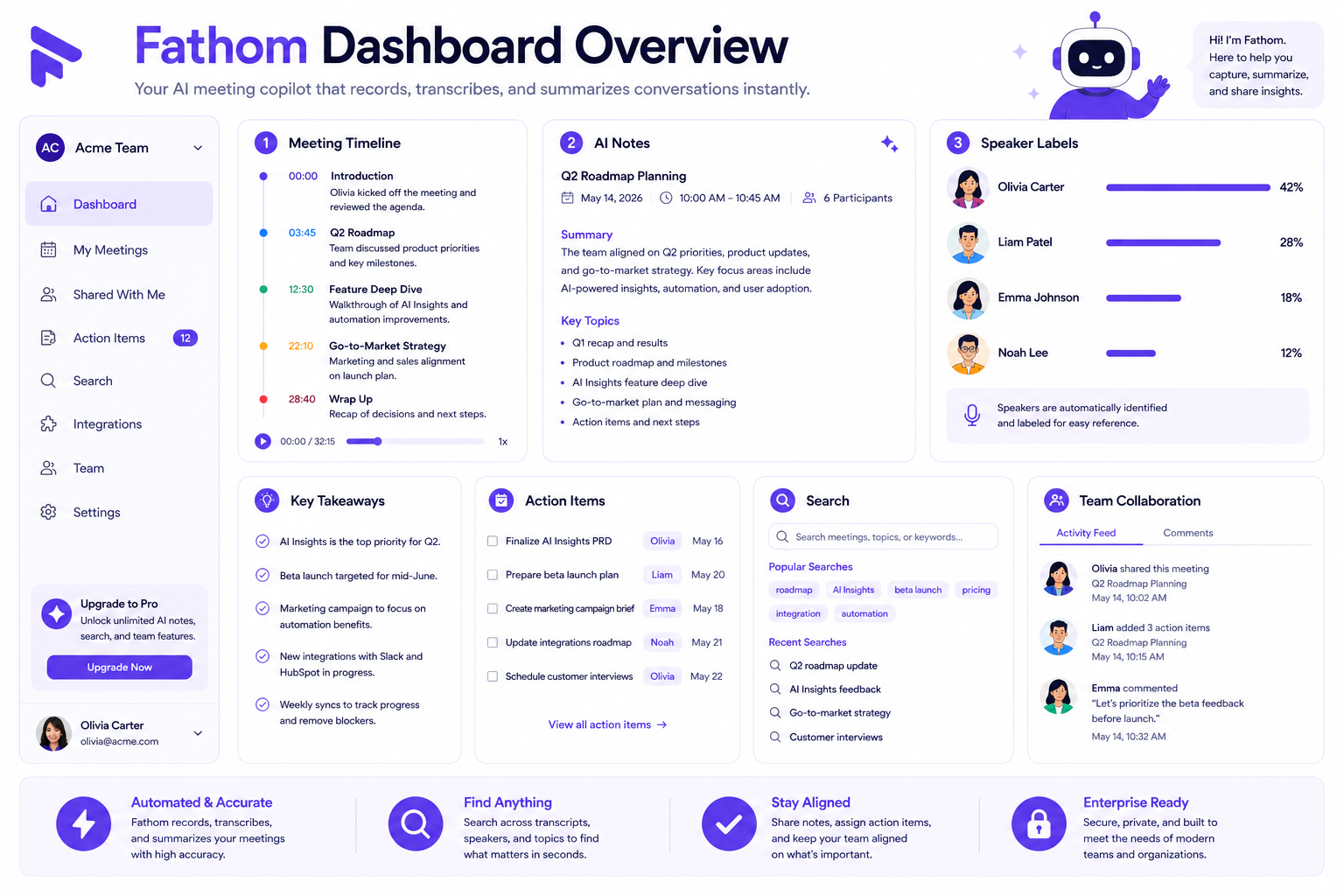
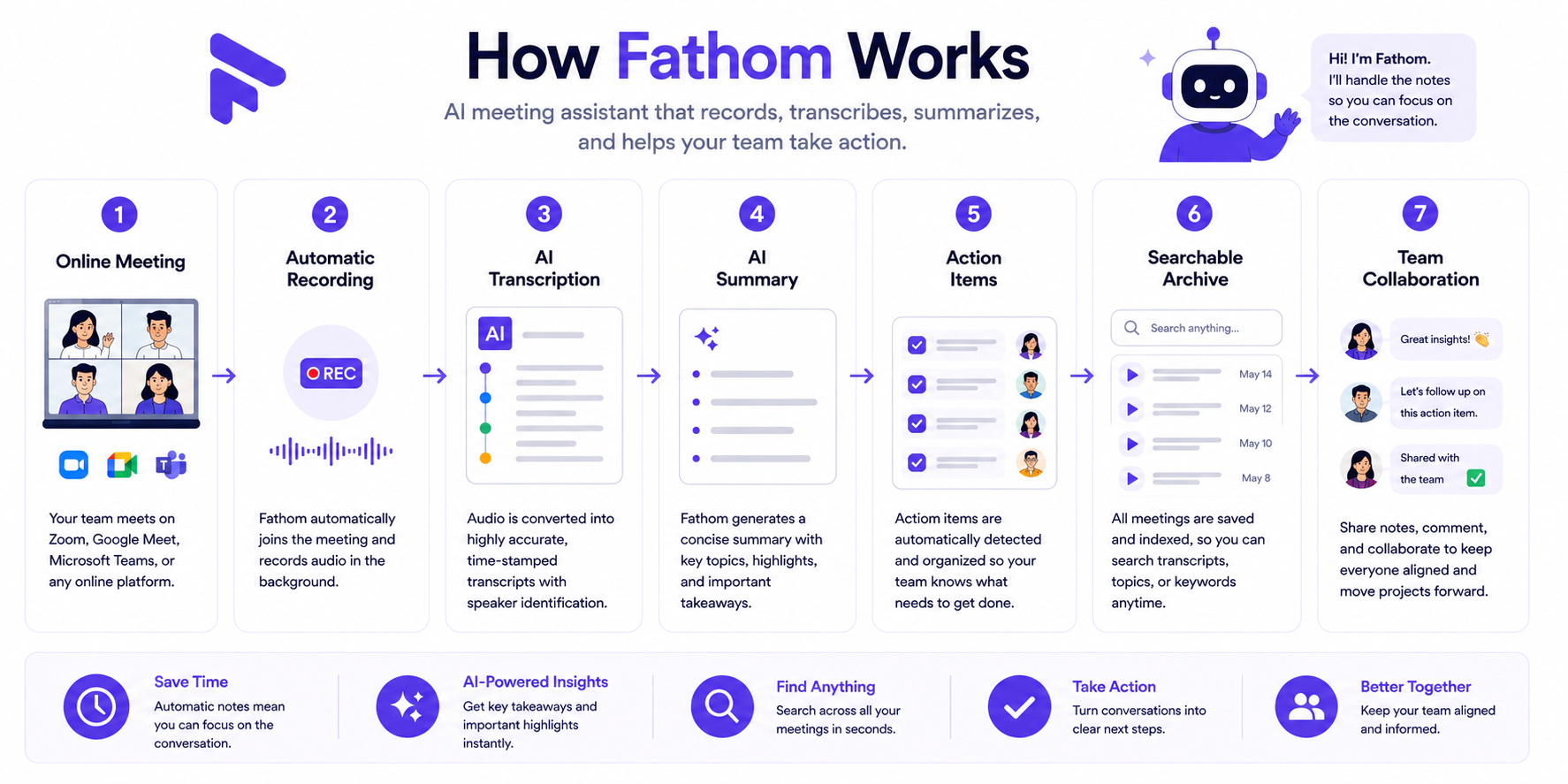
Fathom operates as a participant in your online meetings. Once you connect your calendar (Google Calendar or Outlook), the Fathom bot monitors your schedule. When a meeting containing a Zoom, Meet, or Teams link begins, the bot automatically requests entry. During the call, a side panel provides a live transcript and allows you to highlight important moments with a single click.
After the meeting concludes, Fathom processes the recording within seconds. It delivers a comprehensive dashboard where you can review the full video, read the cleaned-up transcript, and view an AI-generated summary. These summaries can be instantly pushed to other tools in your workspace, such as a Slack channel, a Notion database, or directly into a contact record in HubSpot or Salesforce. The core philosophy behind Fathom is simplicity and speed, aiming to reduce the administrative burden that follows back-to-back virtual meetings.
The platform was built to address the specific pain point of professional context-switching. When you are forced to divide your attention between listening to a client and typing out summaries, the quality of your interaction drops. By handling the documentation mechanically, Fathom allows users to look directly at the camera, maintain eye contact, and participate authentically. The tool acts as an accurate digital memory bank, preserving exactly what was said, who said it, and what next steps were agreed upon, eliminating the ambiguity that frequently follows complex group discussions.
Key Features
To understand how Fathom performs in a real-world setting, we need to look closely at its core functionality. Below is a detailed breakdown of the features that make Fathom a popular choice, as well as the mechanics of how they operate.
1. Unlimited Recording and Transcription
One of the most significant advantages Fathom offers is unlimited recording and transcription on its free plan. While many competitors cap your monthly usage at 300 or 600 minutes, Fathom allows you to record as many meetings as you need. The transcription engine is highly accurate and handles different accents well. It identifies different speakers automatically (speaker diarization) and labels them in the text. This feature alone makes it an invaluable tool for users who spend most of their day on calls and cannot afford restrictive usage limits.
The underlying engine handles background noise filtering efficiently. Even if a participant is speaking from a noisy environment or using a sub-par microphone, Fathom manages to construct an accurate textual representation of the dialogue. It also strips out filler words like “um,” “uh,” and “like” automatically in the final transcript, resulting in a cleaner text file that is far easier to skim or read thoroughly.
2. Real-Time Highlighting
During a live call, Fathom provides a desktop widget or an integrated panel (depending on the platform) that features highlight buttons. If someone says something important—like mentioning a budget, agreeing to an action item, or providing positive feedback—you simply click a button. Fathom will flag that specific portion of the video and transcript. After the meeting, these highlights are categorized, making it incredibly easy to jump straight to the most important parts of a one-hour call without having to skim through the entire transcript.
This highlighting system is highly customizable on paid tiers. Users can create custom tags that correspond to their specific business practices, such as “Competitor Mentioned,” “Technical Objection,” or “Follow-up Required.” When you click a tag during the call, Fathom marks the preceding 30 seconds of audio, ensuring that the full context of the speaker’s statement is captured in that specific highlight clip.
3. AI-Generated Summaries
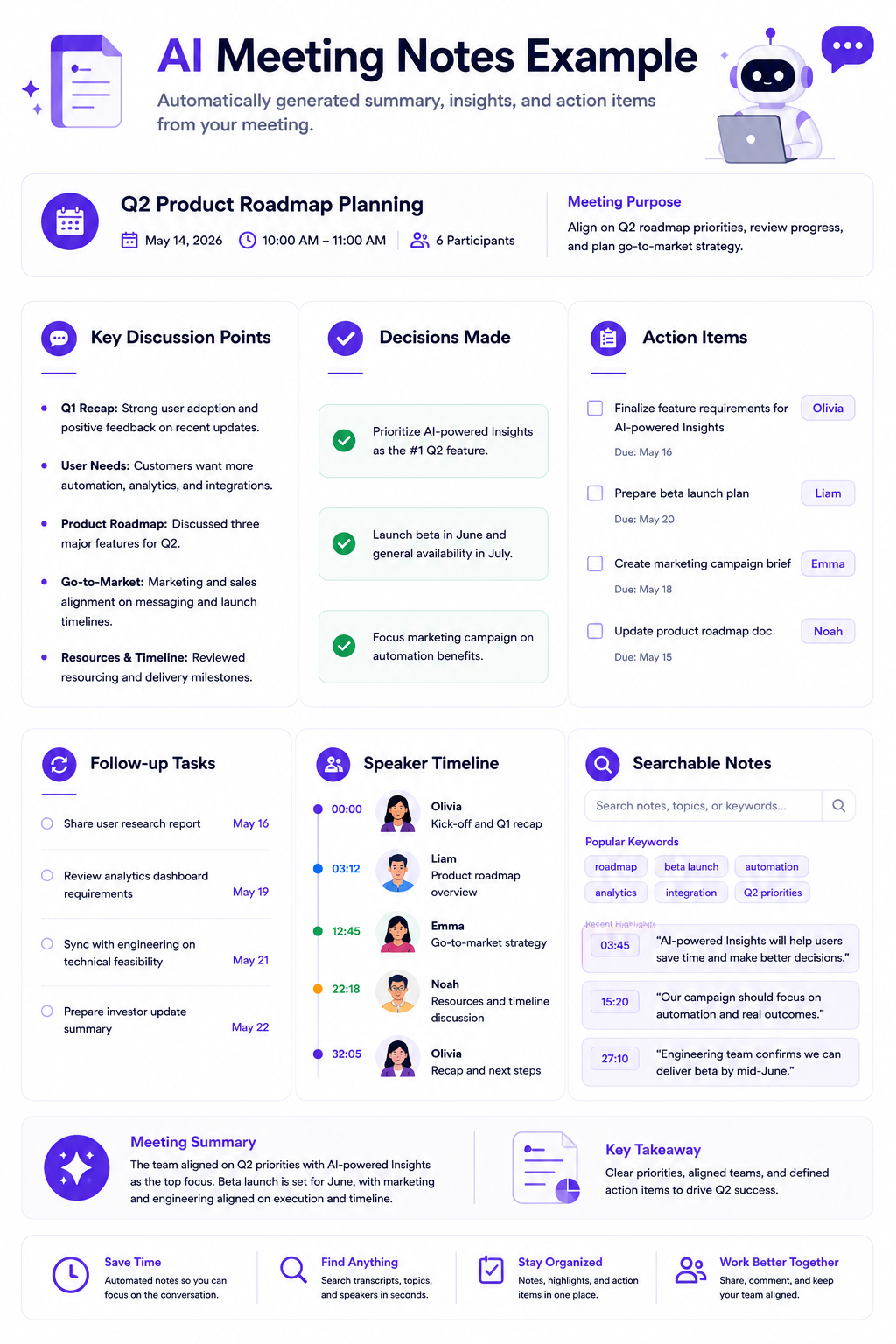
The moment you end a call, Fathom’s AI goes to work on the transcript. It does not just provide a giant block of text; it structures the summary based on templates. You can choose templates tailored to specific types of meetings, such as Sales Discovery, Customer Success check-ins, or standard internal team syncs. The AI accurately pulls out action items, assigns them to the correct speaker based on the context of the conversation, and summarizes the main topics discussed. The speed of generation is impressive, typically taking less than a minute even for hour-long meetings.
The summaries use hierarchical formatting, combining bullet points, bolded text, and clear section dividers to ensure maximum readability. For instance, a technical sync summary will clearly separate “Infrastructure Updates” from “Front-End Performance Bugs,” list the specific individuals assigned to resolve those bugs, and state the deadlines discussed during the call. This automated structuring removes the human bias and fatigue that often alter manual meeting minutes.
4. CRM Integration and Syncing
For sales professionals and account managers, Fathom’s CRM integration is a major time-saver. Available primarily on the paid tiers, Fathom can connect directly to Salesforce, HubSpot, and Close. When a meeting ends, Fathom searches your CRM for the participants’ email addresses. It then automatically logs the call, attaches the AI summary, and includes a link to the full recording directly in the contact or deal record. This eliminates the tedious task of manually typing up notes and copying them into your CRM software.
The depth of the integration ensures that specific notes can be routed to different custom fields within your CRM layout. For instance, if your sales team uses a specific methodology like MEDDPICC or BANT, Fathom’s premium AI structures can identify answers to questions regarding budget or decision-making timelines and map those specific text blocks into the corresponding CRM fields, ensuring clean data hygiene across the entire sales org.
5. Multi-Language Support
Fathom is not restricted to English. According to information available at publication time, it supports over 28 languages. If you conduct business internationally, Fathom can accurately transcribe languages like Spanish, French, German, Italian, and Portuguese. Furthermore, you can speak in one language and have the system generate the post-meeting summary in another. For example, you can conduct a meeting in German, but have the Fathom AI generate the bulleted summary and action items in English to share with your global team.
This cross-lingual capability is particularly beneficial for distributed software teams or multinational agencies. It reduces misunderstandings caused by language barriers, as team members can review the text in their preferred language alongside the original audio file. The engine also handles bilingual meetings smoothly, tracking speaker changes even when participants switch between languages mid-sentence.
6. Video Clipping and Sharing
Sometimes sharing a full 45-minute recording is too much. Fathom makes it easy to create bite-sized clips. By highlighting a section of the transcript, you can instantly generate a shareable link to just that specific video segment. This is incredibly useful for sharing product feedback directly with an engineering team, or sharing a positive customer testimonial with the marketing department. The recipient does not need a Fathom account to view the clip.
The video clips retain the synchronized subtitle track, making them easy to watch even on mute. Additionally, users can string multiple individual clips together into a single “playlist.” For example, a user could compile five different clips of different customers complaining about a specific software bug and send that curated playlist to the product manager as evidence for why a particular feature needs immediate attention.
7. Team Folders and Organization
If you use Fathom within a company, the Team Edition allows you to create centralized folders. You can set up folders for specific projects, departments, or clients. Team members can automatically route their meeting recordings into these shared spaces. Furthermore, Fathom includes a global search function. If you need to remember what was said about “Project Apollo” three months ago, you can search that keyword, and Fathom will pull up every transcript across your team’s folders where that phrase was mentioned.
This centralized repository acts as a highly searchable knowledge base for the entire organization. New employees can be added to a folder and quickly get up to speed on historical client conversations or internal engineering design discussions without requiring hours of manual onboarding or debriefing meetings from senior staff members.
8. Strict Privacy and Security Measures
In the current software environment, inputting confidential business conversations into AI tools raises valid security concerns. Fathom addresses this directly by maintaining SOC 2 Type II compliance. More importantly, Fathom explicitly states that they do not sell user data and they do not use your private meeting transcripts to train their foundational AI models. This commitment to privacy makes Fathom much easier to clear through IT and security reviews compared to some newer, less established AI tools.
Encryption standards are strictly maintained both in transit and at rest. Video recordings are securely stored on AWS servers using AES-256 encryption, and all communication between your browser, video platforms, and Fathom’s servers uses encrypted TLS 1.3 channels. This technical setup ensures that proprietary business discussions, financial projections, and sensitive customer data remain fully protected from unauthorized access.
How Well Does It Work?
Features on a pricing page are one thing, but everyday usability is another. Based on extensive testing and user feedback, here is how Fathom performs across the three stages of a meeting: setup, execution, and post-meeting wrap-up.
The Setup Process
Getting started with Fathom is remarkably frictionless. You sign up using your Google or Microsoft account, which automatically links your calendar. Fathom then prompts you to install a browser extension or a desktop application. The interface is clean, relying on standard design patterns that require no learning curve. You can configure your joining preferences immediately: you can set Fathom to join every single calendar event that has a video link, only meetings with external participants, or only meetings you manually select. This level of granular control prevents the bot from accidentally joining sensitive internal 1-on-1s unless you want it there.
The calendar syncing logic is robust. It scans for changes continuously, meaning if a meeting is rescheduled or canceled at the last minute, Fathom updates its queue within seconds. This prevents ghost bots from entering abandoned meeting rooms or missing meetings that were shifted earlier in the day. The setup dashboard also allows you to whitelist specific domains, ensuring that calls with family members or medical professionals remain completely private and ignored by the software.
During the Meeting
When the meeting starts, Fathom appears as a participant (e.g., “Fathom Notetaker”). It operates quietly in the background. If you are using Zoom, Fathom integrates directly into the Zoom interface via an app, which feels native and unobtrusive. For Google Meet and Microsoft Teams, it utilizes a floating desktop widget. The real-time transcription is responsive, with words appearing on the screen with only a minor, acceptable delay.
The highlighting feature during the call is intuitive. If you forget to click a highlight, you do not need to panic; you can easily go back and highlight sections in the transcript after the call. The only minor friction point is that participants must admit the Fathom bot from the waiting room. If you are not the host of the meeting, you will need to ask the host to let your Fathom bot in. This requirement can occasionally lead to a brief explanation at the start of a call if the other party is unfamiliar with AI note-takers.
After the Meeting
This is where Fathom truly shines. The post-meeting processing is exceptionally fast. By the time you have closed your video conferencing app and opened your browser, Fathom has usually finished compiling the video, transcript, and AI summary.
The accuracy of the summaries is high. It rarely hallucinates or invents conversation points. It is particularly good at identifying action items and noting who is responsible for them. Sharing these notes takes one click. You can copy a formatted text block to paste into an email, or use the native integrations to push the notes to a Slack channel. The entire workflow—from call end to notes shared—takes less than two minutes, representing a massive reduction in administrative work.
The post-meeting dashboard also includes a text editor, allowing you to manually polish the summary before exporting it. If the AI slightly misunderstood a specific acronym or technical product name unique to your business, you can quickly fix it in the dashboard. Any changes you make in the editor are preserved when you sync the text block over to Slack, Notion, or your preferred CRM platform.
Pricing
When evaluating Fathom, the pricing structure is one of its strongest selling points. Fathom offers a highly capable free version and transparent paid tiers for advanced needs.
Pricing may change over time. Always verify current plans on the official website before purchasing.
Fathom Free
The free version of Fathom is arguably the most generous in the industry. It includes:
- Unlimited recording limits without restrictive monthly caps
- Unlimited AI transcriptions across all supported video platforms
- Basic AI summaries focused on main topics and action items
- Video clipping and sharing functionality
- Support for all standard languages
For solo professionals, freelancers, and students, the Free plan is entirely sufficient. Fathom has stated they intend to keep the core recording and transcription features free permanently, using it as a funnel to drive enterprise and team adoption.
Fathom Premium
Designed for individual power users, consultants, and salespeople, the Premium plan typically costs around $15 to $19 per month when billed annually. It adds:
- Advanced AI summaries with access to custom templates
- Automatic CRM syncing (HubSpot, Salesforce, Close)
- Zapier integrations for building custom webhooks and automated workflows
- The ability to remove Fathom branding from shared links and clips
- Priority customer support with faster response times
Fathom Team Edition
Aimed at agencies, customer success departments, and sales teams, the Team Edition generally costs between $20 and $25 per user per month. It includes everything in Premium, plus:
- Centralized team billing, analytics dashboards, and user management
- Team-wide searchable transcript repositories and folders
- Keyword tracking and automated alerts (e.g., get alerted when a competitor is mentioned)
- Advanced security controls, domain restrictions, and compliance features
Pros and Cons
To provide a balanced view, here is a breakdown of where Fathom excels and the areas where it still has room for improvement.
| Pros | Cons |
|---|---|
| Unlimited Free Tier: Unmatched value for users who need basic recording and transcription without monthly minute caps. | No Standalone Mobile App: You cannot currently use Fathom to natively record in-person meetings on your mobile device. |
| High Accuracy: The transcription and AI summarization are incredibly reliable and fast, minimizing administrative editing. | Bot Entry Friction: If you are not the host, the host must manually admit your Fathom bot from the virtual waiting room. |
| Strong Privacy: Clear, strict policies against using your data to train external AI models or third-party platforms. | Basic Team Analytics: Lacks the deep conversational metrics (like talk-to-listen ratios) found in some legacy competitors. |
| Excellent CRM Sync: Flawless integration with Salesforce and HubSpot saves hours of manual entry for sales representatives. | Platform Limitations: Primarily focused on Zoom, Meet, and Teams; lacks deep native support for niche webinar software. |
| Easy to Use: Clean UI and minimal setup time; users can start recording and processing calls within minutes. | Lack of Text Uploads: Does not let free users easily upload pre-recorded audio files for standalone transcription processing. |
Who Should Use It?
Fathom is a versatile tool, but it provides the most value to specific types of professionals.
Freelancers and Consultants
If you manage multiple clients and jump between different video platforms all day, Fathom’s free tier is an absolute necessity. It allows you to keep perfect records of client requirements without paying hefty monthly subscription fees. The ability to search past transcripts saves time when drafting proposals or reviewing project scopes. It also serves as a protective record if a client disputes the initial project requirements or parameters discussed during an unrecorded kickoff call.
Sales Professionals and Account Executives
Sales reps need to listen actively during discovery calls, not type furiously. Fathom Premium allows reps to focus entirely on the prospect. The automatic CRM syncing ensures that HubSpot or Salesforce is always up-to-date with accurate meeting notes, keeping sales managers happy and keeping the pipeline organized. The video clipping feature also allows reps to send short video snippets of an executive expressing an explicit business pain point directly to the engineering team for fast solutioning.
Agencies and Client Success Teams
For teams managing client relationships, the Fathom Team Edition provides a centralized repository of client knowledge. If an account manager goes on vacation, another team member can easily search the Fathom folders to review the last three client meetings, ensuring continuity of service without needing a debriefing session. It also helps agency leadership monitor client sentiment across all accounts, jumping in to assist if specific keyword flags indicate an account is experiencing technical issues or strategic dissatisfaction.
Competitor Comparison
To fully understand Fathom’s position in the market, we must look at how it stacks up against its main competitors.
Fathom vs. Otter.ai
Otter.ai is one of the oldest and most recognized names in the transcription space. Otter excels in general transcription and offers a very strong mobile app for recording in-person lectures or meetings. However, Otter’s free plan is restrictive, limiting both the number of minutes per month and the duration of individual recordings. Fathom completely wins in the free tier category. Furthermore, many users find Fathom’s AI summaries to be formatted more naturally for business use compared to Otter’s chat-based AI interface. (See our detailed Otter.ai Review for more context).
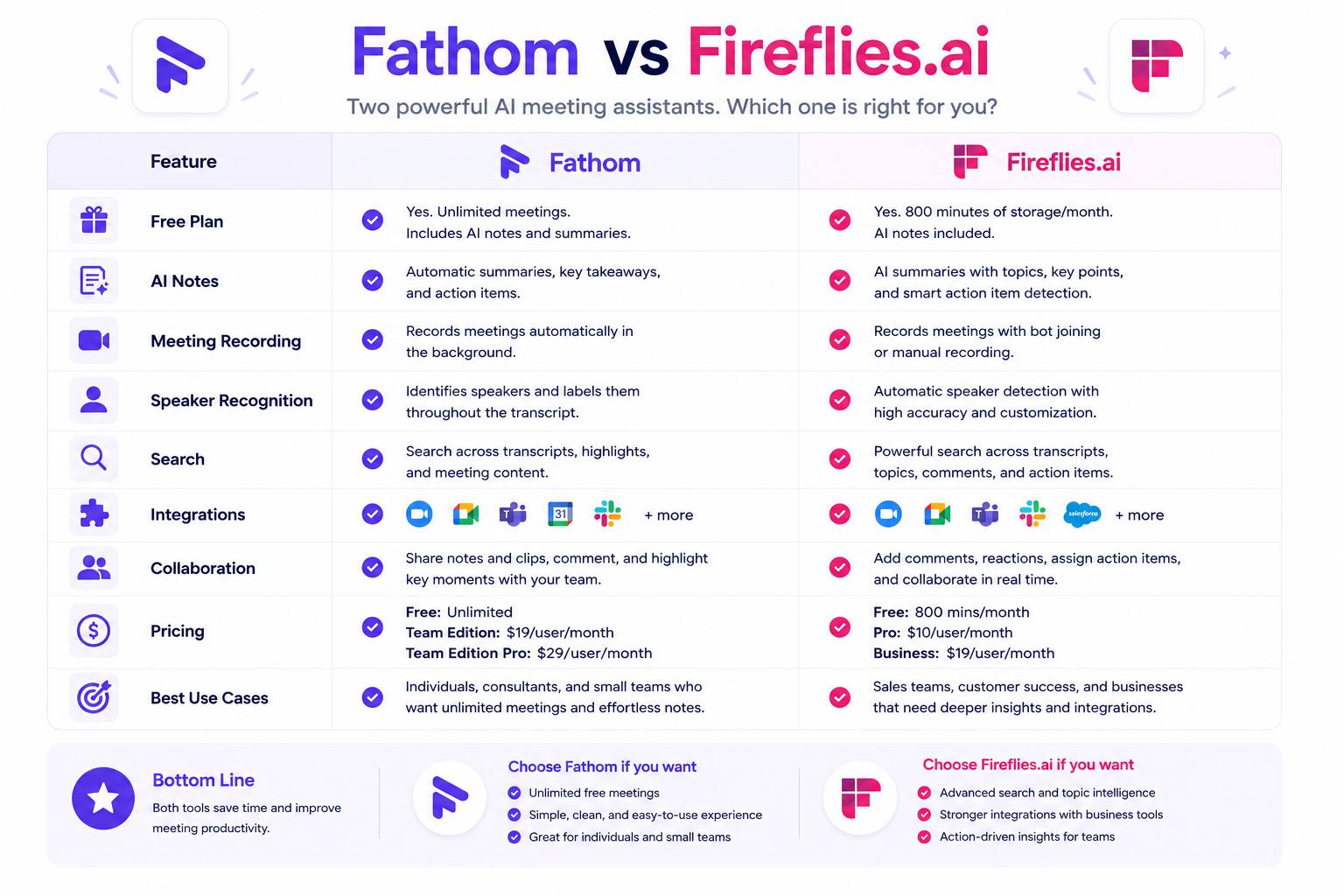
Fathom vs. Fireflies.ai
Fireflies.ai is a heavy hitter in the team and enterprise space. Fireflies offers much deeper analytics than Fathom. For example, Fireflies can analyze talk-to-listen ratios, detect sentiment, and track complex conversational metrics across an entire sales floor. If you are a sales manager looking to coach a team of 50 SDRs, Fireflies might be the better choice. However, for individuals and smaller teams, Fireflies can feel complex and overwhelming. Fathom is much simpler, faster to set up, and features a cleaner user interface. (For a deep dive into the differences, read our Fireflies.ai vs Otter.ai comparison).
Fathom vs. tl;dv
tl;dv is a video-first AI meeting assistant designed primarily for UX researchers and product teams conducting qualitative user testing. While Fathom focuses on automated note-taking and CRM sync, tl;dv records full high-definition video and generates AI summaries that link directly to the corresponding video timestamps, allowing teams to share specific video clips as evidence. If your work involves sharing user interview footage with developers or building multi-meeting video reel collections, tl;dv is the more specialized tool. If you simply need reliable, free note-taking with CRM logging, Fathom is the simpler and more cost-effective choice. See our full tl;dv Review for a detailed comparison.
Fathom vs. Native Platform AI (Zoom AI Companion / Teams Copilot)
Zoom and Microsoft have started including AI features directly within their platforms. These native tools are convenient because they do not require a bot to join the meeting. However, they are platform-locked. If your company uses Zoom, the Zoom AI Companion is great—but what happens when a client sends you a Google Meet link? Fathom is platform-agnostic, providing a unified dashboard for all your meetings regardless of where they take place.
Alternatives
If you decide that Fathom does not quite fit your workflow, there are several strong alternatives in the market. We highly recommend reviewing these options to ensure you find the perfect match for your needs.
- Best Meeting AI Tools: Start here if you want a comprehensive overview of the entire market landscape, comparing the top 10 tools based on different use cases and budgets.
- Fireflies.ai Review: The best alternative if you need advanced conversational analytics, deep team collaboration features, and native integrations with a massive variety of third-party apps.
- Otter.ai Review: Consider Otter if your primary need is recording in-person conversations via a mobile app, such as lectures, physical boardroom meetings, or live interviews.
- tl;dv Review: Consider tl;dv if your team needs full high-definition video recording, timestamped AI summary navigation, and multi-meeting clip reel collections for UX research and product discovery.
- Fireflies.ai vs Otter.ai: A detailed head-to-head comparison to help you choose between the two biggest names in the AI transcription industry.
Decision Table
Use this quick guide to make a confident decision about whether to adopt Fathom into your workflow.
| If you are looking for… | Is Fathom the right choice? | Why? |
|---|---|---|
| A totally free meeting recorder | Yes | Fathom offers unlimited recording and transcription on its free plan, making it the best budget-friendly option. |
| Automatic Salesforce/HubSpot logging | Yes | The Premium version seamlessly pushes notes and links directly into your CRM records. |
| In-person mobile recording | No | Fathom does not currently have a dedicated mobile app for recording live, offline audio. Look into Otter.ai instead. |
| Advanced team conversation analytics | No | While Fathom has team folders, it lacks the deep coaching metrics (sentiment analysis, talk ratios) found in Fireflies.ai. |
| A secure, private tool | Yes | Fathom is SOC 2 compliant and explicitly promises not to train AI models on your private data. |
Common Questions
Does Fathom work if I am not the host of the meeting?
Yes. You can use Fathom even if you are just an attendee. However, the Fathom bot will enter the meeting’s waiting room (if one is enabled), and the host will need to admit the bot. You may also need to inform the host that you are recording the call, depending on local privacy laws. Many users find it helpful to add a note to their calendar invite or mention at the start of the call that they are using an AI note-taker to ensure transparency and comfort for all participants.
Is Fathom truly free forever?
According to information available at publication time, Fathom has committed to keeping its core features—recording, transcription, and basic summaries—completely free without usage caps. They monetize the platform by charging for premium integrations, team features, custom summary templates, and advanced AI systems. This freemium model ensures that individual users can rely on the basic product without fear of hitting sudden paywalls or minute restrictions.
How does Fathom handle different languages?
Fathom supports over 28 languages. You can set your primary language in the application settings. If you join a meeting where a supported language is spoken, Fathom will transcribe it accurately. You can also prompt the AI to translate the final summary into a different language. For example, if your team holds a meeting in Spanish but needs to distribute the action items to English-speaking stakeholders, Fathom handles this translation layer seamlessly during post-meeting compilation.
Is my meeting data safe with Fathom?
Fathom takes privacy very seriously. They are SOC 2 Type II compliant. Most importantly, their privacy policy clearly states that they do not sell your data, nor do they use your private meeting recordings or transcripts to train their AI models or any third-party foundational models. All files are encrypted at rest and in transit, and access controls within the software ensure that only designated users within your organization can view specific meeting recordings or data entries.
Can I stop Fathom from recording midway through a call?
Yes. You maintain full control over the Fathom bot during the meeting. You can pause the recording at any time using the desktop widget or Zoom app interface if the conversation shifts to sensitive, personal, or confidential topics. You can also permanently delete the entire recording and transcript from your Fathom dashboard immediately after the call ends, ensuring that nothing is saved on Fathom’s servers if a meeting needs to be entirely off the record.
Should You Use It?
For the vast majority of professionals, the answer is a resounding yes. Fathom solves a universal problem—the tedious nature of manual note-taking—with remarkable efficiency and ease.
If you are a freelancer, a solo consultant, or an individual contributor tired of losing track of action items, you should install Fathom’s free version today. There is zero financial risk, and the unlimited transcription removes the anxiety of monitoring your monthly usage limits. It sets up in seconds and runs invisibly, allowing you to give full attention to your clients or colleagues.
If you are a sales professional or manage a small agency, upgrading to Fathom Premium is an easy decision. The hours saved by automatically syncing accurate meeting notes into HubSpot or Salesforce easily justify the monthly subscription cost. It allows you to close your laptop at the end of the day knowing your CRM is perfectly updated.
You should only pass on Fathom if your specific use case requires offline mobile recording (where Otter.ai is better) or if you are managing a large enterprise sales floor that requires deep, data-driven coaching metrics and sentiment analysis (where Fireflies.ai excels).
Bottom Line
Fathom has successfully democratized AI meeting assistants. By offering unlimited core features for free, they have created a tool that is accessible to everyone from students to startup founders. Its clean interface, rapid processing times, and reliable accuracy make it a pleasure to use daily. While it may lack some of the heavier analytics found in enterprise-focused software, Fathom focuses on doing the basics perfectly: recording clearly, transcribing accurately, summarizing intelligently, and keeping your data private. It is a practical, functional tool that delivers immediate value from the very first meeting you use it on.
Try Product: Learn More About Fathom
Final Verdict
Fathom is an exceptionally well-designed meeting assistant that excels in ease of use and affordability. Its unlimited free tier makes it an easy recommendation for individuals, freelancers, and small teams looking to automate their note-taking without adding another subscription to their budget. The seamless CRM integrations also make the paid tiers a logical choice for sales professionals looking to save time on administrative tasks.
However, Fathom may not be the perfect fit for everyone. Teams that require deep conversational analytics, sentiment tracking, or comprehensive sales coaching metrics might find Fathom’s feature set slightly too basic and should explore alternatives. Additionally, users who rely heavily on mobile apps to record in-person, offline meetings will need to look elsewhere. Ultimately, Fathom is a highly reliable, privacy-conscious tool that performs its core functions exceptionally well, making it a strong contender in the AI productivity space.
Internal Link Opportunities
- Review our comprehensive guide on the Best Meeting AI Tools to see how Fathom fits into the broader market landscape.
- Compare similar industry leaders in our deep dive Fireflies.ai vs Otter.ai breakdown.
- Read our direct head-to-head Fireflies.ai vs Fathom comparison to see when enterprise analytics and deep CRM pipelines outweigh Fathom’s unlimited free plan.
- Read our detailed Otter.ai Review if your workflow requires a solution with a dedicated mobile application for offline meetings.
- Check out our comprehensive Fireflies.ai Review to analyze advanced sales analytics and conversational data metrics.
- Explore our tl;dv Review if your team needs to share timestamped video evidence with developers or compile multi-session user research reels.
Backfill Recommendations
To optimize your team’s administrative workflow, we recommend exploring these related topics:
- How to Choose the Best AI Meeting Assistant: A frameworks-based approach analyzing when to prioritize free transcription versus deep enterprise-grade conversational data tracking.
- CRM Workflow Automation Guide: Best practices for structuring AI-generated notes to automatically populate custom fields in Salesforce and HubSpot without manual intervention.
- AI Meeting Privacy and Compliance Best Practices: A technical look at SOC 2 Type II compliance, localized data-recording consent laws, and keeping corporate data secure when using third-party transcription tools.