Otter.ai Review (2026): Is the Popular AI Meeting Assistant Still Worth It?
Otter.ai Review (2026)
The way we work, learn, and collaborate has completely changed over the last few years. The days of having one person frantically typing meeting notes while everyone else talks are over. Today, whether you are running a remote brainstorming session on Zoom, attending a university lecture, or conducting a face-to-face interview, capturing conversations accurately is a basic requirement.
However, recording a conversation is only half the battle. If you record an hour-long meeting, you still have to listen to that hour-long file to find the information you need. This is where AI meeting tools come into play. These apps have moved far beyond simple speech-to-text dictation. They now act as active meeting participants that write summaries, track action items, and allow your team to search through past discussions easily.
One of the most recognizable names in this space is Otter.ai. It gained massive popularity early on, becoming the go-to tool for students, journalists, and remote teams who needed a fast, reliable way to turn speech into text. Over time, Otter has added advanced features like automated meeting bots, AI-generated summaries, and real-time collaborative workspaces.
But the software market moves quickly. Today, Otter.ai faces tough competition from specialized tools like Fireflies.ai, Fathom, and tl;dv. Buyers have to ask: Is Otter.ai still the best choice for capturing meeting notes? Is its simple, feed-style layout powerful enough for professional project management? And do the recording and file upload limits hidden inside its pricing plans make it a smart choice for your specific needs?
This data-driven Otter.ai review breaks down exactly how the platform performs today. We analyze its real-time transcription speed, its mobile app experience, the reality of its subscription caps, and how it compares to top competitors. By the end of this guide, you will know exactly if Otter.ai is the right tool to add to your daily workflow.
Product At a Glance
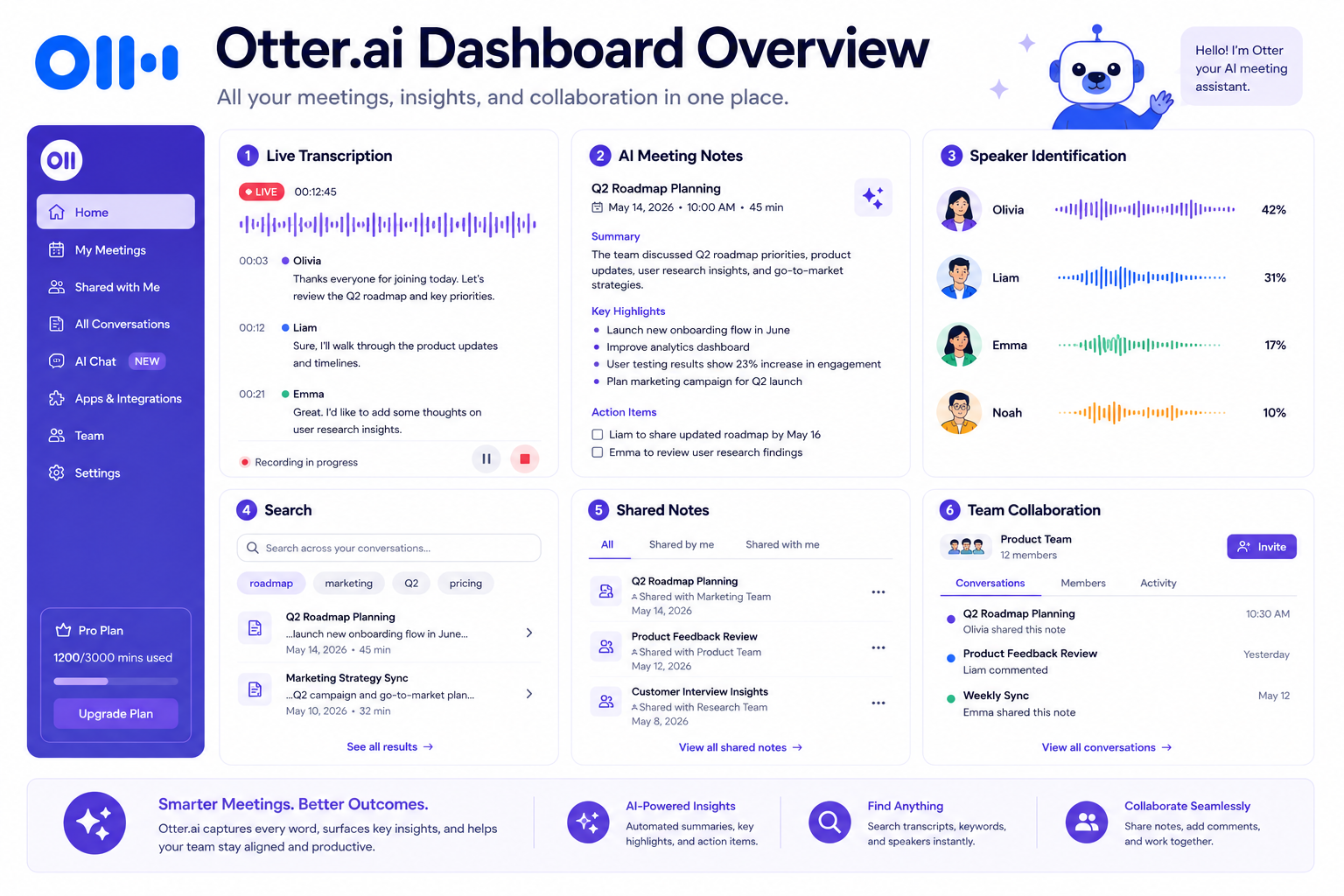
Otter.ai is a cloud-based AI meeting tool that focuses heavily on live transcription and real-time collaboration. Rather than quietly recording in the background, it provides a live, scrolling text feed of your meeting that you can interact with immediately.
| Need | Recommendation |
|---|---|
| Best for Students | ✅ Excellent |
| Best for Journalists | ✅ Excellent |
| Best for Small Teams | ✅ Very Good |
| Best for Sales Teams | ⚠️ Better choose Fireflies.ai |
| Mobile Recording | ✅ Excellent |
TL;DR
Otter.ai remains one of the most accessible and visually impressive AI meeting assistants available. It really shines in situations where you need to see a live text feed of a conversation as it happens. Its ability to generate a scrolling transcript, automatically grab screenshots of presentation slides, and let team members leave comments during an active meeting makes it a fantastic tool for classrooms, media interviews, and internal creative meetings. Furthermore, its mobile app is top-tier for recording in-person conversations on the go.
However, Otter.ai has some strict pricing limits that might frustrate heavy users. The free plan caps meetings at 30 minutes, which is not enough for standard business calls. The paid Pro plan also severely limits how many pre-recorded audio files you can upload each month. Additionally, it lacks the deep CRM integration and backend data automation that enterprise-focused tools like Fireflies.ai offer. Ultimately, Otter.ai is highly recommended for users who want a simple, live-text interface and great mobile features, but corporate teams requiring heavy automation should explore other options.
👉 Visit the Official Otter.ai Website
Quick Recommendation Guide
If you need to make a decision fast, use this simple guide to find the tool that matches your daily routine:
| If you are a… | Recommended Tool |
|---|---|
| Student | Otter.ai |
| Journalist or Writer | Otter.ai |
| Qualitative Researcher | Otter.ai |
| Sales Professional | Fireflies.ai |
| Enterprise Operations Manager | Fireflies.ai |
| Remote Team Leader | Fireflies.ai |
Quick Facts
- Best For: Students, educators, journalists, qualitative researchers, and teams that want live in-meeting text collaboration.
- Free Plan: Yes (Otter Basic), but strictly limited to 300 minutes per month, a 30-minute cap per conversation, and only 3 lifetime file imports.
- Mobile Apps: Excellent native applications for both iOS and Android, supporting direct in-person recording and offline playback.
- AI Meeting Notes: Features automated summaries, action item extraction, and a live AI chat assistant during the meeting.
- Integrations: Connects natively with Zoom, Microsoft Teams, Google Meet, Dropbox, and Slack.
- Pricing Starts At: Around $16.99/user/month (billed monthly) or $8.33/user/month (billed annually) for the Pro plan.
What Is Otter.ai?
Direct Answer Block: Otter.ai is an automated AI meeting assistant and transcription platform that records, transcribes, summarizes, and archives voice conversations in real time. Using automated speech recognition and large language models, Otter.ai joins web conferences or records in-person audio to generate a live, scrolling text transcript. It identifies different speakers, extracts key action items, automatically captures shared presentation slides, and provides a collaborative workspace where teams can highlight text, add comments, and ask an AI chatbot questions about the meeting instantly.
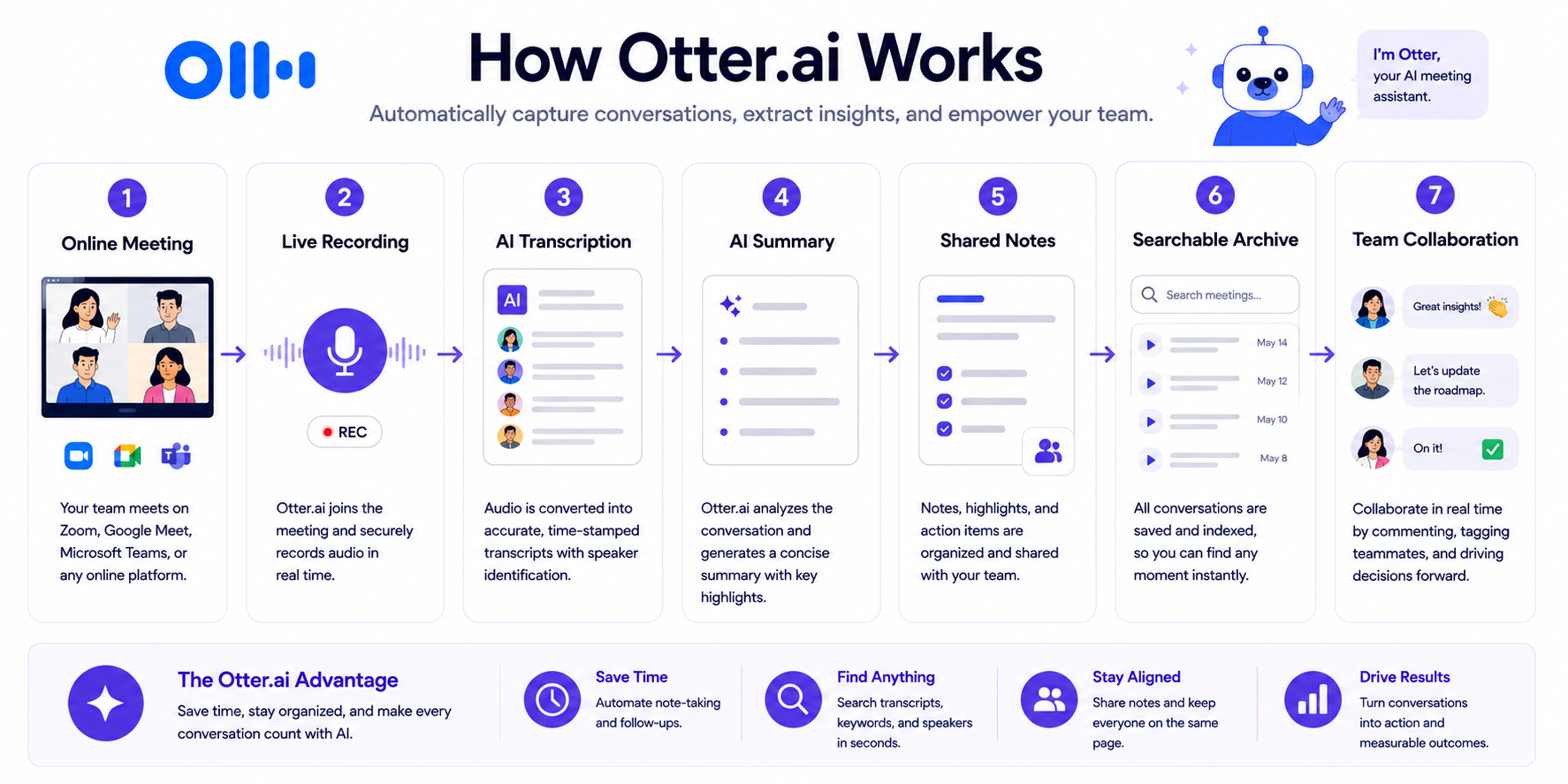
To truly understand how Otter.ai fits into your workday, you need to look at its interface. Many business meeting tools act as invisible background bots—they quietly record your call and email you a summary 15 minutes after you hang up. Otter.ai is different. It is designed to be an active part of your meeting.
When you start Otter.ai during a Zoom call or a face-to-face interview, you get a continuous, live feed of the conversation on your screen. The words appear almost instantly. If a coworker joins the call late, they do not have to interrupt to ask what they missed; they can just open the Otter link, scroll up, and read the last five minutes of dialogue. If a presenter shares a chart on their screen, Otter takes a screenshot and places that image directly into the transcript right next to the text.
This focus on live, visual interaction turns the platform from a basic note-taker into an active team workspace. It bridges the gap between spoken conversations and written documents perfectly, allowing teams to edit, highlight, and share verbal meetings as easily as they would a Google Doc.
Key Features
Evaluating Otter.ai requires a deep look at what it actually does. Over the years, the platform has grown from a basic dictation app into a robust meeting suite.
Live Transcription (Otter Live Notes)
The absolute core of the Otter.ai experience is its real-time transcription engine.
- The Live Scroll: As people speak, the text appears on the screen dynamically. This is not a static block of text that loads all at once when the meeting ends; it flows naturally like closed captioning. It is incredibly easy to follow along.
- Accessibility: For users with hearing impairments, or for people who are not native speakers and prefer to read along while listening, the live transcription feature is an amazing accessibility tool that helps everyone stay included.
- In-Person Recording: Unlike many competitors that only work via web-conferencing links, Otter.ai is just as powerful in the real world. You can place your smartphone on a table, open the Otter app, and hit record. The app uses the phone’s microphone to capture the audio, transcribing the face-to-face conversation live.
AI Meeting Notes & Summaries
Raw transcription text can be overwhelming. An hour-long meeting easily generates thousands of words. Otter solves this problem with its AI summary features.
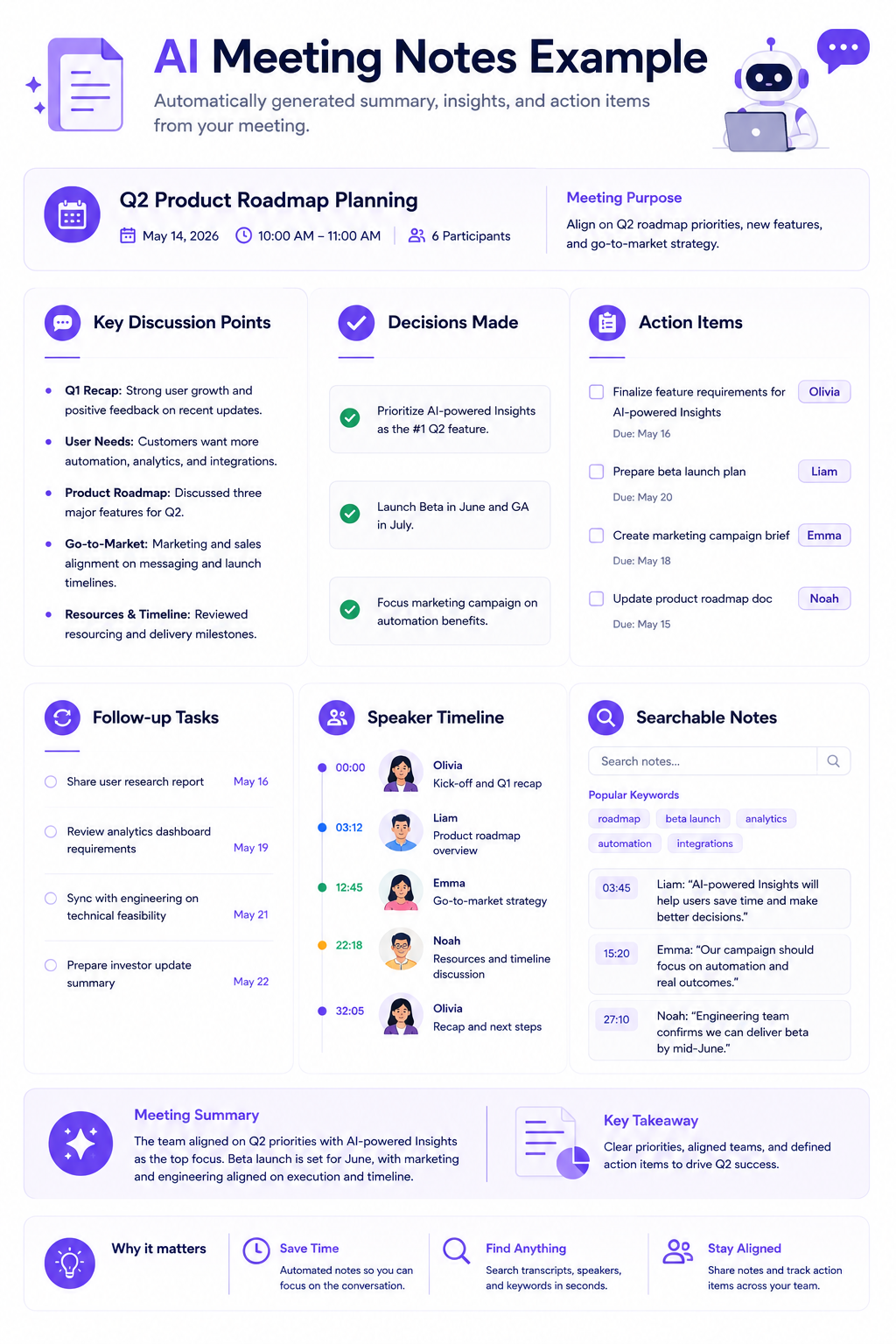
- Automated Outline: While the meeting is happening, Otter.ai generates an automated outline on the side of the screen. It breaks the conversation into chapters, letting you click a title to jump instantly to that part of the transcript.
- Post-Meeting Summary: Once the recording stops, the AI generates a quick paragraph summarizing the main theme of the call, followed by a bulleted list of key takeaways.
- Action Items: The system actively listens for promises (like, “I will send the report by Tuesday”). It pulls these out and puts them into a dedicated Action Items list with checkboxes, making it easy to track who is responsible for what.
Speaker Identification
For a transcript to be helpful, you have to know who is talking.
- Diarization: Otter.ai uses acoustic analysis to separate the audio into distinct speaker blocks based on how people sound.
- Voiceprints: You can train Otter to recognize your specific voice by recording a short sample. Once trained, the system will automatically label your dialogue with your name in future meetings. For other people, it labels them sequentially (Speaker 1, Speaker 2).
- Easy Relabeling: If the system misses a speaker’s name, you can click the “Speaker 1” tag, type in a name, and Otter will update all instances of that person’s voice throughout the entire document.
Otter AI Chat
Otter includes a built-in AI chatbot that lets you interact directly with your meeting text.
- Live Queries: During an active meeting, you can open the chat panel and type a question, such as, “What percentage growth did Sarah mention for Q2?” The AI scans the transcript and gives you the answer instantly. You do not have to interrupt the live meeting to ask for clarification.
- Post-Meeting Drafting: After a call, you can ask the chat assistant to format the data. You can tell it to “Draft a follow-up email summarizing our pricing proposal,” and the AI will write the email based entirely on the facts discussed in the meeting.
Team Collaboration and Shared Notes
Otter.ai makes it easy for teams to work together on transcripts.
- Inline Highlighting and Commenting: Just like in a shared document, anyone with access to the transcript can highlight a sentence or leave a text comment.
- Team Tagging: If an engineer mentions a software bug during a daily sync, a project manager can highlight that sentence and type “@David, please look into this.” David receives an instant notification linking him directly to that exact moment in the transcript and the audio playback.
- Workspaces: Organizations can create dedicated team folders, automatically routing specific meeting types (like “Marketing Weekly Syncs”) into shared directories that the whole department can access.
Automated Slide Capture
This is one of Otter’s most unique and praised features. When the Otter bot joins a Zoom, Google Meet, or Teams call, it monitors the visual video feed. Whenever a presenter shares their screen and shows a presentation slide, Otter detects the visual change, takes a high-resolution screenshot, and drops that image right into the transcript at the exact moment the speaker was talking about it. This ensures you always have visual context for verbal explanations.
Meeting Search
- Global Search: You can search your entire Otter dashboard for specific keywords across months of past meetings.
- Playback Synchronization: When reading a transcript, clicking any word instantly jumps the audio playback to that exact millisecond. The audio player also features variable speed playback and a “skip silence” toggle, letting researchers and journalists review hour-long interviews very quickly.
Integrations and OtterPilot
- Calendar Sync: You can connect your Google or Microsoft calendars. The OtterPilot bot scans your schedule and automatically joins any recognized web-conferencing link at the right time without you having to click anything.
- Ecosystem Connections: Otter connects natively with Dropbox (to automatically transcribe uploaded audio files) and Slack (to push meeting summaries into channels). However, deep CRM integrations (like Salesforce) are heavily gated behind its highest-tier Enterprise plans.
How Well Does It Work?
Feature lists are great, but a meeting tool is only valuable if it is reliable and accurate under the stress of a real workday.
Accuracy
Based on widespread industry use, Otter.ai’s core transcription engine is highly dependable for standard conversational English. In quiet environments with decent microphones, the accuracy is exceptional. It captures proper nouns, standard business phrasing, and punctuation consistently well.
However, like all audio tools, it has limitations. Accuracy can drop when there is heavy background noise, severe cross-talk (when multiple people shout over each other), or thick regional accents mixed with highly technical jargon. Otter tries to help with this by letting paid users upload a Custom Vocabulary list, teaching the AI to recognize specific brand names or industry terms. Overall, the text requires very little manual cleanup for everyday internal company use.
Ease of Use
Setting up Otter is incredibly simple. The interface is clean and looks more like a modern consumer app than clunky enterprise software. Navigating between your calendar, direct messages, and historical folders is easy. For non-technical users, installing the mobile app and pressing the large microphone button requires absolutely zero training.
Reliability
The OtterPilot bot is very consistent when joining scheduled calendar events. When set up properly, it shows up in your Zoom or Teams waiting room right on time. When issues do occur, they usually happen because of external platform security settings (for example, a host setting their Zoom room to explicitly block all unverified guest bots) rather than a failure on Otter’s end.
Collaboration
The collaborative features are where Otter truly shines. Treating a live transcript as a shared workspace changes how teams interact during calls. Because the text flows in real-time, remote employees who are multitasking can keep the Otter window open on a second monitor. This lets them follow the conversation visually and only unmute their microphone when their specific project is mentioned.
Mobile Experience
Otter.ai arguably offers the best mobile application in the meeting assistant market. Available for iOS and Android, the app is highly stable and responsive. It is a must-have tool for journalists conducting field interviews, students recording university lectures, or sales reps taking voice memos in their cars. The smooth synchronization between the mobile app and the desktop cloud dashboard ensures your field recordings are instantly available on your computer.
Pricing
Pricing may change over time. Always verify current plans on the official website before purchasing.
Otter.ai uses a subscription-based freemium model. While the starting prices look great, you have to carefully understand the strict usage limits hidden inside its tiers. Otter does not offer usage-based pricing; it relies on hard monthly limits.
1. Basic Plan (Free)
The Basic plan is designed purely for casual testing.
- Cost: $0
- Features: Includes the OtterPilot bot, real-time transcription, automated slide capture, and basic AI summaries.
- The Limits: This plan provides 300 monthly transcription minutes, but it enforces a strict 30-minute maximum limit per conversation. If your meeting lasts 45 minutes, Otter will abruptly stop transcribing at the 30-minute mark. Furthermore, the free plan limits users to only 3 lifetime audio/video file imports. Once you upload three MP3s, you can never upload another file unless you upgrade. Finally, you can only view your 25 most recent conversations; older recordings are locked.
2. Pro Plan
The Pro plan is targeted at individual professionals, students, and freelancers.
- Cost: Around $16.99/user/month (billed monthly) or $8.33/user/month (billed annually).
- Features: Increases capacity to 1,200 monthly transcription minutes. It extends the per-meeting limit to 90 minutes. It unlocks custom vocabulary additions, advanced search, and full export capabilities (PDF, DOCX).
- The Limits: The Pro plan strictly caps file imports at 10 audio/video files per month. For podcasters, qualitative researchers, or video editors who rely heavily on uploading pre-recorded interviews rather than recording live web calls, this 10-file limit is a massive bottleneck.
3. Business Plan
The Business plan is designed for small to medium-sized teams who run back-to-back meetings.
- Cost: Around $30/user/month (billed monthly) or $20/user/month (billed annually).
- Features: Increases capacity to a massive 6,000 monthly transcription minutes per user. It extends the per-meeting limit to 4 hours. It completely removes the file import cap, allowing unlimited file uploads. It allows the Otter bot to join up to 3 concurrent overlapping meetings on your behalf. It also unlocks shared team folders, administrative usage analytics, and priority support.
4. Enterprise Plan
Designed for large corporate deployments requiring advanced security.
- Cost: Custom pricing (requires contacting sales).
- Features: Includes everything in Business, plus Single Sign-On (SSO), advanced domain capture, organization-wide deployment controls, and access to deep CRM syncing with Salesforce and HubSpot. It also provides options for SOC 2 compliance.
Pricing Analysis
Otter.ai is highly affordable on its annual Pro plan provided your work consists mostly of live web-conferencing meetings that last under 90 minutes. However, if you rely on uploading pre-recorded files, the 10-file monthly cap on the Pro plan makes it highly restrictive, forcing you to upgrade to the Business tier. For corporate teams, the lack of native Salesforce integration on the lower tiers makes it less appealing than competitors like Fireflies.ai, which offer CRM connectivity at lower price points.
Pros and Cons
To help you evaluate the platform, here is a quick look at its technical advantages versus its limitations:
| Pros / Operational Advantages | Cons / Systemic Limitations |
|---|---|
| Real-Time Live Transcription: Displays scrolling text dynamically during the call, allowing for immediate reading and inline commenting. | Severe Free Plan Limits: The 30-minute cap per meeting makes the free tier useless for standard hour-long business calls. |
| Automated Slide Capture: Automatically detects and embeds high-resolution presentation screenshots directly into the text. | Harsh File Import Caps: The Pro plan strictly limits users to only 10 audio/video file uploads per month. |
| Exceptional Mobile Application: The native iOS and Android apps are stable, intuitive, and perfect for offline field recording. | Gated CRM Integrations: Deep syncing with Salesforce and HubSpot is restricted to the custom-priced Enterprise tier. |
| User-Friendly Interface: The feed-driven dashboard is visually clean and requires virtually zero training to master. | Cloud-Only Processing: Cannot process highly confidential audio offline locally; all data must be uploaded to the cloud. |
| AI Chat Assistant: The inline chatbot lets users query the meeting data instantly and generate custom email drafts. | Limited Video Integration: While it captures slide screenshots, it does not record the full moving video of the web call. |
Who Should Use Otter.ai?
Otter.ai’s feature set is not for everyone. Its focus on live-text and mobile accessibility makes it perfect for specific groups while lacking the heavy automation needed by others.
Students and Educators
Otter.ai is arguably the best tool on the market for higher education. A student can place their phone on their desk during a three-hour lecture, let the Otter app record the audio, and watch the text generate live. If the professor displays a complex diagram, Otter automatically captures the slide. When studying for finals, the student can use the global search to find exactly when the professor mentioned a specific topic.
Journalists and Writers
For reporters conducting field interviews, press junkets, or phone calls, Otter’s mobile app is a lifesaver. The ability to record an in-person interview, have it transcribed with high accuracy, and immediately use the web dashboard to search for exact quotes drastically reduces the time it takes to write an article.
Qualitative Researchers
Academic or market researchers conducting focus groups or one-on-one user interviews benefit immensely from Otter’s speaker identification and variable playback speeds. However, researchers must watch the pricing limits: if you conduct 15 pre-recorded interviews a month and try to upload the audio files, you will hit the Pro plan’s 10-file cap and be forced to upgrade to the Business plan.
Small Internal Teams and Brainstorming Groups
For creative agencies, marketing teams, or design rooms that engage in free-flowing brainstorming sessions, Otter provides a great collaborative canvas. The ability to watch the transcript live, highlight a great idea immediately, and tag a designer with a comment ensures that creative momentum is captured instantly.
Who Should Consider Another Tool?
- Dedicated Sales Teams: If your goal is to extract buyer intent and push meeting notes automatically into specific Salesforce deal fields, Fireflies.ai provides much better CRM automation on its lower pricing tiers.
- Product and UX Designers: If you need to share a video snippet of a user struggling with a website interface, the video-first tools like tl;dv are much more effective than Otter’s text-only approach.
- Highly Confidential Enterprises: If your security team strictly prohibits uploading internal conversations to third-party cloud servers, you should seek out local, hardware-based solutions or specialized offline software.
Otter.ai vs Competitors
To accurately position Otter within the broader market, we must look at how its features compare to its primary rivals.
Otter.ai vs Fireflies.ai
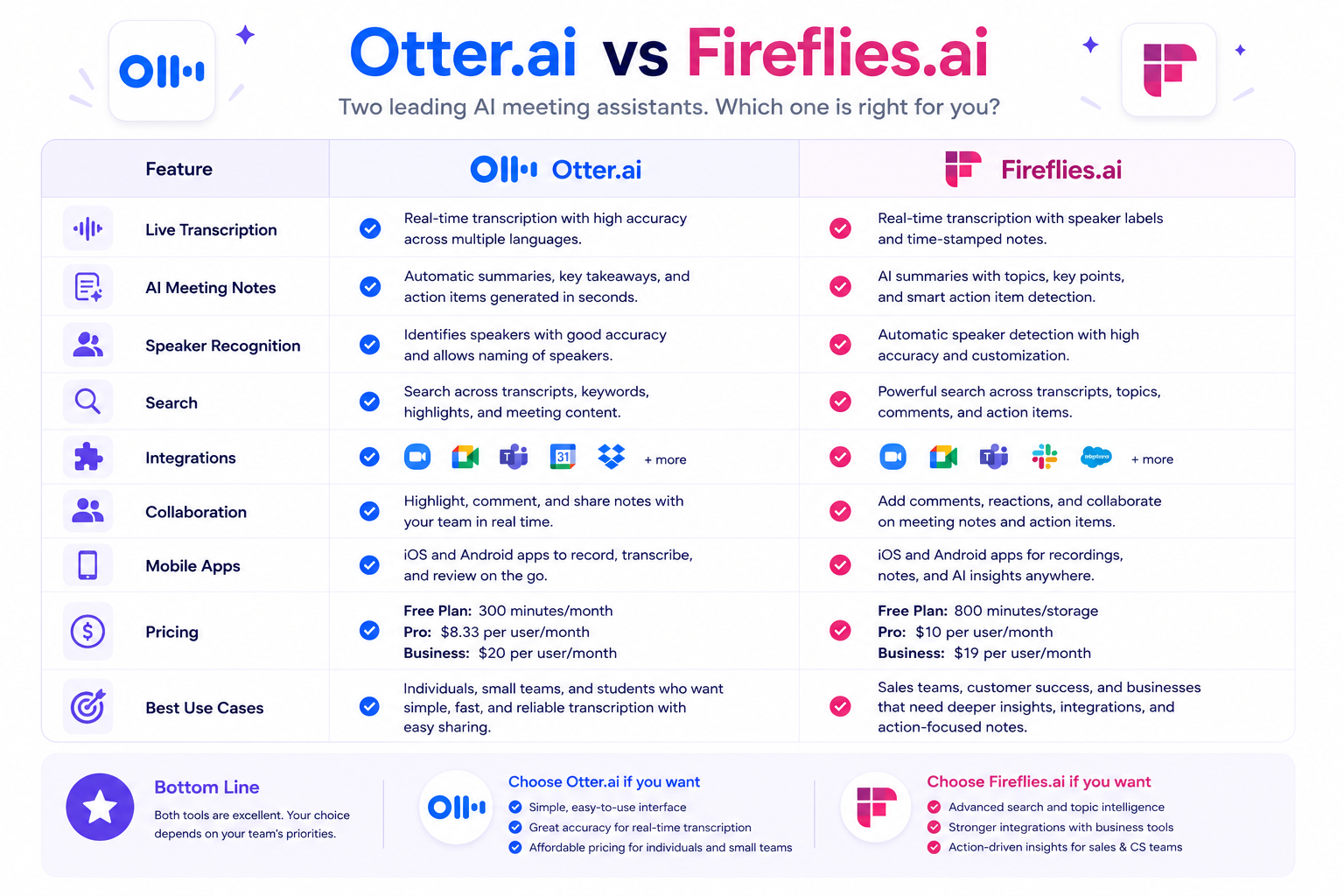
This is the most common comparison in the software space. The difference is clear: Otter.ai is built for real-time visualization, while Fireflies.ai is built for backend automation.
Otter is designed for users who want to watch the text scroll live and interact with it during the meeting. Fireflies focuses heavily on summarizing the transcript after the fact and pushing that data automatically into Salesforce, Slack, Asana, and HubSpot.
- When Otter wins: If you are sitting in a lecture hall, conducting a live interview, or want your team to comment on a transcript while the speaker is talking, Otter is the better choice.
- When Fireflies wins: If you manage a sales team, need to log notes into a CRM without typing, or want to search a massive database of past company meetings to find a specific keyword, Fireflies.ai is significantly more powerful.
Otter.ai vs Fathom
Fathom gained popularity by offering an incredibly generous free tier designed for individuals. While Otter’s free plan cuts you off at 30 minutes, Fathom’s free plan allows for unrestricted recording times and unlimited meetings. Fathom also provides desktop buttons that let you apply highlight tags with a single click during a call. If you are a solo freelancer looking for a capable tool without hitting a paywall 30 minutes into a client call, Fathom is a great alternative.
Otter.ai vs tl;dv
tl;dv is built entirely around video. It records the high-definition video of the web call and uses its AI text summaries as clickable timestamps, allowing users to jump through the raw video content quickly. Otter focuses entirely on audio-to-text, capturing static slide images but ignoring the moving video feed. If visual evidence and UI screen sharing are your primary concerns, tl;dv is the better option. See our full tl;dv Review for a detailed breakdown of its video-first model, multi-meeting reel collections, and pricing tiers.
Otter.ai vs Avoma
Avoma is a specialized platform built explicitly for sales enablement and revenue operations. It provides deep dashboards that track buyer intent, monologue ratios, and script compliance over a long sales lifecycle. Otter is a generalized knowledge tool suitable for students, writers, and casual business users. Avoma is more expensive and complex, but it provides pipeline visibility for sales directors that Otter cannot match.
Alternatives
If Otter.ai’s strict file import caps or lack of robust CRM integration on lower tiers do not fit your needs, explore these alternative guides on Zotopie to find the right match:
- Best Meeting AI Tools: Read our comprehensive pillar guide to evaluate the entire landscape of AI meeting platforms, contrasting Otter against video-first tools and automation engines.
- Fireflies.ai Review: Dive into our analysis of Fireflies.ai to understand how customized AI prompts and deep integrations can automate your post-meeting tasks.
- Fathom Review: Explore our review of Fathom — the best free-tier alternative for freelancers who need unlimited recording without hitting monthly minute caps.
- tl;dv Review: Explore our review of tl;dv — the best choice for UX researchers and product teams who need timestamped video navigation and multi-meeting reel collections.
- Fireflies.ai vs Otter.ai: Explore our detailed comparison to see exactly how real-time text feeds stack up against backend CRM automation.
Decision Table
Use this simple Q&A format to determine if Otter.ai solves your specific challenges:
| Operational Challenge | Does Otter.ai Solve This? |
|---|---|
| I need to transcribe a 60-minute weekly staff meeting for free. | No. Otter’s Free Basic plan enforces a strict 30-minute cap per conversation. You will need to upgrade to Pro or use an alternative. |
| I am a journalist recording in-person interviews on my smartphone. | Yes. Otter’s native iOS and Android mobile apps are exceptional for recording and transcribing in-person audio directly in the field. |
| I want my team to highlight text and leave comments on a transcript while the meeting is happening. | Yes. The Otter Live Notes feature generates a real-time scrolling transcript designed for inline team collaboration during active calls. |
| I host a podcast and need to upload and transcribe 15 pre-recorded MP3 audio files this month. | No. The Otter Pro plan strictly limits users to 10 file imports per month. You would be forced to upgrade to the Business plan. |
| I need the tool to automatically detect when a presenter changes a slide on Zoom and take a screenshot. | Yes. Otter’s Automated Slide Capture feature monitors the visual feed and embeds presentation screenshots directly into the text. |
| I want to automatically push my meeting action items into specific Salesforce deal fields. | No. While possible on the custom Enterprise tier, native CRM syncing is highly limited on lower tiers compared to Fireflies. |
| I want to ask an AI chatbot questions about what was discussed during a meeting. | Yes. The integrated Otter AI Chat allows you to query the transcript directly to extract specific data points or draft emails. |
| Our IT department prohibits uploading internal meetings to external cloud servers. | No. Otter.ai operates entirely via its cloud infrastructure. You would need a local hardware processing tool for total offline security. |
Common Questions
1. Is Otter.ai completely free to use?
Otter.ai offers a free “Basic” plan, but it is heavily restricted. According to information available at publication time, the free tier provides 300 monthly transcription minutes, but it enforces a strict hard cap of 30 minutes per conversation. It also limits accounts to a lifetime maximum of 3 audio/video file imports and restricts your visible history to the 25 most recent conversations. It is useful for testing the software, but inadequate for regular professional use.
2. Does Otter.ai record video or just audio?
Otter.ai is primarily an audio-to-text transcription engine. While it does not record the full, moving high-definition video of the web conference, it does monitor the visual feed to power its Automated Slide Capture feature. It grabs static screenshots of shared presentations and embeds them into the text, giving you visual context without massive video file sizes.
3. How accurate is Otter.ai’s transcription?
Based on regular use and industry feedback, Otter.ai’s transcription accuracy is very high for standard conversational English in clear audio environments. It handles basic punctuation and formatting well. Accuracy can drop when there is heavy background noise, rapid overlapping dialogue, or highly obscure technical jargon. However, users on paid plans can improve this by uploading a Custom Vocabulary list to train the AI.
4. Can I upload old audio files to Otter.ai?
Yes, you can import pre-recorded audio and video files (MP3, MP4, WAV, M4A) into the dashboard. However, you must monitor your plan’s limits carefully. The Free plan allows only 3 lifetime imports. The Pro plan allows 10 imports per month. To get unlimited file imports, you must upgrade to the Business plan.
5. What happens when I reach my minute limit on Otter?
If you exhaust your monthly allocation of transcription minutes (for example, hitting the 1,200-minute limit on the Pro plan), Otter will stop transcribing new meetings or uploaded files until your billing cycle resets the following month. The platform will prompt you to upgrade to a higher tier to continue processing audio immediately.
6. Does Otter.ai work offline?
No. Otter.ai is a cloud-based application. While you can use the mobile app to record audio in a location without cell service, the app will not actually transcribe the audio into text until your device reconnects to the internet and uploads the file to Otter’s servers for processing.
7. Can Otter.ai join my meetings automatically?
Yes. By connecting your Google Calendar or Microsoft Outlook account, you can enable OtterPilot. The system will scan your schedule and automatically dispatch a virtual bot to join recognized Zoom, Microsoft Teams, and Google Meet links at the appointed time, requiring no manual activation from you.
8. Is Otter.ai safe for confidential business meetings?
Otter implements standard SaaS security protocols, including encryption in transit and at rest. However, advanced enterprise security features—such as Single Sign-On (SSO), domain capture, advanced administrative controls, and optional HIPAA compliance add-ons—are strictly gated behind the custom-priced Enterprise tier. Organizations dealing with highly sensitive data should review Otter’s data retention policies carefully before deploying it company-wide.
Should You Use Otter.ai?
The decision to adopt Otter.ai should be based entirely on how you and your team consume meeting data.
If your daily routine involves dynamic discussions, educational lectures, or journalism interviews, Otter is an exceptional asset. The live, scrolling text feed provides immediate visibility. It allows remote team members to follow along, highlight critical insights on the fly, and comment inline, effectively turning a verbal conversation into a shared, interactive document. Furthermore, if you rely heavily on recording in-person conversations, Otter’s mobile app is unparalleled in the market.
However, if your primary goal is backend automation—such as automatically syncing structured meeting notes into Salesforce, pushing action items into Asana, or conducting research that requires uploading dozens of pre-recorded audio files a month—Otter.ai’s strict file import caps and limited native CRM pathways will cause frustration. In those specific scenarios, database-first platforms or sales-focused tools will provide a better return on your investment.
Bottom Line
Navigating the AI meeting assistant landscape requires matching software capabilities directly with your working habits. While platforms like Fireflies.ai dominate the market for automated CRM syncing and backend data routing, Otter.ai remains the undisputed leader in real-time, interactive text collaboration. By combining fast live transcription speeds, a consumer-friendly interface, automated presentation slide capture, and robust mobile recording tools, Otter.ai transforms verbal conversations into immediate, shareable workspaces.
Final Verdict
Otter.ai remains a highly capable and visually impressive meeting tool, easily holding onto its reputation as a market pioneer. While the hidden file import caps on the Pro plan and the severe 30-minute meeting restriction on the Free plan demand careful budget evaluation, the platform’s core transcription engine is excellent. Its live-scrolling interface, automated slide capture, and seamless mobile-to-desktop synchronization make it a highly recommended application for individuals, students, and teams who prioritize immediate text visibility and in-meeting collaboration over complex enterprise automation.
Internal Link Opportunities
Build topical authority and expand your understanding of modern software tools by exploring our specialized analysis across the Zotopie network:
- Best Meeting AI Tools: Review our comprehensive pillar guide to evaluate the entire landscape of AI meeting platforms, contrasting Otter against video-first tools and executive risk management platforms.
- Fireflies.ai Review: Read our deep dive into Otter’s primary competitor to understand how custom AI prompts and deep integration directories can automate your post-meeting administration.
- Fireflies.ai vs Otter.ai: Explore our rigorous head-to-head comparison evaluating real-time scrollable text pipelines against backend CRM automation routing.
Backfill Recommendations
To construct a complete topical cluster and reinforce organizational authority within the Meeting AI software vertical, Zotopie should prioritize the development of the following content assets that will link back to this review:
- Otter.ai vs tl;dv (Text Feeds vs. Video Curation): A specialized comparison asset evaluating live text transcription environments against high-definition visual timeline video clip hyperlinking models for UX research groups. See our tl;dv Review for tl;dv’s current capabilities.
- The Best Transcription Apps for Journalists in 2026: A targeted “Best” list focusing heavily on mobile application stability, offline recording capabilities, and file import limits, prominently featuring Otter.ai.
- Otter.ai vs Fathom (The Free Plan Showdown): A detailed breakdown of the features and limits separating the two most popular free tiers in the meeting assistant software market.