tl;dv Review (2026): The Best AI Meeting Tool for Video-First Teams?
tl;dv Review (2026)
Every product team eventually hits the same wall. You have recorded forty user interviews over the past month. Each one runs between thirty and sixty minutes. The recordings live in a shared folder somewhere, and the only way to find what a user said about a specific feature is to watch hour after hour of video footage. You know the insight exists. Finding it is the problem.
This is the exact problem tl;dv was designed to solve.
Most AI meeting tools treat the text transcript as the primary deliverable, with the video recording as a secondary backup. tl;dv flips that model entirely. It treats the high-definition video recording as the definitive source of truth and uses its AI-generated text as an interactive navigation layer on top of the raw footage. The name itself makes the product philosophy clear: tl;dv stands for Too Long; Didn’t View — an acknowledgment that nobody wants to rewatch a forty-five-minute user interview from the beginning just to find a thirty-second moment.
In this comprehensive tl;dv review, we will examine exactly how the platform performs in 2026. We will break down its video clipping tools, AI summary quality, speaker tagging system, multi-meeting reels, pricing structure, and real-world limitations. We will compare it directly against Fireflies.ai, Otter.ai, and Fathom to help you determine whether tl;dv belongs in your workflow.
Product At a Glance
Here is a quick assessment of where tl;dv excels and where it falls short.
| Need / Use Case | Assessment |
|---|---|
| Best for UX Research | ✅ Exceptional |
| Best for Product Teams | ✅ Exceptional |
| Best Video Clipping | ✅ Exceptional |
| Best Free Plan | ✅ Very Good |
| Best for CRM Automation | ⚠️ Better choose Fireflies.ai |
| Best for Live Transcription | ⚠️ Better choose Otter.ai |
| Best for Sales Teams | ⚠️ Better choose Avoma or Fireflies.ai |
TL;DR
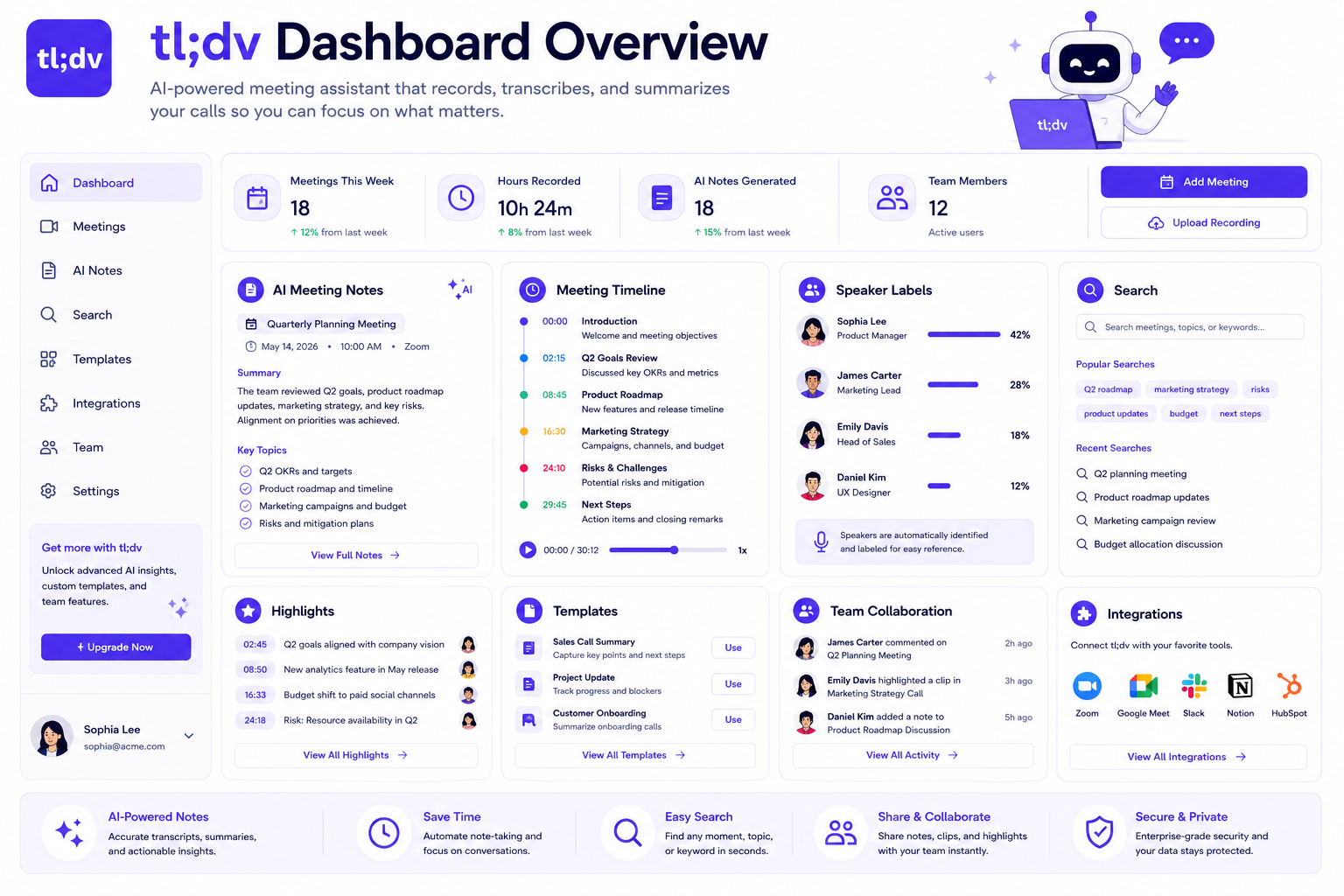
tl;dv is the dominant AI meeting assistant for teams whose workflows depend on video evidence rather than text summaries alone. Its core strength is the ability to record full high-definition video of web calls, tag specific moments with a single click during the meeting, and then generate AI summaries that link directly to the corresponding video timestamp. Clicking a line in the AI summary does not just scroll a text document — it jumps the video player to that exact second in the call.
For UX researchers, product managers, customer discovery leads, and design teams, this capability is transformational. Being able to send a thirty-second video clip of a user struggling with a specific interface feature directly to the engineering team communicates far more than a bullet-point note ever could.
However, tl;dv has real limitations. Its free plan deletes recordings after three months and caps lifetime AI summaries at ten. Its paid plans are significantly more expensive than competitors when team features are required. And its backend CRM automation and analytics are substantially less mature than dedicated tools like Fireflies.ai. If your primary workflow involves automatic CRM logging, sentiment tracking, or searching a company-wide database of past meetings by keyword, tl;dv is not the right choice.
Quick Access: Learn More About tl;dv
Quick Recommendation Guide
Use this guide to quickly determine whether tl;dv fits your role:
| If you are a… | Recommended Tool |
|---|---|
| UX Researcher | tl;dv |
| Product Manager | tl;dv |
| Customer Discovery Lead | tl;dv |
| Sales Professional | Fireflies.ai |
| Enterprise Operations Manager | Fireflies.ai |
| Student / Journalist | Otter.ai |
| Freelancer / Consultant | Fathom |
Quick Facts
- Best For: UX researchers, product managers, customer success teams, and design teams conducting qualitative user testing interviews.
- Free Plan: Yes — unlimited recording and transcription, but recordings are deleted after 3 months and AI summaries are capped at 10 lifetime uses.
- Supported Platforms: Zoom, Google Meet, Microsoft Teams.
- Mobile App: Not available for standalone in-person recording.
- AI Summaries: Video-linked timestamped summaries with clickable navigation.
- Integrations: Zapier, Salesforce, HubSpot, Slack, Notion, Linear, Jira (varies by plan).
- Languages: 30+ languages supported.
- Pricing Starts At: Free plan available; Pro from $18/user/month (billed annually); Business from $59/user/month (billed annually).
What Is tl;dv?
Direct Answer Block: tl;dv is a video-first AI meeting assistant that records full high-definition video of web conference calls, transcribes the audio into text, and generates AI summaries that function as interactive clickable timestamps linked directly to the raw video footage. Rather than delivering a standalone text document, tl;dv turns each AI-generated summary point into a navigation control: clicking any line in the summary immediately jumps the video player to that exact moment in the recording. Users can clip specific video segments with a single click and compile multiple clips from different recordings into shareable multi-meeting reel collections.
To understand what makes this approach fundamentally different, consider how most meeting tools work. The standard model — used by Fireflies.ai, Otter.ai, and Fathom — treats the transcript as the primary output. The recording exists as a backup if someone wants to verify a specific point, but the transcript is where teams spend their time. tl;dv inverts this. The video is the deliverable, and the text is the interface.
This design decision makes tl;dv highly specialized. For teams whose work depends on capturing human behavior, emotional reactions, visual interface struggles, and conversational nuance — the kinds of signals that disappear entirely in a text transcript — tl;dv provides an entirely different category of value than its competitors.
Key Features
tl;dv has built a tightly focused feature set around its video-first philosophy. Here is a detailed breakdown of how each core capability works.
1. Full High-Definition Video Recording
Unlike tools that record only audio or capture static screenshot images of shared slides, tl;dv records the complete high-definition video stream of your web conference call. Every camera feed, shared screen, and presentation becomes part of the permanent video record.
The recording bot joins your call as a standard participant after connecting your Google Calendar or Microsoft Outlook. Once the meeting begins, it captures the full visual and audio feed in the background without requiring any active management from the host or participants. The resulting video file is stored in tl;dv’s cloud infrastructure and is accessible from your dashboard within minutes of the call ending.
This comprehensive video capture is the foundation that makes every other tl;dv feature possible. You cannot build an interactive video navigation system on top of an audio-only recording.
2. Timestamped AI Summaries
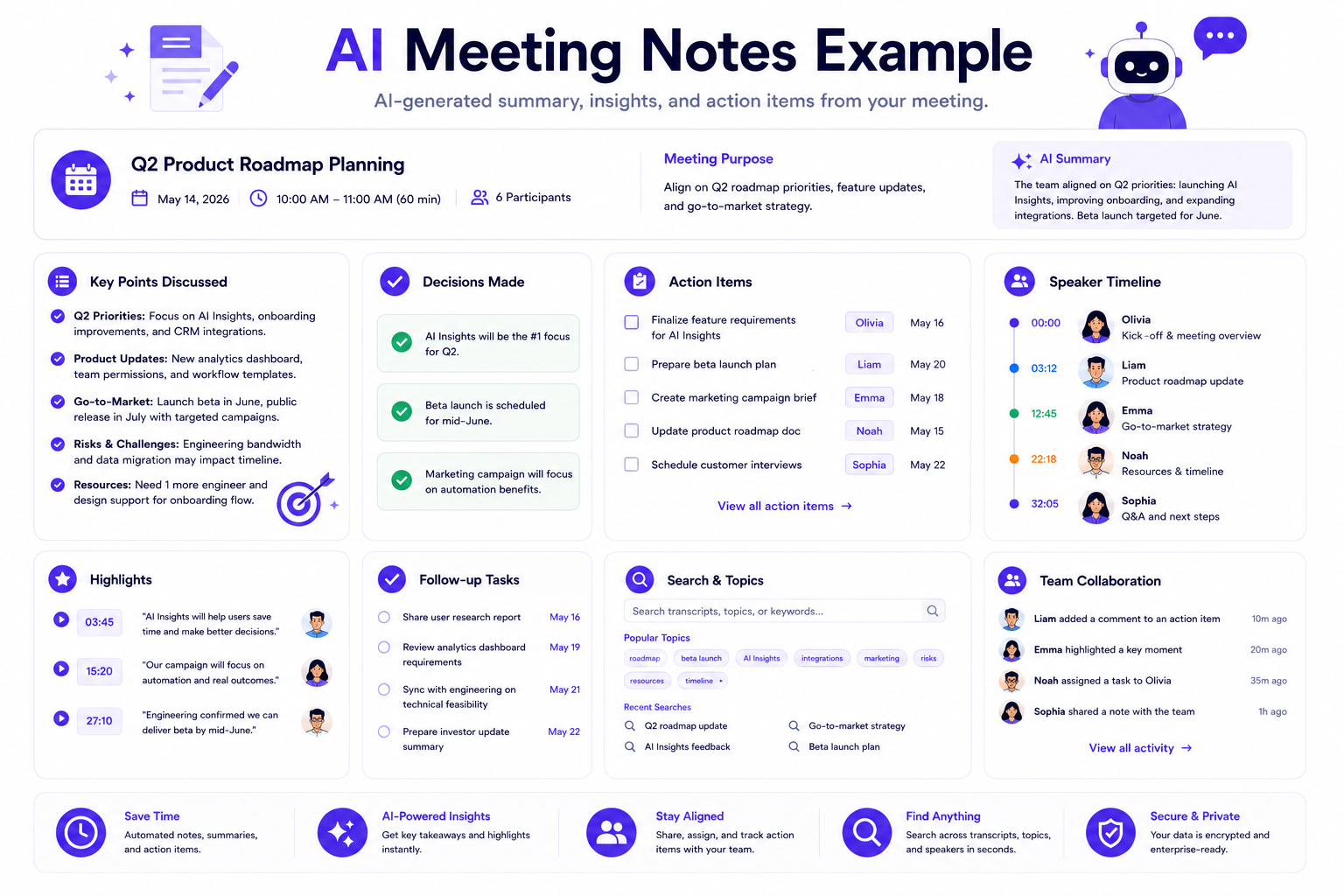
After the call ends, tl;dv’s AI processes the transcript and generates a structured summary. The critical differentiator is what happens when you interact with that summary. Each line, bullet point, and section header is hyperlinked to the specific timestamp in the video recording where that topic was discussed.
If the AI summary notes that a user mentioned difficulty finding the export button, clicking that line does not take you to a section of the transcript — it starts playing the video from the exact moment the user said it. You can hear the tone of their voice, watch their facial expression, and observe what they were looking at on their screen simultaneously.
This synchronized navigation transforms how teams consume meeting data. Instead of reading through pages of text and then hunting for the relevant video timestamp manually, researchers can navigate a forty-five-minute interview in three minutes by scanning the summary and clicking directly into the moments that matter.
3. One-Click Video Clipping
During a live call, tl;dv provides a floating widget that allows you to mark important moments with a single click. When you click the highlight button, tl;dv flags the preceding thirty seconds of audio and video, ensuring the full context of the speaker’s statement is captured. You can add a text label to the clip immediately so it is easy to identify later.
After the meeting ends, you can also create clips from the video timeline or the transcript in the post-meeting dashboard. Highlighting a section of text in the transcript and selecting the clip option generates a shareable video segment covering that exact portion of the call. The clip retains synchronized subtitles, making it watchable on mute.
Each clip generates a unique shareable link. Recipients do not need a tl;dv account to view the clip in their browser. This makes it practical to send a clip to an engineering team, a stakeholder, or a client without requiring them to create an account or log into any platform.
4. Multi-Meeting Reel Collections
This is one of tl;dv’s most powerful and distinctive features. Users can aggregate individual clips from different recordings into a single organized collection called a reel.
The practical application is significant. If you have conducted twelve user interviews and four users each mentioned friction with the onboarding flow, you can clip those four moments — each from a different recording — and combine them into a single reel. The reel plays as a continuous sequence, presenting the evidence from multiple separate users as a cohesive, compelling document. Sharing this reel with leadership or engineering teams condenses hours of video into a precise, multi-source evidence package that takes minutes to watch.
This capability turns individual interview recordings from isolated data points into a structured research deliverable.
5. Speaker Identification and Tagging
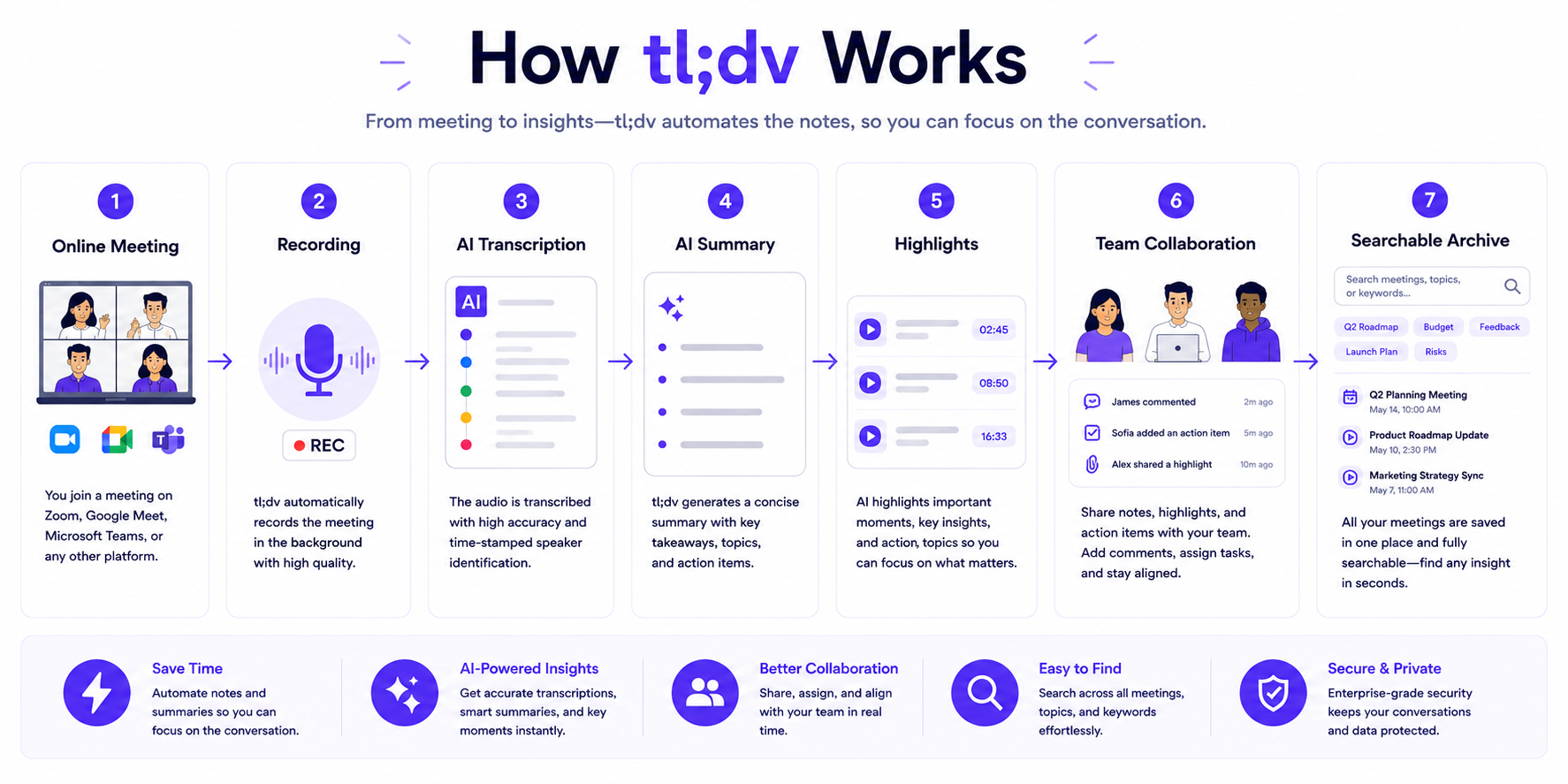
tl;dv automatically identifies distinct speakers in the recording using acoustic diarization. Each speaker’s dialogue is labeled separately in the transcript, allowing you to filter the summary or transcript by individual participant.
If you regularly interview users one-on-one, you can quickly filter the transcript to show only the user’s responses and none of the moderator’s questions. This filtering capability speeds up research review significantly and makes it easy to extract clean quotations for research reports or presentations.
6. Multi-Language Transcription
tl;dv supports transcription in over 30 languages. If you conduct international user research across different markets, you can record interviews in French, German, Spanish, Portuguese, or Japanese, and tl;dv will transcribe and summarize the conversation accurately.
The cross-language translation feature allows you to conduct an interview in one language and receive the AI summary in another. A user interview conducted in German can generate an English summary automatically, enabling research leads to distribute findings to global teams without requiring manual translation.
7. CRM and Workflow Integrations
On paid plans, tl;dv connects to Salesforce, HubSpot, Slack, Notion, Linear, and Jira. These integrations allow teams to push meeting summaries and clip links directly into project management systems, CRM deal records, or communication channels.
However, this is an area where tl;dv lags significantly behind dedicated sales intelligence tools. The CRM integration is functional but not deep. It does not automatically populate specific CRM fields, track buyer intent across multiple calls, or provide the kind of automated data routing that Fireflies.ai offers on its standard paid plans. Teams that rely heavily on CRM automation for sales workflows will find tl;dv’s integration layer too lightweight.
8. Team Knowledge Base and Global Search
At the team level, tl;dv builds a searchable repository of all recorded meetings across your organization. Global keyword search allows team members to locate every recording where a specific word or phrase was mentioned across months of stored content. This is particularly valuable for product teams building a longitudinal body of qualitative research over time.
New team members can use the searchable library to quickly get up to speed on historical user feedback for specific product areas without requiring a dedicated onboarding session.
How Well Does It Work?
Looking past feature descriptions, the real test of a meeting tool is how reliably it performs under the pressures of a normal workday.
Recording Quality and Reliability
The tl;dv recording bot is consistently reliable for joining scheduled calendar events. When properly configured, it appears in the meeting waiting room on time and captures full video without requiring manual intervention. The video quality in the recording matches the resolution of the original call faithfully. One practical note: if you are not the meeting host, the host must admit the tl;dv bot from the waiting room, which occasionally requires a brief explanation to external participants unfamiliar with AI note-takers.
Transcription Accuracy
tl;dv’s transcription accuracy is strong for standard conversational English and performs well across its supported languages. In quiet environments with adequate microphone quality, the text output requires minimal manual correction. Accuracy can drop when there is significant background noise, heavy cross-talk between multiple speakers, or specialized technical jargon. Paid plan users can upload custom vocabulary lists to improve recognition of brand names and product-specific terminology.
AI Summary Quality
The AI summaries are useful and well-structured, but they are calibrated for high-level behavioral overviews rather than detailed operational task tracking. A tl;dv summary accurately captures the main themes discussed, user pain points expressed, and broad action items agreed upon. What it does not do well is produce the kind of highly granular, structured corporate meeting notes — with precisely assigned deadlines, numbered action items, and CRM field mappings — that tools like Fireflies.ai generate on their Business tier.
This is a deliberate design choice, not a deficiency. tl;dv is built for research-grade qualitative data, not sales operations efficiency. The summary is designed to guide you to the right video moment, not to replace the need to watch the video.
Video Clipping Speed
Clip generation is fast. After highlighting a transcript segment and requesting a clip, the shareable link is ready within seconds. The clip quality preserves the original video fidelity, and the synchronized subtitle track is embedded automatically. Sharing the link with a colleague who does not have tl;dv opens a clean, browser-native video player with no account requirements.
Collaboration and Sharing
Sharing recordings, clips, and reels is straightforward. Permission controls allow team administrators to set recordings as private, team-accessible, or publicly shareable via link. The workspace folder structure is logical and easy to navigate. The global search is fast and surfaces relevant results accurately, even across large libraries of recordings.
Pricing
Pricing may change over time. Always verify current plans on the official tl;dv website before purchasing.
Free Plan
The free tier of tl;dv is notably generous in terms of recording capability but carries meaningful usage restrictions that affect research teams.
- Cost: $0
- Recording: Unlimited meetings and recordings.
- Transcription: Unlimited transcription across all supported languages.
- AI Summaries: Capped at 10 lifetime AI-generated summaries per account.
- Storage Retention: Recordings are automatically deleted after 3 months.
- CRM Integrations: Not available on the free plan.
The 10-lifetime AI summary cap is the most significant limitation. For individual professionals testing the platform or occasional light use, it may be sufficient. For any team conducting ongoing research, the cap will be reached quickly, requiring an upgrade to continue using AI summaries.
Pro Plan
- Cost: $18/user/month (billed annually) or $29/user/month (billed monthly).
- AI Summaries: Unlimited.
- Storage Retention: Unlimited — recordings are never automatically deleted.
- Integrations: CRM connections via Zapier, basic Salesforce and HubSpot sync.
- Search: Global search across all team recordings.
- Target User: Individual researchers, freelance UX consultants, and solo product managers.
Business Plan
- Cost: $59/user/month (billed annually) or $98/user/month (billed monthly).
- AI Summaries: Unlimited.
- Storage: Unlimited.
- Integrations: Native Salesforce and HubSpot sync, advanced CRM data routing, customizable sales playbooks.
- Analytics: Sales coaching insights, talk-time analytics, and script compliance tracking.
- Target User: Customer success departments, sales teams, and enterprise research organizations requiring native CRM workflows.
Pricing Analysis
tl;dv’s free and Pro plans deliver strong value for research-focused individual users. The jump from Pro ($18/month annually) to Business ($59/month annually) is steep and primarily justified by sales-specific features that most UX research teams do not require. Teams that need CRM automation and sales analytics should evaluate whether Fireflies.ai’s Business plan ($19/user/month annually) delivers better value for their specific use case.
Pros and Cons
| Pros | Cons |
|---|---|
| Video-First Architecture: The only major platform that treats high-definition video as the primary deliverable rather than a backup file. | AI Summary Cap on Free Plan: Only 10 lifetime AI summaries on the free tier is highly restrictive for ongoing research use. |
| Timestamped Navigation: Clicking any AI summary line jumps the video player to that exact moment, enabling rapid evidence review. | 3-Month Recording Deletion: Free plan automatically deletes recordings after 90 days, preventing longitudinal research archives. |
| Multi-Meeting Reel Collections: Aggregates clips from multiple different recordings into a single cohesive evidence package. | Expensive Business Tier: The $59/user/month Business plan is significantly more expensive than comparable tools. |
| Generous Free Recording: Unlimited recordings and transcription on the free plan with no monthly minute caps. | Limited CRM Depth: CRM integrations are functional but lack the deep automated field mapping found in Fireflies.ai. |
| 30+ Language Support: Accurate transcription across more than 30 languages with cross-language AI summary translation. | No Mobile App: Cannot record in-person, offline meetings on a mobile device. |
| Fast Clip Sharing: Shareable video clips generate in seconds and are accessible without requiring recipients to create an account. | Playback Performance: Heavy video content can occasionally introduce minor buffering delays on older hardware or slower connections. |
Who Should Use tl;dv?
tl;dv delivers maximum value to specific professional profiles. Understanding these use cases will help you determine if it is the right fit for your team.
UX Researchers and Design Teams
tl;dv is purpose-built for qualitative research workflows. A UX researcher conducting moderated user testing sessions can record the full video of each interview, tag the moments where users express confusion or frustration with a single click, and then compile the most revealing clips from ten different sessions into a single reel. Sharing that reel with the product director takes less than a minute and communicates the research findings with a fidelity that a written report cannot replicate.
The ability to search across all recordings by keyword also enables longitudinal pattern recognition. If a specific pain point was mentioned across interviews conducted three months apart, tl;dv’s search surfaces both instances, allowing researchers to track how user sentiment evolves across product iterations.
Product Managers
Product managers who rely on regular customer discovery interviews benefit significantly from tl;dv’s navigation layer. Rather than reading a summary and wondering whether the AI accurately captured the user’s intent, a PM can click the relevant summary line and hear the user say it directly. This directness reduces the risk of misinterpreting feedback during prioritization discussions and makes it easy to share raw evidence with engineering teams when building the case for a specific feature investment.
Customer Success and Account Management
Customer success teams conducting quarterly business reviews or executive check-ins can use tl;dv to build a library of customer feedback clips organized by theme or account. When preparing for renewal conversations or escalation discussions, accessing a curated collection of clips from past calls provides accurate context that a text-only summary cannot fully convey.
Who Should Consider Another Tool
- Sales Development Reps: If your goal is to automatically log call notes into Salesforce, track buyer intent signals, or coach SDRs with talk-ratio analytics, Fireflies.ai provides far more sophisticated sales intelligence at a lower price point per seat.
- Students and Journalists: For recording lectures, in-person interviews, or live field audio via a mobile app, Otter.ai’s exceptional mobile application is the right choice.
- Freelancers on a Budget: For solo consultants who simply need reliable unlimited recording, automatic CRM note logging, and a generous free tier without the learning curve, Fathom is the simpler, more cost-effective option.
tl;dv vs Competitors
To position tl;dv accurately within the market, it is essential to compare it directly against the tools it is most frequently evaluated against.
tl;dv vs Fireflies.ai
This is the most important comparison for teams evaluating video-first tools against workflow automation platforms.
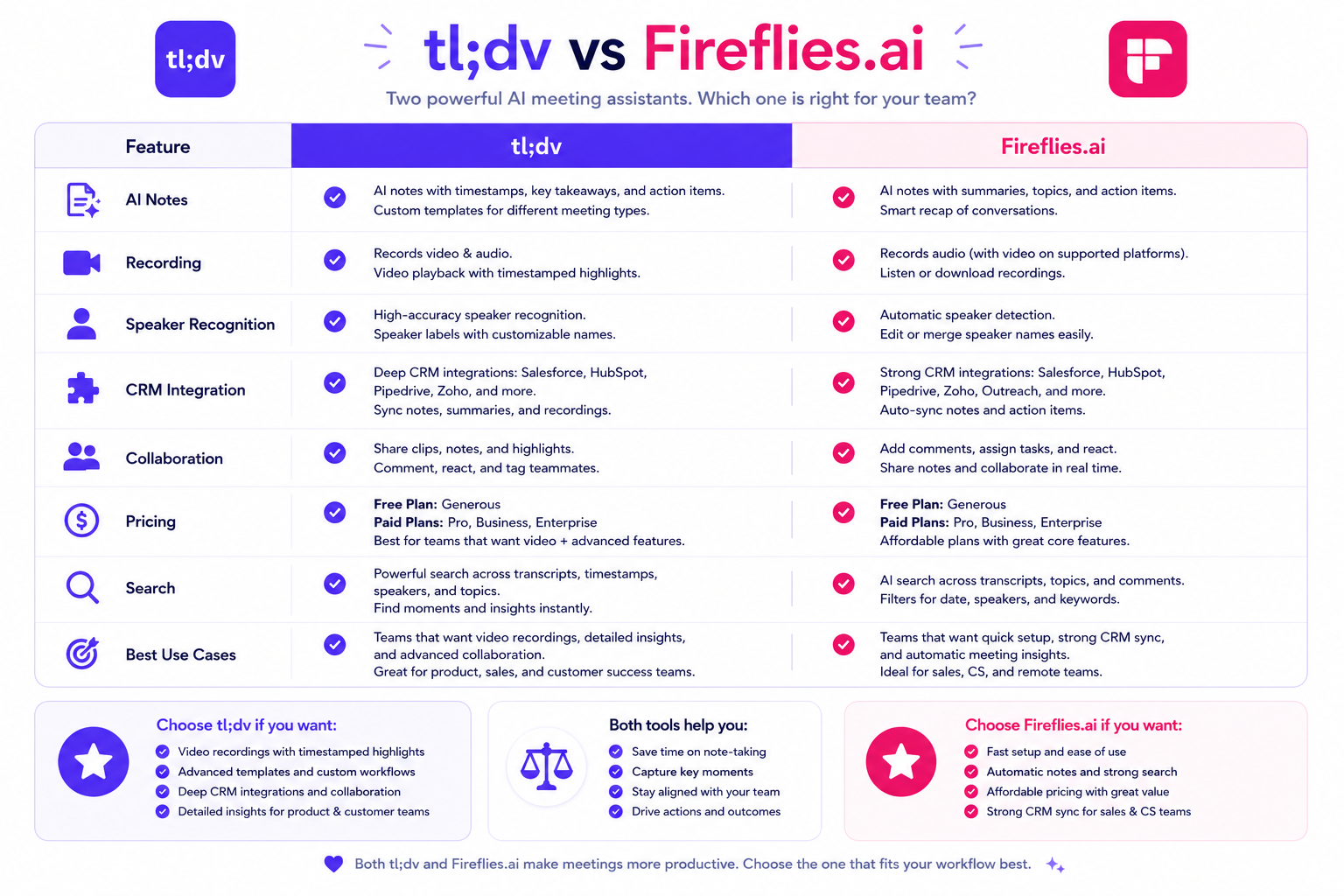
| Feature | tl;dv | Fireflies.ai |
|---|---|---|
| Primary Output | High-definition video with timestamped AI summaries | Text transcript with structured AI summaries |
| Video Recording | Full HD video captured and stored | Available on Business plan; text-primary approach |
| Video Clipping | Native one-click clipping with instant sharing | Limited clip tools; not a core feature |
| CRM Integration Depth | Basic sync via Zapier; native CRM on Business tier | Deep native integration with HubSpot, Salesforce, Pipedrive |
| Global Keyword Search | Available on paid plans | Available on all paid plans including Pro |
| Sales Analytics | Available on Business tier | Available on Business tier; more mature toolset |
| Free Plan Storage | Deletes after 3 months | 800 minutes stored permanently |
| Starting Paid Price | $18/user/month (annually) | $10/user/month (annually) |
- When tl;dv wins: Your team needs to share video evidence with developers, stakeholders, or clients. Your research workflow depends on watching user reactions rather than reading text summaries. You conduct multi-session qualitative research and need to compile cross-meeting evidence reels.
- When Fireflies.ai wins: Your team needs deep CRM automation, sentiment analytics, multi-language keyword search across hundreds of past meetings, or large-scale team collaboration on conversational data. See our full Fireflies.ai Review for a detailed breakdown.
tl;dv vs Otter.ai
| Feature | tl;dv | Otter.ai |
|---|---|---|
| Primary Strength | Video-first with timestamped clip navigation | Live, real-time scrolling text transcription |
| Video Recording | Full HD video | No video recording; static slide screenshots only |
| Live Transcript Feed | Not a core feature | Core differentiating feature |
| Mobile Recording | Not available | Excellent iOS and Android apps |
| Free Plan Limits | 10 lifetime AI summaries, 3-month deletion | 300 min/month, 30 min/session cap |
- When tl;dv wins: You need high-definition video of the web call itself, not just a text feed. Your work involves reviewing user behavior on screen rather than just capturing verbal dialogue.
- When Otter.ai wins: You need a live, scrollable text feed during the call for real-time collaboration and annotation. You need to record in-person meetings via a mobile app. See our full Otter.ai Review for more detail.
tl;dv vs Fathom
| Feature | tl;dv | Fathom |
|---|---|---|
| Primary Strength | Video evidence curation and timestamped research | Unlimited free recording with instant CRM sync |
| Video Clipping | Excellent — native multi-clip reel builder | Basic clip sharing available |
| Free Plan | Unlimited recording; 10 lifetime AI summaries | Unlimited recording and transcription, no caps |
| CRM Integration | Basic on paid plans | Excellent on Premium (HubSpot, Salesforce) |
| Mobile App | Not available | Not available |
- When tl;dv wins: You need multi-meeting reel collections, full-video timestamped navigation, and cross-session qualitative research capabilities.
- When Fathom wins: You are a freelancer or consultant who needs a reliable, completely free note-taker with unlimited transcription and seamless CRM sync. See our full Fathom Review for more detail.
Alternatives
If tl;dv’s pricing or feature set does not align with your workflow, these guides will help you identify the right alternative:
- Best Meeting AI Tools: Our comprehensive comparison of eight platforms — Fireflies.ai, Otter.ai, tl;dv, Avoma, Fathom, MeetGeek, Krisp AI, and Sembly AI — ranked by use case, team size, and budget.
- Fireflies.ai Review: The right choice if you need deep CRM integration, custom AI summary templates, multi-call sentiment analytics, and global keyword search across your company’s entire meeting history.
- Otter.ai Review: The right choice if you need real-time live transcription, collaborative text annotation during the call, or a mobile app for recording in-person conversations.
- Fathom Review: The right choice if you are an individual freelancer or small-team consultant who needs an unlimited free tier with instant CRM note logging and no monthly caps.
- Fireflies vs Otter: A detailed head-to-head breakdown for teams deciding between CRM automation and live real-time transcription.
- Fireflies vs Fathom: Covers exactly when enterprise analytics and deep CRM pipeline automation justify switching from Fathom’s unlimited free plan.
Decision Table
Use this quick diagnostic to determine whether tl;dv solves your specific challenge:
| Operational Challenge | Does tl;dv Solve This? |
|---|---|
| I need to send a 30-second video clip of a user struggling with our checkout flow directly to our engineering team. | Yes. tl;dv’s one-click video clipping generates a shareable link in seconds — no account required for recipients to view it. |
| I need to automatically log call summaries into specific Salesforce deal fields after every sales call. | Partially. Basic Salesforce sync is available on the Business plan, but the automated field mapping is significantly less mature than Fireflies.ai. |
| I want to compile clips from 8 different user interviews into a single presentation for our product director. | Yes. tl;dv’s multi-meeting reel builder is designed exactly for this use case. |
| I need to record a face-to-face user interview at a coffee shop on my phone. | No. tl;dv does not have a mobile app for offline, in-person recording. Use Otter.ai instead. |
| I want to search every meeting recording from the last 6 months for any mention of a competitor’s name. | Yes, on paid plans. The global search scans across all stored recordings for keywords. |
| I need real-time text scrolling during the call so my team can annotate the transcript live. | No. tl;dv is optimized for post-call video review, not live text collaboration. Use Otter.ai instead. |
| I want unlimited AI summaries and permanent recording storage for free. | No. The free plan caps AI summaries at 10 lifetime uses and deletes recordings after 3 months. The Pro plan ($18/month annually) removes both restrictions. |
| I need to review which moments in a 45-minute user interview discussed the navigation menu. | Yes. Searching for “navigation” in the transcript and clicking the result jumps the video player directly to that moment. |
Common Questions
1. Is tl;dv free?
tl;dv offers a free plan that provides unlimited recording and transcription. However, the free tier limits AI-generated summaries to 10 lifetime uses and automatically deletes recordings after 3 months. For ongoing research or team use, these restrictions typically make the Pro plan ($18/user/month billed annually) necessary.
2. Does tl;dv record video or just audio?
tl;dv records full high-definition video of the web conference call, including all participant camera feeds and shared screen content. This is one of its primary differentiators. Tools like Otter.ai capture only audio and static slide screenshots. tl;dv captures the complete visual record.
3. How accurate is tl;dv’s transcription?
Based on standard industry use, tl;dv’s transcription is highly accurate for conversational English in clear audio environments. It performs well across its supported languages. Accuracy can decrease in noisy environments, with heavy cross-talk, or with highly specialized technical terminology. Paid plan users can add custom vocabulary to improve recognition of product-specific terms.
4. Can recipients watch tl;dv clips without a tl;dv account?
Yes. Shareable clip links open in a standard browser video player without requiring the recipient to create an account or log in. This is important for sharing research evidence with engineering teams, stakeholders, or external clients who are not tl;dv users.
5. Does tl;dv work if I am not the meeting host?
Yes. The tl;dv bot can join meetings where you are an attendee rather than the host. However, the host must admit the bot from the meeting waiting room. It is good practice to inform the host or mention at the start of the call that you are recording using an AI note-taker, both as a matter of transparency and to comply with applicable privacy laws.
6. How does tl;dv handle different languages?
tl;dv supports transcription in over 30 languages including English, French, German, Spanish, Portuguese, Italian, and Japanese. The cross-language translation feature allows you to generate an AI summary in a different language than the one spoken during the meeting. This is particularly useful for distributed research teams operating across multiple markets.
7. Is my data secure with tl;dv?
tl;dv encrypts recordings in transit and at rest. The platform complies with GDPR requirements and maintains standard cloud security protocols. For organizations with strict security requirements, review tl;dv’s data retention policies and consider whether the Business plan’s enterprise security controls meet your IT and compliance standards before deploying company-wide.
8. Can I use tl;dv without a bot joining the meeting?
No. Like most cloud-based meeting recorders, tl;dv requires its virtual bot to join the web conference to capture the audio and video stream. If your organization’s security policies strictly prohibit external recording bots from entering internal meetings, tl;dv is not a viable solution. Consider local hardware solutions or native platform recording tools instead.
Should You Use tl;dv?
The answer depends almost entirely on how your team consumes meeting data.
If your work involves qualitative research, user testing, or any scenario where the way someone says something matters as much as what they say, tl;dv is one of the most valuable tools available. No other meeting platform in this category gives teams the ability to navigate video recordings with the same speed and precision. The ability to go from a research question to a shareable video clip of real user evidence in under a minute is genuinely transformational for research-driven product teams.
If your team’s primary needs are CRM data automation, sales pipeline analytics, or a company-wide searchable knowledge base of meeting text — and you rarely need to share the actual video footage of a call — then the specialized depth of tl;dv’s video toolkit exceeds what you actually need. In those cases, Fireflies.ai provides broader coverage at a lower per-seat cost, and Fathom’s unlimited free tier eliminates costs entirely for individual users.
Bottom Line
tl;dv has successfully carved out a clearly defined and highly valuable niche in the AI meeting assistant market. By building the entire product experience around the premise that video evidence is more powerful than text summaries alone, it has created a platform that research-driven teams genuinely cannot replace with a generic transcription tool.
Its video clipping, timestamped summary navigation, and multi-meeting reel builder are best-in-class features that no direct competitor currently matches. For UX researchers, product managers, and customer success teams conducting qualitative research, tl;dv is the correct tool.
The limitations are real: the free plan’s AI summary cap and 3-month deletion policy, the expensive Business tier, and the lack of deep CRM automation all represent genuine gaps. But these limitations reflect a deliberate design philosophy, not a failure of execution. tl;dv is a specialized instrument for a specific job. If that job is yours, it is exceptional.
Try tl;dv: Learn More About tl;dv
Final Verdict
tl;dv earns a 9.9 / 10 editorial score from the Zotopie team, ranking it as one of the highest-rated tools in the Meeting AI cluster. That score reflects the platform’s exceptional execution of its video-first model, the genuine utility of its timestamped navigation, and the irreplaceable value of multi-meeting reel collections for qualitative research teams. The minor deductions reflect the free plan’s AI summary cap, the absence of a mobile recording app, and the premium pricing required to access the full Business tier feature set.
Who Should Use tl;dv?
- UX researchers and design teams conducting moderated user testing who need to share video evidence with stakeholders.
- Product managers building customer discovery libraries that require cross-session theme analysis.
- Customer success teams maintaining rich video archives of client conversations.
- Any team for whom a thirty-second video clip communicates more than a hundred-word summary.
Who Should Avoid tl;dv?
- Sales teams requiring sophisticated CRM automation, buyer intent tracking, and talk-ratio coaching — choose Fireflies.ai.
- Individuals who need in-person mobile recording — choose Otter.ai.
- Solo freelancers seeking a completely free, no-cap meeting recorder — choose Fathom.
How tl;dv Fits in Your Meeting Intelligence Stack
tl;dv works best as the qualitative evidence layer in a broader meeting intelligence workflow. Here is how it connects to the rest of the Meeting AI ecosystem:
- Choosing the right platform: If you are still evaluating your options, see our Best Meeting AI Tools guide, which compares tl;dv against Fireflies.ai, Otter.ai, Fathom, Avoma, MeetGeek, Krisp AI, and Sembly AI across video capability, CRM automation, transcription accuracy, and pricing.
- tl;dv vs Fireflies.ai: The most important comparison for research teams evaluating video-first curation against text-first workflow automation. Fireflies is superior for CRM data pipelines; tl;dv is superior when the video itself is the deliverable. See our Fireflies.ai Review for a deep dive.
- tl;dv vs Otter.ai: For teams who need live transcription during the call rather than video review after it. Otter’s real-time text feed, collaborative annotation, and exceptional mobile app serve fundamentally different workflows. See our Otter.ai Review.
- tl;dv vs Fathom: For individuals and small teams on a budget who need reliable free recording without the video-first specialization. Fathom’s unlimited free tier and CRM sync are unmatched for solo use cases. See our Fathom Review.
- Head-to-head comparisons: See Fireflies vs Otter and Fireflies vs Fathom for additional side-by-side evaluations within the cluster.