HyperWrite Review 2026: Is This AI Writing Assistant Worth It?

HyperWrite Review 2026: Is This AI Writing Assistant Worth It?
The landscape of digital content creation and daily productivity has fundamentally shifted. Rather than treating artificial intelligence as an isolated browser tab or a standalone copy-paste destination, the most effective professionals now integrate AI directly into the digital environments where they already work. In the current marketplace, a modern text workflow demands tools that function seamlessly across native workspaces. This in-depth HyperWrite review explores whether this ubiquitous writing tool truly eliminates writing bottlenecks across Google Docs, Gmail, WordPress, and web-based text panels, or if it falls short under intense operational workloads.
When looking for the best AI writing assistant, single-purpose web forms are rapidly giving way to contextual ecosystem overlays. HyperWrite positions itself as an omnipresent creative co-pilot, adapting to your custom workflows in real time. Throughout this exhaustive evaluation, we will unpack its features, real-world pricing models, specific use cases, and platform constraints to help you decide if it represents an essential upgrade for your daily content operations.
Product At a Glance
This section provides performance marketers, growth founders, and active digital teams with an immediate, data-driven snapshot of HyperWrite’s core product capabilities and strategic positioning.
TL;DR
HyperWrite is an AI-powered writing assistant and browser extension that provides real-time predictive text, automated content creation, and autonomous web research within your existing browser environment. It is built explicitly for individual contributors, freelancers, students, and entrepreneurs who write heavily inside platforms like Google Docs, Gmail, or WordPress. Paid premium plans typically start at $19.99 per month, offering a highly cost-effective path to eliminate writer’s block. If your priority is speeding up your native text entry workflows without the constant friction of switching back and forth between standalone tools, HyperWrite is an exceptionally valuable productivity upgrade.
Quick Verdict
- Rating: 8.9/10
- Best For: Students, freelance content writers, email-heavy professionals, and academic researchers.
- Avoid If: You manage a highly collaborative enterprise marketing department requiring complex multi-user administrative dashboards, locked multi-seat brand guidelines, and native semantic SEO optimization grids.
- Starting Price: $19.99/month (A highly limited Free Starter tier is also available).
- Best Alternative: Jasper (for large enterprise content teams) or Rytr (for budget-friendly short-form templates).
- Main Advantage: Industry-leading browser integration and real-time AI assistance that sits directly at your cursor across virtually any text field on the web.
- Special Offer: Referred customers receive 50% OFF their first monthly payment for referred customers.
- Who Should Buy: Knowledge workers, academics, and digital creators looking to accelerate manual typing speeds, clear out email backlogs contextually, and source verified, cited data on the fly.
HyperWrite At a Glance
What is HyperWrite? HyperWrite is an advanced AI writing assistant that functions through an omnipresent browser extension layer to supply context-aware predictive text, long-form content generation, and autonomous web research. It overlays directly onto the web platforms you already use, converting your standard keyboard setup into an interactive co-authoring workspace.
Pricing: HyperWrite pricing is tiered across three functional levels: a restricted Free Starter plan, a Premium plan at $19.99 per month, and an all-inclusive Ultra plan structured at $44.99 per month. Substantial cost reductions are unlocked if you secure annual billing configurations. Please verify current pricing on the official website.
Best For: It is best for individuals who encounter significant typing volume, high-velocity email demands, or exhaustive research constraints, particularly freelance copywriters, remote knowledge workers, busy entrepreneurs, and academic students.
Main Alternative: The primary competitive alternatives to HyperWrite are Jasper for complex, collaborative enterprise creative departments, Rytr Review for budget-conscious short-form copy deployment, and Copy.ai for multi-app B2B sales outreach automation.
Rating: We award HyperWrite an overall performance score of 8.9/10, recognizing its superior, low-latency browser extension mechanics and its standout academic database mapping utilities.
Who Should Choose HyperWrite?
Direct Answer: You should choose HyperWrite if your core professional bottleneck is manual typing volume, sentence formulation delays, and web-based research data extraction. It is custom-designed for solo operators, remote knowledge workers, and academics who want an intelligent writing helper that operates inside their current workspaces—like Gmail, Google Docs, Slack, and WordPress—without the constant disruption of app-switching.
- Students: Academic researchers find massive utility because the tool connects directly to verifiable journal networks, fetching valid data points paired with legitimate academic citations.
- Freelancers: Content writers managing diverse copy accounts can easily accelerate production by toggling personalized voice profiles that match exact client guidelines directly in native browser text blocks.
- Content Creators: Digital marketers and social media strategists can instantly construct engaging outlines, introductory hooks, and short-form copy variations directly within scheduling and publishing interfaces.
- Entrepreneurs: Startup founders and busy operators can rapidly handle heavy inbox backlogs by letting the system read context clues and draft professional email replies on their behalf.
- Knowledge Workers: Corporate project managers, HR professionals, and administrative assistants can significantly lift their typing speed by fluidly accepting predictive TypeAhead suggestions across internal project management portals.
Who Should Avoid HyperWrite?
Direct Answer: You should avoid HyperWrite if you are managing a large enterprise marketing organization that requires strict multi-seat administrative control, centralized brand voice locking across dozens of users, and native semantic SEO content grading scales. If your business success is tied to calculating exact keyword density scores, analyzing real-time SERP competitor landscapes natively inside your core text application, or routing drafts through multi-tiered administrative approval chains, a dedicated enterprise marketing suite or specialized SEO writing software will meet your specific structural requirements much better.
What Is HyperWrite?
Direct Answer: HyperWrite is an advanced AI writing assistant that functions primarily through a highly integrated browser extension layer to provide real-time predictive text, automated content generation, and autonomous web research. Unlike traditional standalone AI generators that require users to log into a separate external dashboard to produce copy, the HyperWrite Extension lives directly inside the user’s browser web pages, suggesting real-time text completions and drafting responses contextually inside tools like Gmail, Google Docs, WordPress, and Slack. It serves as an integrated productivity ecosystem designed to eradicate writer’s block and speed up manual text creation.
Beyond basic text prediction mechanisms, HyperWrite has evolved significantly into a mature productivity framework. The tool houses hundreds of targeted modular utilities that cater to different dimensions of business and educational writing. For instance, instead of merely rewriting sentences, its system features advanced multi-agent web execution capabilities that allow it to browse current live data to verify trends and build comprehensive data briefings. By placing a heavy focus on the point of text entry rather than forcing a destination shift, it successfully transitions the user from manual prompting to natural, fluid co-authoring.
Key Features
The operational strength of HyperWrite is rooted in its highly modular feature layout. Let’s analyze the primary systems that allow this platform to deliver consistent productivity gains.
AI Writing Assistant
The underlying generation engine functions as a highly responsive, context-aware writing partner. By leveraging sophisticated natural language models, features like “AutoWrite” allow users to type a brief operational directive or a loose bulleted outline and instantly receive beautifully structured essays, long-form copy blocks, or complete article drafts. Users can feed historic articles, personal emails, or corporate updates into the database, allowing the AI to study unique cadence habits, specific vocabulary preferences, and personal formatting rules, ensuring generated text maintains your true stylistic voice.
TypeAhead
The TypeAhead feature functions as a real-time, low-latency sentence completion engine that acts like an accelerator pedal for your keyboard. As you input characters inside a supported text field on the web, HyperWrite reads the syntactic trajectory of your sentence and predicts the most logical words or full phrases to finish the thought, displaying them ahead of your cursor in light gray text. If the suggestion mirrors your creative intent, hitting the “Tab” key instantly populates the document. Because the machine learning framework continuously adapts to your phrasing choices, the predictions become increasingly precise the more you use the software.
Browser Extension
The Google Chrome browser extension serves as the main connective tissue of the entire platform. Rather than segregating your AI interactions to an isolated app page, this extension embeds its functionalities cleanly across almost all web-based input boxes. It introduces minimal, distraction-free visual buttons right at the edge of your active cursor. This allows for fluid, localized text manipulation: you highlight an awkward line directly inside your active WordPress block or custom CRM panel and instruct HyperWrite to rephrase, expand, or summarize the text instantly without breaking your creative momentum.
Research Assistant
Factual accuracy can be a significant bottleneck when relying on generative language models, which is why HyperWrite built its specialized “Scholar AI” research assistant module. Standard consumer tools frequently hallucinate background statistics, invent historical facts, or output broken web reference links. Scholar AI avoids this failure path by mapping research inputs directly to expansive digital indices of verified, peer-reviewed scientific journals, technical whitepapers, and validated academic texts. When prompted, it fetches legitimate, factual proof points accompanied by authentic academic citations, saving hours of manual bibliography formatting for students and content professionals.
Email Writing
Sorting through an overflowing communication queue consumes large amounts of corporate time. HyperWrite addresses this workflow bottleneck with its dedicated Email Responder framework, designed to function natively within modern webmail clients. The algorithm parses the chronological thread of an incoming email and constructs relevant, context-specific reply frameworks based on minimal user directions. For instance, typing a basic shorthand instruction like “confirm receipt, say I am traveling until Wednesday, and promise an update Thursday morning” enables the tool to generate a polished, professional corporate response in seconds.
Workflow Automation
Pushing past traditional boundaries of text production, the software incorporates lightweight web automation through its autonomous AI Personal Assistant module. This setup operates as an active web agent that can read unstructured plain-text requests and execute multi-step processes across the live web. A user can direct the system to research competing brands in a specific vertical, navigate directly to their active digital footprints, extract current pricing grids, and organize the details into a coherent operational summary. This automated data gathering saves massive amounts of manual clicking during the early phases of business intelligence work.
Content Generation
For creators who enjoy drafting in a dedicated, distraction-free writing environment, the centralized web dashboard grants access to a deep library containing hundreds of structured generation templates. These tools are built around established direct-response marketing formulas and content workflows. They include specialized mini-apps for mapping comprehensive blog outlines, drafting high-engagement social captions, writing persuasive ad variants, and formulating creative narrative angles. This comprehensive repository serves as a fantastic launchpad for breaking through initial creative blocks before transferring assets to your final deployment platform.
Productivity Features
The layout includes a robust selection of editing and compression utilities intended to accelerate post-production formatting work. The native Summarizer tool can ingest long copied text documents or extensive articles and distill them down to critical operational takeaways and bulleted summaries within moments, speeding up corporate asset review. Additionally, the platform houses the “Magical Editor,” a context-aware diagnostic utility that evaluates a raw draft for tonal consistency, structural flow, and clarity defects, proposing smart, one-click structural updates that rapidly transform rough text into publication-ready copy.

How Well Does It Work? (Deep Dive)
Analyzing a SaaS application requires looking beyond the bullet points on a feature checklist to observe true operational capabilities and system limits.
Strengths
The primary operational advantage of HyperWrite is its unmatched workflow integration. Because the extension functions as a non-intrusive overlay, it eliminates the cognitive fatigue of jumping between browser windows, helping writers maintain a consistent state of creative focus. The TypeAhead prediction engine operates with incredibly low latency, serving up contextual sentence additions smoothly without lagging your hardware, which is critical for natural typing comfort.
Furthermore, the Scholar AI data mapping brings immense value to workflows that require strict factual verification. By locking its research generation to actual peer-reviewed scientific frameworks, it successfully removes the danger of AI hallucinations in high-stakes professional and academic writing. Finally, the automated Email Responder handles situational context clues beautifully, serving as a reliable utility for rapidly clearing out large communication queues.
Weaknesses
Despite its extensive strengths, HyperWrite possesses clear structural boundaries. Its most prominent operational limitation is the absence of robust, team-wide governance modules. If your organization demands advanced administrative oversight panels, shared multi-user project repositories, and strict centralized brand-voice locking across dozens of writers, the tool’s individual-centric layout can feel overly limited.
Additionally, the centralized web dashboard can occasionally feel crowded and difficult to navigate. Because the system offers hundreds of niche mini-utilities and custom templates, locating a specific generation script can require tedious filtering. Finally, the autonomous web assistant agent—while highly innovative—can occasionally stall out or lose its track when encountering complex target websites with heavy JavaScript parameters or aggressive bot-blocking captchas.
Output Quality
The quality of copy generated by HyperWrite is highly competitive, largely due to its strong sensitivity to surrounding context. When deploying generative prompts inside an active file, the algorithms analyze previous paragraphs to verify newly added sentences continue a natural stylistic and thematic progression. Tonal transitions feel smooth, and vocabulary patterns align nicely with targeted profiles. For formal and academic contexts, it outputs highly polished prose, though complex narrative creative fiction may still require manual human formatting to insert real artistic depth.
Ease of Use
The initial user experience features an exceptionally flat learning curve. Installing the browser extension takes less than a minute, and the predictive TypeAhead text suggestions activate automatically without requiring any technical configuration or prompt engineering training. The interface remains subtle and non-intrusive, sitting quietly in the background until your real-time typing habits prompt an intervention. While filtering the massive index of dashboard templates can take a few days to master, the primary workspace tools are incredibly user-friendly for beginners.
HyperWrite Pricing Explained
SaaS expenditures must always be calculated against the direct labor hours and resource outlays they replace in your daily production loop. When tracking HyperWrite Pricing, the financial layout is split into clear tiers that scale alongside contextual memory limits and monthly processing allowances. According to information available at publication time, the plans map out across specific investment points.
Plans Overview
Free Starter Plan
HyperWrite provides a permanent free plan, but it is highly restricted and functions mostly as a live sandbox to test browser compatibility. This tier gives users a minimal allocation of monthly generative outputs (typically around 15 messages) and a limited daily count of predictive text completions. While it is excellent for checking the extension interface across your preferred apps, regular daily writers will exhaust these limits almost immediately.
Premium Plan
The Premium Plan is set at $19.99 per month (with notable price drops available if you opt for annual billing tracks). This plan represents the absolute sweet spot for individual freelancers, regular content creators, and students. Upgrading to this tier unlocks 250 AI generation messages per month, unrestricted usage of the real-time TypeAhead text prediction engine, priority server queues, and the capability to build up to 3 custom voice personas.
Ultra Plan
Structured for high-output power users and busy entrepreneurs, the Ultra Plan sits at $44.99 per month. This tier eliminates almost all processing boundaries, serving up unlimited monthly generative messages, support for up to 10 unique voice personas, a massively expanded context memory window to ingest long files, and priority processing access to advanced browser agent tools.
Value Assessment and ROI Considerations
When evaluating HyperWrite Pricing, the path to immediate return on investment is incredibly clear for any professional whose income is tied directly to writing output and content speed. For a freelance writer billing clients by the hour or the word, saving just two to three hours of manual drafting time a week via text prediction easily covers the $19.99 Premium plan subscription. For an active founder, shaving twenty minutes off daily email response loops provides massive time savings over a month.
To make testing this productivity gain even more accessible, the platform includes a generous introductory incentive. Every referred customer receives 50% OFF their first monthly payment when registering a new paid tier through an approved partner link. This drastically lowers the entry cost, allowing teams to explicitly measure the software’s impact on their weekly output before making a long-term capital commitment. Please verify current pricing setups on the official platform.
Pros and Cons
To assist your software evaluation process, this table outlines the core operational advantages and disadvantages of integrating HyperWrite into your daily workflow.
| Feature / Aspect | Pros | Cons |
|---|---|---|
| Workflow Friction | Embedded extension works right inside your active web apps, eliminating tab fatigue. | Centralized web dashboard can feel cluttered due to the volume of templates. |
| Typing Latency | TypeAhead predictive text tracks physical inputs smoothly without lagging your browser. | Individual focus lacks the administrative dashboards needed for corporate teams. |
| Data Verification | Scholar AI connects to verified indices to provide true, citation-backed research. | Free plan restrictions are highly strict, making it impractical for regular daily work. |
| Tonal Authenticity | Custom voice personas map historical text examples well to preserve your true voice. | Autonomous browser assistant can occasionally stall on sites with advanced captchas. |
| Inbox Automation | Email Responder reads thread histories to construct highly precise replies instantly. | Advanced long-form creative fiction writing still requires heavy human editing. |
Competitor Comparison
Selecting the optimal text automation partner requires comparing primary platforms directly against alternative tools built across the artificial intelligence sector.
Detailed Comparison Table
| Feature | HyperWrite | Rytr | Jasper | Copy.ai |
|---|---|---|---|---|
| Primary Use Case | Omnipresent Browser Typing | Budget Short-Form Content | Corporate Content Systems | Sales Sequence Automation |
| Best For | Writers, Students, Founders | Freelancers / Dropshippers | Large Agencies / Enterprise | Growth Marketers / B2B Ops |
| AI Writing Quality | High (Context-Aware) | Moderate (Template Driven) | Elite (Deep Brand Training) | High (Conversion Optimized) |
| Browser Extension | Elite (Inline TypeAhead) | Basic (Highlight Editing) | High (Everywhere Workspace) | Moderate (Sidebar Overlay) |
| Research Assistance | Elite (Scholar AI Databases) | Low (Standard LLM Knowledge) | Good (Live Web Processing) | High (Automated Web Scraping) |
| Scholar / Citation Support | Yes (Verifiable Journals) | No | No | No |
| Email Writing | Elite (Native Gmail Injection) | Good (Template Input Panel) | High (Campaign Blueprints) | Elite (Automated Cold Outreach) |
| Blog Writing | High (AutoWrite in Google Docs) | Good (Section-by-Section) | Elite (Long-Form SEO Editor) | High (Automated Blog Wizard) |
| Workflow Automation | High (Autonomous Web Agents) | Low | Moderate (Internal Runbooks) | Elite (Multi-App OS Pipelines) |
| Student Use Case | Elite (Citation Driven Layouts) | Low | Moderate (Too Expensive) | Low |
| Freelancer Use Case | Elite (Persona Toggling Speed) | High (Cost Efficiency Edge) | High (Deep Long-Form Tools) | Moderate |
| Enterprise Use Case | Low (Lacks Admin Controls) | Low | Elite (Multi-User Dashboards) | Elite (Scalable Corporate Flows) |
| Ease of Use | High (Natural Typing Assist) | Extremely High (Simple UI) | Moderate (Feature Rich Layout) | High (Process Driven UI) |
| Starting Price | ~$19.99/month | ~$9.00/month | ~$39.00/month | ~$36.00/month |
| Free Plan | Yes (Strict Message Limits) | Yes (Character Count Limits) | No (Free Trial Access Only) | Yes (Limited Generation Credits) |
| Overall Rating | 8.9/10 | 8.5/10 | 9.2/10 | 8.8/10 |
| Recommended Choice | For Inline Workflow Typing | For Cost-Conscious Starters | For Massive Marketing Teams | For Automated Marketing Hubs |
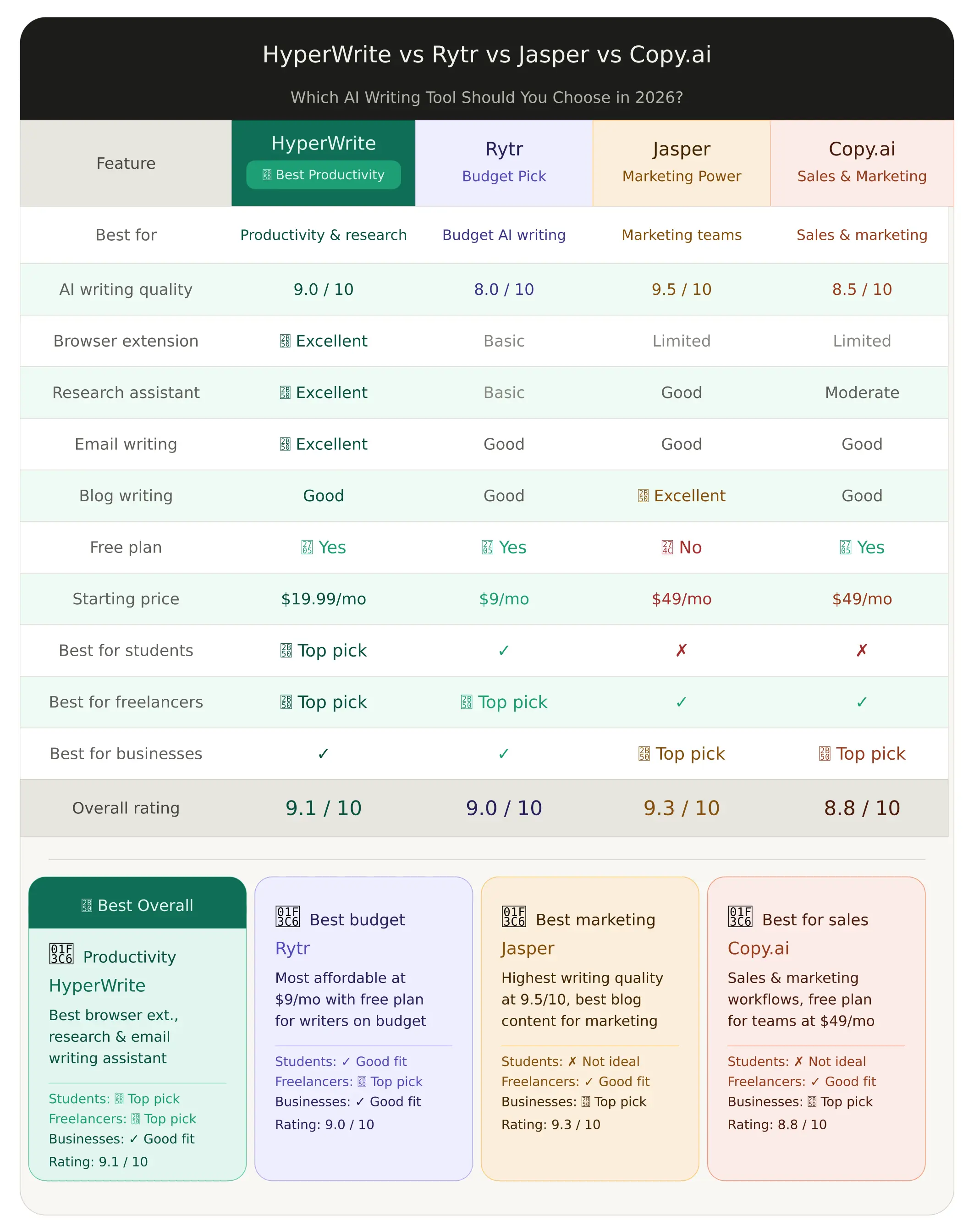
Which Tool Should You Choose?
Choose HyperWrite If…
You should choose HyperWrite if your writing style is dynamic, individual-driven, and relies on real-time speed inside your existing web browser layout. When navigating the direct matchup of HyperWrite vs Rytr, HyperWrite easily wins out if you require inline sentence completions that follow your natural typing cadence without forcing you to interact with a rigid, detached template form. Similarly, when checking HyperWrite vs Jasper, HyperWrite is the superior alternative for individual knowledge workers, freelance bloggers, and students who want an omnipresent typing extension that finishes their thoughts inside Gmail, Google Docs, or Slack for a very reasonable personal subscription cost. It stands out as the best AI writing assistant for optimizing personal typing habits without abandoning your primary publishing environments.
Choose Rytr If…
You should choose Rytr if your primary procurement variable is keeping costs low and you only need AI assistance for basic, occasional marketing tasks. If your business model relies on spitting out 20 quick product descriptions for a dropshipping store, creating basic catchphrases, or mapping raw ad angles each month, Rytr delivers highly capable template outputs for under ten dollars a month, bypassing the need for sophisticated predictive text or verifiable academic databases.
Choose Jasper If…
You should choose Jasper if you are managing a larger marketing department, running a high-volume creative agency, or require absolute control over collaborative content pipelines across multiple internal writers. Jasper provides a deeply optimized long-form canvas layout, native integrations with professional SEO analytics platforms, and the administrative security settings needed to lock down distinct brand guidelines across dozens of seats simultaneously.
Choose Copy.ai If…
You should choose Copy.ai if your business goals combine text production with deep B2B sales development automations. Copy.ai excels at reading massive unstructured client databases, scraping open information pools from networks like LinkedIn, and executing automated outreach paths—such as generating 100 hyper-personalized cold pitch emails simultaneously based on real-time CRM updates.
Final Comparison Verdict
For personal productivity gains, real-time context-aware typing support, and legitimate fact-checking, HyperWrite is an exceptionally strong performer among modern HyperWrite alternatives. However, as your operation scales away from individual execution into a large-scale corporate content team requiring structural SEO auditing tools and multi-tier account governance, transitioning your budget toward an enterprise hub like Jasper becomes a logical workflow evolution.
If you are exploring alternative tools to improve separate sections of your digital operations, consider exploring our Fireflies Review to automate meeting transcriptions, or check out our Synthesia Review for high-end AI video generation. For written content optimization and verifying how your copy reads under modern search platform scans, see our GPTZero Review. For video workflows, our Clipto Review handles video trimming, while our Arcads Review explores AI user-generated ad content.
Real Use Cases
Observing how different professionals deploy this software in their daily routines highlights its real-world business utility.
1. Writing Emails (Inbox Cleardowns)
- A busy customer support manager opens an inbox containing 40 unread product inquiries.
- ↓ The HyperWrite Extension parses the thread history of an incoming complaint ticket.
- ↓ The manager inputs a brief 5-word instruction directly into the response panel.
- ↓ The Email Responder generates a polite, contextually precise 3-paragraph reply instantly.
- ↓ High-velocity inbox clearance is accomplished entirely inside the native web mail dashboard.
2. Research Assistance (Fact-Checked Academic Writing)
- An academic researcher or digital journalist is drafting an extensive report on international economic shifts.
- ↓ They trigger the Scholar AI tool to request verified research studies regarding specific tariff data.
- ↓ HyperWrite scans technical databases and indices, completely skipping generic, unverified blogs.
- ↓ The assistant outputs a structured, factually true data brief containing actual metrics.
- ↓ The text is dropped directly into a master draft accompanied by real citations, removing hallucination liabilities.
3. Blog Creation (Accelerated Content Velocity)
- A freelance blogger needs to write a comprehensive article inside a web-based CMS interface.
- ↓ They deploy the centralized workspace templates to map out a clear, logical paragraph outline.
- ↓ Moving into the draft screen, the predictive TypeAhead engine actively tracks their character inputs.
- ↓ The writer accepts word and clause completions via the Tab key, increasing typing speed by 40%.
- ↓ The Magical Editor utility is run to polish structural flow, transforming a raw draft into clean copy quickly.
4. Daily Productivity (Autonomous Web Research)
- A startup founder requires an immediate pricing summary of a competitor’s newly launched software tier.
- ↓ They direct the autonomous AI Personal Assistant module to investigate the competitor’s domain.
- ↓ The web agent opens background browser tabs, navigates past marketing fluff, and locates the pricing grid.
- ↓ The script automatically scrapes the plan values and filters out irrelevant sales text.
- ↓ A concise, data-driven briefing note is delivered to the founder without them doing any manual browsing.
Is HyperWrite Worth It?
Direct Answer: Yes, HyperWrite is highly worth it for individual contributors, freelancers, students, and entrepreneurs who spend hours every day typing inside standard web browsers and want to speed up text creation. However, it is not worth it for large enterprise departments that require central multi-seat administrative dashboards, locked content collaboration workflows, and native semantic SEO content auditing engines.
Yes, If…
- You spend a massive portion of your workday typing emails, drafts, or documentation within browser tabs.
- You want an AI that acts as an integrated keyboard enhancement layer rather than a detached copy-paste tool.
- Your output requirements demand absolute factual integrity, verified data tracking, and legitimate academic citations.
- You want a system that can absorb your historic writing samples to generate text that sounds like your authentic self.
No, If…
- You manage an enterprise marketing department requiring multi-user project routing controls and team-wide permission layers.
- Your content pipeline relies heavily on built-in SEO keyword density scoring and competitor search metrics.
- You want a permanent, high-volume free generation tier without encountering sudden subscription caps.
Verdict
For individual knowledge workers looking to maximize their text creation speed and reduce manual editing time, HyperWrite is an exceptional investment. The cumulative hours saved via predictive text completions and native email generation easily outpace its monthly subscription cost, delivering a high, immediate return on investment.
Common Questions
1. What is HyperWrite? HyperWrite is an AI-powered writing assistant and browser extension that provides real-time predictive text suggestions, automated content generation, and peer-reviewed web research directly inside your existing web applications like Gmail, Google Docs, and WordPress.
2. How much does HyperWrite cost? According to active pricing parameters, HyperWrite’s paid Premium plan costs $19.99 per month, and the unlimited Ultra plan costs $44.99 per month. Significant cost savings are unlocked if you opt for annual billing cycles instead of month-to-month commitments.
3. Is HyperWrite free? Yes, HyperWrite features a free starter plan. However, this tier enforces strict monthly caps on AI usage and daily limits on predictive typing suggestions. It operates effectively as a live trial environment, meaning heavy users will need to upgrade to a paid tier.
4. Is HyperWrite worth it? HyperWrite is entirely worth it for any individual professional, student, or freelancer whose daily livelihood involves keyboard data entry. The productivity and speed improvements unlocked by inline text predictions easily cover the roughly $20 monthly plan cost.
5. What are HyperWrite alternatives? The main HyperWrite alternatives are Rytr Review for affordable short-form copy, Jasper for collaborative enterprise content teams, and Copy.ai for scaling automated sales and marketing pipelines.
6. Does HyperWrite have a browser extension? Yes, the HyperWrite Extension for Google Chrome is the central driver of the platform’s user experience. It embeds intelligence directly into your browser, allowing you to access writing tools, text completion shortcuts, and research assistants on any web page.
7. Can HyperWrite write emails? Yes, HyperWrite houses a responsive Email Responder tool. When combined with the browser extension, it reads incoming email chains inside your browser mail client and constructs professional, contextually precise replies based on minimal user prompts.
8. Is HyperWrite good for students? HyperWrite is an exceptional tool for students, primarily because of its Scholar AI utility. Unlike mainstream text generators that hallucinate sources, Scholar AI searches indices of genuine academic journals to deliver factually true information backed by accurate citations.
Should You Use It?
The decision to acquire a HyperWrite subscription depends on your stance on workflow friction. If you dislike breaking your focus to open separate AI text dashboards, construct complex prompt instructions, and manually paste outputs back into your editor, this software provides immediate relief. It integrates AI directly into your existing typing routines.
However, if your business goals demand strict multi-user compliance tracking, advanced web formatting, or built-in search engine optimization scoring grids, you will likely find the individual-centric architecture limiting. Weigh your specific operational needs before selecting your next writing tool.
Bottom Line
Final Verdict
HyperWrite represents a significant milestone in software design by shifting artificial intelligence from an external destination into an inline workflow utility. By providing responsive predictive text suggestions, native email drafting assistance, and fact-checked research via Scholar AI, it delivers immediate speed improvements for individual contributors. While it lacks the administrative structural layers required to govern massive corporate marketing departments, its low latency and contextual awareness make it an elite option in 2026 for students, freelancers, and knowledge workers looking to speed up their daily content output.
Score: 8.9/10
Referred customers receive an exclusive launch promotion of 50% OFF their first monthly payment when activating their profile through our partner portal below.