Synthesia Review (2026): Is It Still the Best AI Video Generator?
The video production landscape has undergone a radical transformation over the past few years. What used to require a soundproof studio, professional lighting rigs, teleprompters, camera crews, and multiple days of post-production editing can now be accomplished by a single person typing a script into a web browser. At the forefront of this text-to-video revolution stands Synthesia.
Since its inception, Synthesia has been the benchmark for AI avatar generation. However, as we move through 2026, the marketplace has become incredibly crowded. Aggressive competitors are launching highly emotive digital humans, advanced voice cloning technology has become commoditized, and social media creators are demanding more dynamic motion.
In this comprehensive Synthesia review for 2026, we dissect the platform’s latest Gen-4 expressive avatars, evaluate its new feature sets, break down its true pricing structure (including hidden costs), and benchmark it against rising rivals to determine if it is still the undisputed king of AI video generation.
Synthesia At a Glance
Before diving into the detailed technical capabilities, here is a high-level summary of where Synthesia currently stands in the market:
- Best For: Learning and Development (L&D) teams, corporate trainers, HR departments, and enterprise internal communications.
- Pricing: Free plan ($0), Starter ($29/month), Creator ($89/month), and custom Enterprise tiers.
- AI Video Score: 4.6 / 5
- Pros: Exceptional Gen-4 micro-expression avatars, supports 160+ languages with 1-click translation, unmatched enterprise security and SCORM compliance, and highly professional corporate templates.
- Cons: Strict minute limitations on lower-tier plans, custom studio avatars carry heavy add-on fees, and it lacks dynamic camera movements preferred by social media creators.
TL;DR
Quick Access
If you’re looking for an AI video platform for training videos, onboarding content, or multilingual communication, you can check out Synthesia here:
Quick Facts
| Attribute | Value |
|---|---|
| Primary Category | AI Video Generator |
| Starting Price | $29/month |
| Free Plan | Yes (10 minutes/month, watermarked) |
| Best For | Corporate training, enterprise scaling |
| AI Avatars | 240+ stock, plus personal digital twins |
| Languages | 160+ languages and accents |
| Best Alternative | HeyGen |
| Founded | 2017 |
| Headquarters | London, United Kingdom |
What Is Synthesia?
Synthesia is an AI video generation platform that allows users to create videos using digital avatars, synthetic voices, and text-based scripts without traditional filming equipment.
Company Overview
Founded by AI researchers and entrepreneurs, Synthesia pioneered the commercial application of synthetic media. Initially gaining fame for bringing simple text-to-speech avatars to life, the company has since secured massive funding and evolved into a robust enterprise solution. By 2026, Synthesia operates less as a novelty tool for tech enthusiasts and more as a foundational infrastructure application for Fortune 500 companies looking to streamline their global communications.
Core Functionality
Synthesia operates on a complex pipeline that combines Natural Language Processing (NLP), Computer Vision, and Audio Synthesis. Users select a template, choose a digital avatar, and input their script. The platform’s AI then processes the text for sentiment and pacing, converts it into audio using advanced text-to-speech models, and maps the phonetic data to a geometric mesh of the avatar’s face. The final result is a photorealistic video of a human delivering your script with perfect lip-syncing.
Target Users
The platform’s interface, template library, and feature gates make it clear who Synthesia is building for:
- Corporate L&D Teams: Professionals who need to turn dry PDF manuals and compliance documents into engaging, localized video training modules.
- Internal Communications & HR: Executives and HR teams delivering company-wide updates across different geographic regions without spending days filming.
- SaaS Marketers: Teams building scalable onboarding flows, knowledge base tutorials, and product explainers.
- Global Agencies: Production houses tasked with creating multilingual campaigns quickly and cost-effectively.
Key Features
Synthesia’s 2026 update cycle introduced several massive overhauls to its core technology, particularly its “Expressive Model 4.0.” Here is a deep dive into the features that define the platform.
AI Avatars
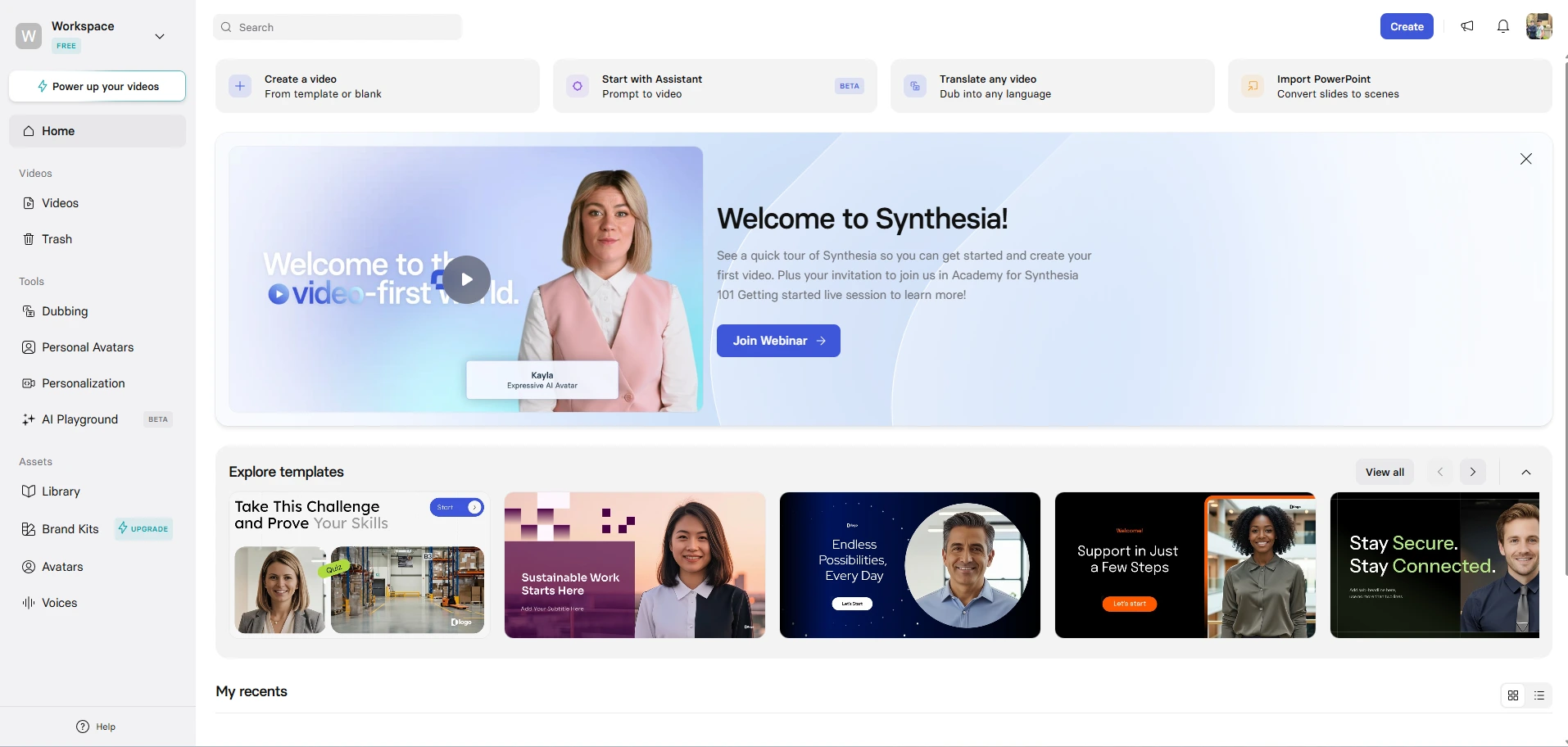
The cornerstone of Synthesia is its avatar library. Currently boasting over 240+ stock avatars, the diversity in age, ethnicity, and professional attire is unmatched. The latest Gen-4 update introduced “Micro-Expression Technology,” which allows the avatars to display subtle facial movements — like eyebrow raises, natural blinking, and realistic breathing patterns. Furthermore, the platform recently added “actionable avatars” that can physically point to visual elements on the screen, breaking the traditional “stiff news anchor” mold that plagued earlier versions of AI video.
Text-to-Video
Synthesia’s text-to-video workflow is highly streamlined. You do not just paste raw text; the platform includes an embedded AI script assistant. You can upload a raw document, a URL, or a presentation deck, and the AI will summarize, restructure, and map out a video script instantly. This drastically reduces the time spent staring at a blank page.
Voiceovers
A video is only as convincing as its audio. Synthesia offers over 1,000 AI voices. The breakthrough in 2026 is the inclusion of emotional toggles. Users can dictate whether the voice should sound “Empathetic” for an HR sensitivity training video, or “Excited” for a new product launch. Additionally, the Instant Voice Clone feature now requires only 10 seconds of uploaded audio to create a highly accurate synthetic replica of your own voice.
Templates
Synthesia provides a massive library of pre-built scenes that lean heavily into corporate aesthetics. Whether you need a split-screen for a software tutorial, a virtual boardroom layout, or a newsroom desk, the templates are designed to be plug-and-play. They are highly customizable, allowing you to enforce brand kits (colors, fonts, and logos) universally across all scenes.
Localization
For international companies, Synthesia’s localization features are the platform’s highest ROI proposition. The tool supports over 160 languages and localized accents. The 1-Click Translation and AI Dubbing features allow you to take an English training video and instantly render it into Spanish, Japanese, and French. The AI automatically adjusts the lip-syncing of the avatar to match the new language perfectly, eliminating the need to hire local voice actors or rely on distracting subtitles.
Team Collaboration
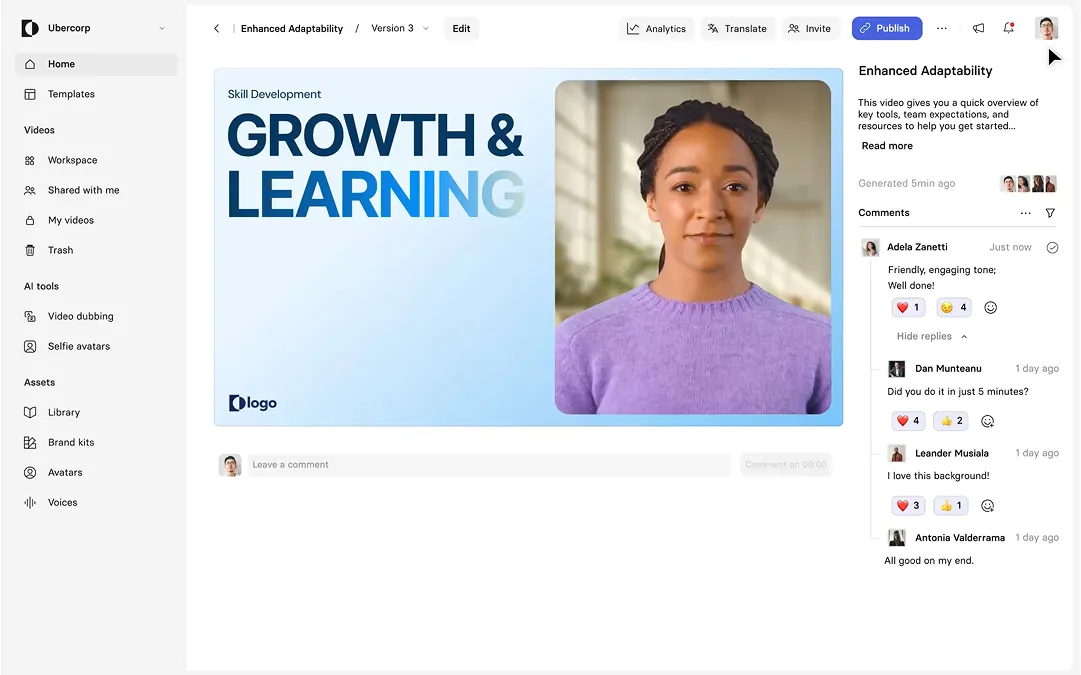
Treating video creation like document editing, Synthesia includes Figma-style real-time collaboration. Team members can leave time-stamped comments on specific scenes, approve scripts, and enforce version control directly within the browser workspace.
How Well Does Synthesia Work?
Synthesia is a technical marvel, but it is not a silver bullet for every video production need. Its architecture favors specific corporate environments.
Strengths
- Frictionless Scale: The ability to generate minutes of high-fidelity video in seconds without stepping foot in a studio represents an unprecedented leap in content scaling.
- Enterprise-Grade Security: Synthesia is SOC 2 compliant, offers SSO/SAML integrations, and features strict brand governance controls. This makes it highly palatable for corporate IT departments.
- LMS Integration: The platform allows for SCORM export (on Enterprise tiers), making it effortless to drop interactive video modules directly into existing Learning Management Systems.
Weaknesses
- The “Uncanny Valley” Lingers: While Gen-4 micro-expressions are excellent, extended viewing of a digital avatar can still feel slightly synthetic. For highly emotive, brand-defining consumer commercials, human actors are still superior.
- Lack of Dynamic Camera Motion: Synthesia avatars are mostly stationary. If your marketing strategy relies on fast-paced, quick-cut, dynamic social media aesthetics (like TikTok or Reels), the platform feels too rigid.
- Feature Gatekeeping: Essential corporate features like SCORM exports and 1-click translation are locked behind opaque, custom-priced Enterprise tiers.
Best Use Cases
The platform shines when used for Standard Operating Procedure (SOP) documentation, multilingual employee onboarding, and executive weekly updates. It operates best as an information-delivery mechanism rather than an entertainment-creation engine.
Pricing
Pricing verified as of: June 2026. Please check the official Synthesia website for real-time updates.
Synthesia utilizes a credit-based pricing model, which can be a point of friction for high-volume users.
Current Plans
- Free Plan: $0. Includes 10 minutes of video per month, 9 stock avatars, and a persistent Synthesia watermark. Video downloads are disabled.
- Starter Plan: $29/month ($18/month if billed annually). Includes 10 minutes of video per month, access to 125+ avatars, watermark removal, MP4 downloads, and 3 personal avatars. Limited to 1 editor and 3 guests.
- Creator Plan: $89/month ($64/month if billed annually). Includes 30 minutes of video per month, 180+ avatars, 5 personal avatars, audio downloads, and custom fonts.
- Enterprise Plan: Custom pricing (typically ranging in the low to mid five-figures annually). Unlocks unlimited video minutes, SCORM export, SSO, 1-click translation, and live collaboration.
Limitations and Hidden Costs
The most significant limitation is the steep jump in price compared to the minute allowance. A solo creator needing 15 minutes of video is forced into the $89/month Creator tier because the Starter tier caps strictly at 10 minutes. Furthermore, a highly polished, professional “Studio Avatar” (a digital twin filmed in a green screen environment) is a paid add-on, often costing around $1,000 per year.
Value for Money
For a corporate L&D department, replacing a $15,000 video shoot with an Enterprise Synthesia contract represents massive value for money. For a solo YouTuber or indie hacker on a tight budget, the $2.90 to $2.97 per-minute cost on the Starter and Creator plans can feel restrictive compared to cheaper voice-only tools.
Pros and Cons
To assist in your software evaluation, here is a breakdown of Synthesia’s structural advantages and drawbacks:
| Pros | Cons |
|---|---|
| 160+ Languages: Unrivaled localization and AI dubbing capabilities. | Minute Caps: Strict limits on monthly video generation on standard plans. |
| Gen-4 Avatars: Highly realistic digital humans with micro-expressions. | Expensive Add-ons: Professional custom Studio Avatars carry heavy annual fees. |
| Enterprise Security: SOC 2 compliance and SSO make it corporate-safe. | Rigid Pricing Gap: No mid-tier option between the 10-minute and 30-minute plans. |
| Fast Rendering: Transforms text to fully produced video in minutes. | Static Aesthetics: Lacks dynamic camera movement for fast-paced social media. |
| LMS Exports: Seamless integration with corporate learning systems. | Enterprise Gatekeeping: Crucial translation tools require custom contracts. |
Who Should Use Synthesia?
Understanding platform alignment is the key to maximizing ROI with AI video tools.
Creators
Social media content creators should approach Synthesia with caution. While personal avatars are fun, platforms like YouTube favor authenticity. Overusing AI avatars for documentary-style content or vlog channels can limit viewer retention. Creators are better off using AI voiceovers combined with dynamic b-roll rather than stationary presenters.
Agencies
Digital marketing and localization agencies will find immense value here. The ability to take a client’s core message and instantly deploy it across ten different localized markets using region-specific avatars drastically improves campaign turnaround times.
Businesses
For mid-market and enterprise businesses, Synthesia is a foundational tool. It allows product teams to update tutorial videos every time a software UI changes simply by editing the text script, rather than re-recording an entire human walkthrough.
Course Creators
Educators building massive digital courses can use Synthesia to scale their output. By cloning their own voice and creating a personal avatar, course creators can generate hours of curriculum from text documents, ensuring their “face” remains attached to the brand without the exhaustion of filming.
Synthesia vs HeyGen
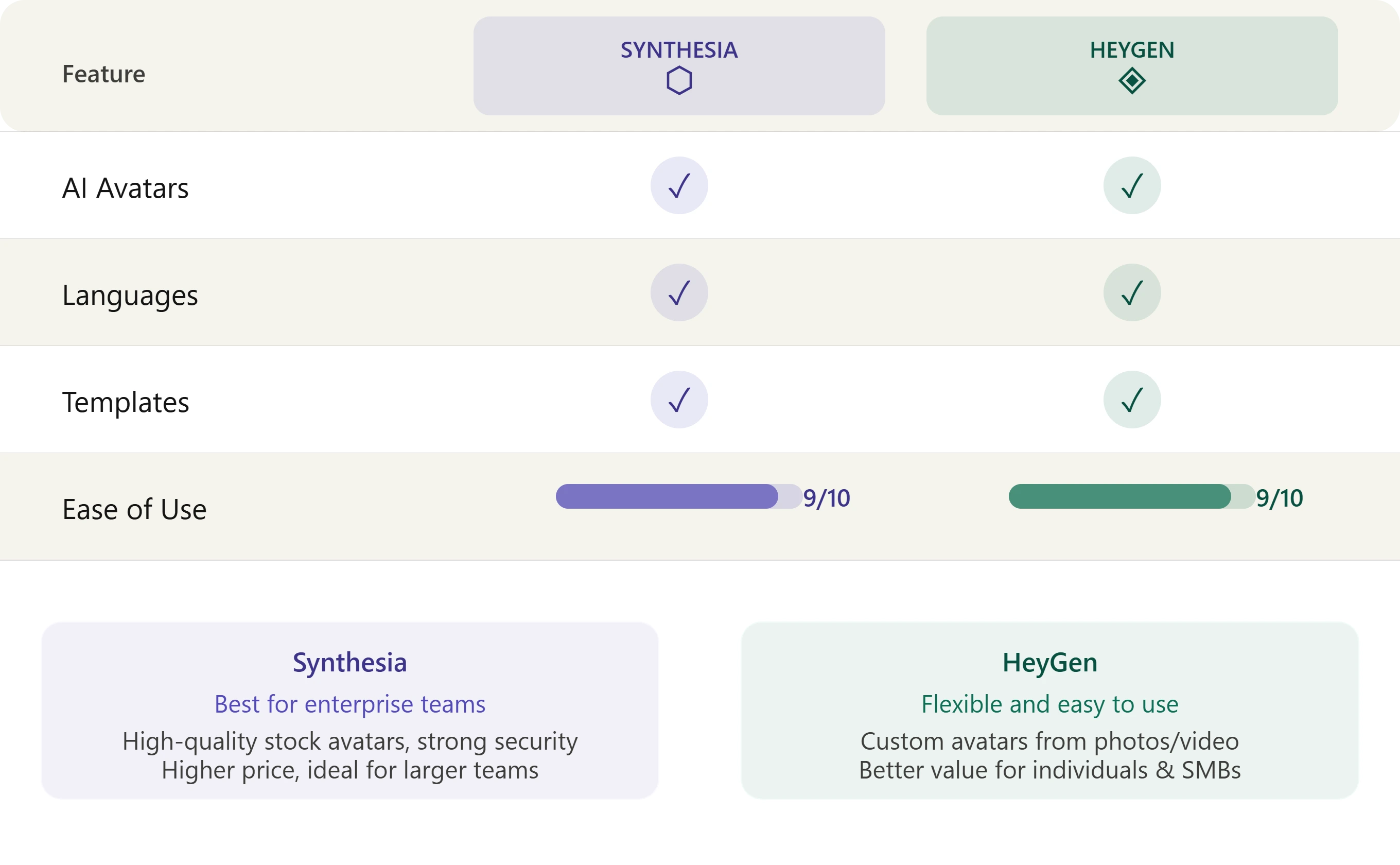
The AI video market in 2026 is largely defined by the rivalry between Synthesia and HeyGen.
- Avatar Dynamism: HeyGen currently edges out Synthesia when it comes to casual, dynamic avatar motion. HeyGen’s avatars feel slightly more relaxed and are better suited for social media ads and TikTok hooks. Synthesia’s avatars lean heavily toward professional, news-anchor realism.
- Enterprise Features: Synthesia crushes HeyGen in the corporate realm. With robust SCORM integration, advanced workspace permissions, and stricter AI safety guardrails, Synthesia is the safer bet for Fortune 500 compliance.
- The Verdict: If you are making Instagram Reels or engaging social media ads, choose HeyGen. If you are building internal company training modules or CEO updates, choose Synthesia.
Synthesia vs Pictory
While both are technically AI video generators, they serve completely different use cases.
- Core Mechanics: Synthesia generates videos featuring synthetic human presenters. Pictory is a text-to-video tool that creates “faceless” videos by matching your script to millions of relevant stock video clips (B-roll) and adding automated subtitles.
- Content Style: If you are creating a “Top 10” YouTube video, a documentary, or a highly visual blog summary, Pictory’s dynamic stock footage approach works best. If you need a virtual instructor to explain a complex topic, Synthesia is required.
- The Verdict: Use Pictory for faceless content creation and social media shorts. Use Synthesia for presenter-led, instructional content.
Best Synthesia Alternatives
If Synthesia’s pricing structure or corporate aesthetic doesn’t match your brand, consider these top-tier alternatives:
| Tool | Best For |
|---|---|
| HeyGen | AI Avatars |
| Pictory | Faceless Videos |
| VEED | AI Video Editing |
1. HeyGen
The strongest direct competitor to Synthesia. HeyGen excels in creating highly emotive, social-media-ready avatars. Their voice cloning technology is top-tier, and their pricing tiers are slightly more flexible for solo creators who need higher minute volumes without enterprise bloat.
2. Pictory
The ultimate tool for repurposing text into dynamic, faceless videos. Pictory excels at turning long-form blog posts into engaging short-form videos using high-quality stock footage, automated captions, and AI voiceovers.
3. VEED
VEED is less of an avatar generator and more of an AI-powered video editing suite. It features fantastic automated subtitle generation, background noise removal, and an intuitive timeline editor. It is perfect for teams that prefer recording real humans but want AI to handle the tedious post-production process.
Decision Table
| Question | Answer |
|---|---|
| Does Synthesia have a free plan? | Yes, but videos are watermarked and limited to 10 minutes per month. |
| Can I clone my own voice? | Yes, you can instantly clone your voice using a 10-second audio sample. |
| Does Synthesia export to SCORM? | Yes, making it perfect for Learning Management Systems (LMS). |
| Is Synthesia better than HeyGen for creators? | No, HeyGen is generally preferred for casual social media creators. |
| Does Synthesia support multiple languages? | Yes, it supports over 160 languages and localized accents. |
Common Questions
Is Synthesia free to use? Synthesia offers a free $0 tier that allows users to test the platform. However, it is heavily restricted: you only receive 10 minutes of generation time, videos feature a permanent watermark, and you cannot download the MP4 files. It is strictly for evaluation.
How much does a custom avatar cost? While lower-tier plans allow you to generate basic personal avatars via a webcam, a highly polished, professional “Studio Avatar” (which involves strict green-screen guidelines and deep machine learning rendering) is a paid add-on. In 2026, this typically costs an additional $1,000 per year.
Can I use Synthesia for YouTube? Yes, but you must be strategic. YouTube’s monetization algorithms increasingly flag repetitive, low-effort AI content. If you build a channel entirely on static AI avatars reading Wikipedia articles, you risk demonetization. Synthesia is best used for instructional content or faceless channels where the avatar is a small supplement to dynamic B-roll.
Does Synthesia offer API access? Yes. Synthesia provides robust API access, allowing developers to programmatically generate videos at scale. This is ideal for SaaS companies looking to trigger personalized onboarding videos automatically when a new user signs up. API access is available on the Creator and Enterprise plans.
How fast is the video generation? Synthesia’s rendering engine is exceptionally fast. Once you finalize your script and hit generate, standard videos typically render and are ready for playback or download within a few minutes, depending on server load and video length.
Should You Use Synthesia?
Bottom Line
Synthesia remains the absolute gold standard for corporate video generation. Its focus on security, compliance, and multi-lingual scalability makes it an undeniable asset for any organization looking to modernize its internal communications and training pipelines. However, its pricing model and rigid aesthetics make it less appealing for solo digital creators looking to build viral social media channels.
Choose Synthesia if…
You are an L&D professional, an HR manager, or an enterprise communications director who needs to scale high-quality, multilingual training videos across a global workforce without the cost of a physical production studio.
Choose HeyGen if…
You are a social media marketer, influencer, or agency that requires more relaxed, emotive, and dynamic avatars designed specifically to capture attention on platforms like TikTok, Instagram, and YouTube.
Choose Pictory if…
You are a content creator running a faceless YouTube channel or a blogger who wants to convert written articles into highly visual, stock-footage-driven video summaries automatically.
Try Synthesia
If your primary goal is creating professional training videos, onboarding content, or multilingual corporate communications, Synthesia remains one of the strongest AI video platforms available today.
Final Verdict
Synthesia’s 2026 iteration proves that it understands its core audience perfectly. By leaning heavily into enterprise features like SCORM exports, advanced localized dubbing, and SOC 2 security, it has cemented itself as the default AI video platform for the corporate world. The Gen-4 expressive avatars successfully bridge the gap between robotic text-to-speech and human-like instruction.
Who Should Use Synthesia?
- Corporate trainers and L&D departments building software tutorials.
- HR teams deploying global compliance videos.
- SaaS companies creating structured onboarding modules.
- Global marketing teams needing instant 1-click video translation.
Who Should Avoid Synthesia?
- Solo YouTubers looking for cheap, high-volume minutes.
- TikTok creators needing highly animated, fast-paced visuals.
- Startups operating on a shoestring budget who only need 15 minutes of video (due to the harsh pricing jump to the Creator tier).
Where Synthesia Fits in a Broader Marketing Stack
Generating a professional video with Synthesia is only the first step in a successful content lifecycle. To truly drive ROI, your AI video assets must be paired with strategic distribution and intelligence tools.
For SaaS founders and agencies, integrating video creation with social listening creates a powerful loop:
- Use a platform like Brand24 to monitor broad industry trends and identify which topics your target audience cares about most.
- Before scripting your next video, use GummySearch (for legacy account holders) to mine the exact pain points and feature requests that Reddit communities are actively discussing in your niche.
- When a highly debated topic surfaces, use Synthesia to rapidly generate an expert explainer video featuring a digital avatar addressing those exact pain points.
- Deploy outbound lead generation tools like Awario to find active buyers on forums asking questions related to your video, and reply with your newly minted Synthesia tutorial.
- For grassroots distribution, leverage the tools outlined in our guide to the Best Reddit Marketing Tools to natively seed your instructional videos into highly relevant subreddit communities without appearing overly promotional.
- Finally, use community tracking utilities like those found in our Best Reddit Monitoring Tools list to measure the exact organic engagement your video generates across the web.
If you are researching Reddit discussions before creating AI videos, the Reddit Thread to VoiceOver Chrome Extension can help transform long Reddit conversations into structured scripts that are ready for tools like Synthesia.