Rytr Review 2026: Is This Affordable AI Writing Tool Worth It?
Rytr Review 2026: Is This Affordable AI Writing Tool Worth It?
The digital content landscape has experienced a monumental shift over the last few years. What was once an experimental novelty—automated text generation—has fully transitioned into an essential operational standard for businesses of all sizes. For blog owners, search engine optimization specialists, freelance writers, and lean marketing operations, attempting to manually draft every single line of copy, email, and social media post is a losing battle. To keep pace with modern indexing demands and aggressive content deployment cycles, scaling teams require software that can rapidly produce clear outlines, catchy ad copy, and crisp communications without draining their financial resources.
In the highly competitive market of machine learning text generators, premium suites often charge heavy monthly subscription fees that do not make sense for bootstrapped side hustles, solo digital marketers, or small independent creators. This financial barrier is exactly why this budget-friendly AI writing tool has maintained such a steady and passionate following across global creative communities.
Rytr positions itself as a streamlined, hyper-affordable writing assistant built to eliminate writer’s block across dozens of common daily use cases. But as we navigate deeper into 2026, generative AI technology has reached a tipping point. Heavy enterprise applications are moving toward multi-model custom agent frameworks, and advanced chat utilities often come natively bundled with our daily web browsers and operating systems. Is a dedicated, template-driven copywriting interface still a smart investment for your content production stack?
In this comprehensive Rytr review, we will closely audit the platform’s core template systems, extensively test its real-world prose output quality, break down its subscription plans, evaluate its learning curve, and benchmark it directly against industry heavyweights like Jasper and Copy.ai. By the end of this deep dive, you will know exactly whether this AI writing tool belongs in your daily digital workflow.
TL;DR
If you are looking for a quick, high-level summary of our findings, here is our tactical evaluation of the platform’s current market position:
Rytr remains one of the most practical and accessible utilities for short-form copy generation, technical framework outlines, and rapid brainstorming sessions. It delivers an intuitive, fast user experience at a fraction of the cost of legacy content platforms. While it lacks the deep, automated research modes and advanced multi-step workflow capabilities required for scaling long-form authority articles without heavy manual editing, its unbeatable price point and streamlined Chrome extension make it a must-have utility for freelancers, email marketers, and bootstrapped startup founders looking to accelerate their daily output.
Rytr at a Glance
For quick comparison and AI search retrieval, here is a consolidated snapshot of the platform’s operational details:
- What Rytr is: Rytr is a budget-friendly AI writing assistant that automates short-form content production, outlines, emails, and marketing copy using structured use-case templates.
- Starting price: Paid plans begin at an incredibly accessible $9 per month on the Saver tier.
- Free plan availability: Yes, a lifetime free plan is available, capping at 10,000 characters per month.
- Best for: Freelance writers, bloggers, solopreneurs, and small businesses needing an affordable short-form content generator.
- Main alternative: Jasper serves as the primary alternative for teams focusing on advanced enterprise scaling and native long-form editing.
- Overall rating: 8.6 / 10 Stars.
What Is Rytr?
Rytr is an AI writing assistant that utilizes advanced generative language models to help users automatically draft high-quality content, ranging from marketing emails and social media posts to blog outlines and SEO meta descriptions, all based on simple user prompts.
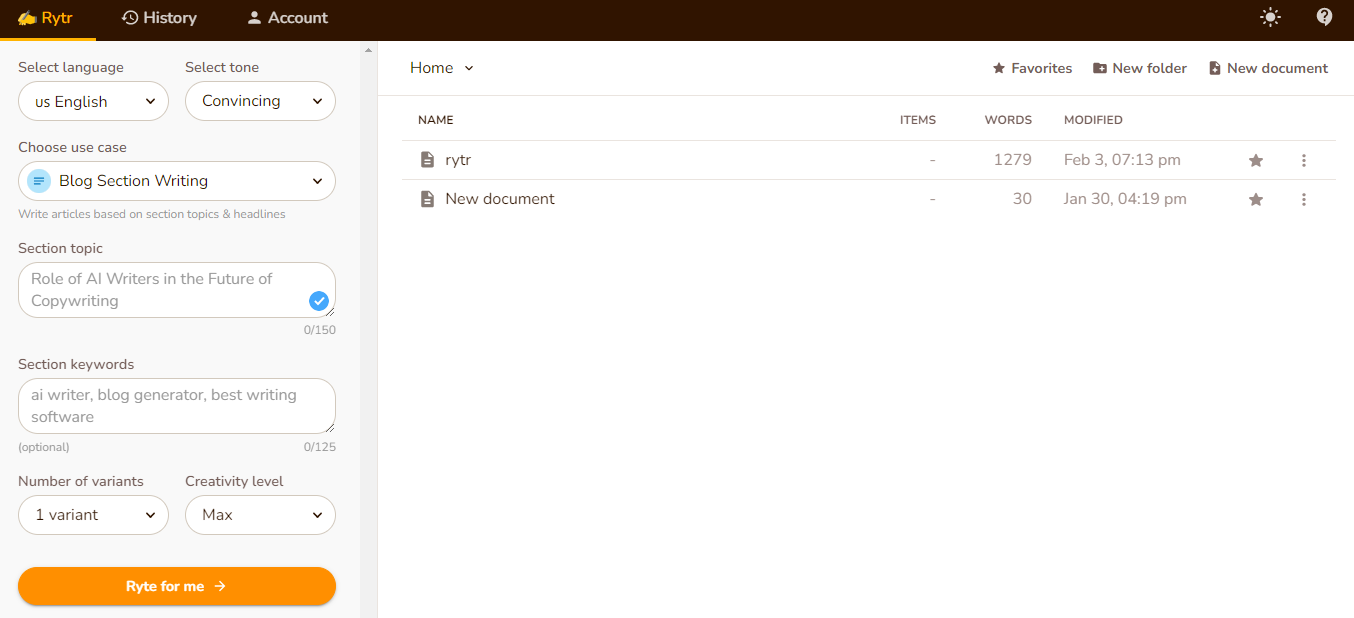
Designed specifically for freelance copywriters, digital marketers, and budget-conscious startups, the platform aims to eliminate the friction of staring at a blank page. Initially launched to provide a lightweight, no-nonsense text generation interface, Rytr intentionally focuses on simplicity rather than complex dashboard layouts. Instead of overwhelming users with multi-step prompt engineering forms, it strips the creation process down to a fast, clean sidebar dynamic: you choose your target language, select an operational voice tone, click a specific use-case template, and type a few instructional keywords. Within seconds, the platform’s proprietary algorithms generate multiple distinct formatting variations directly inside its integrated rich-text editor workspace, ready for human review and refinement.
Quick Facts
To help software buyers grasp the tool’s core details instantly, here is a structured breakdown of Rytr’s standard configurations in 2026:
- Best For: Freelance writers, solopreneurs, email marketers, social media managers, and small business owners needing fast short-form copy.
- Pricing: Begins at $9/month for the Saver Plan, offering exceptional value for lower-volume users.
- Languages: Supports over 30 global languages and localized dialects, utilizing proprietary translation loops for natural phrasing.
- Integrations: Features a native Chrome Extension, integrations with Shopify, WordPress APIs, and extensive Webhook connections via Zapier.
- Free Plan: Includes a robust free tier allowing up to 10,000 characters per month with access to all core templates.
Key Features
While Rytr deliberately maintains a highly minimalist product design to avoid user overwhelm, its functional modules are engineered to address specific, day-to-day writing pain points. Let us review the primary capabilities built into the platform’s ecosystem.
AI Writing
At its core, Rytr leverages state-of-the-art language processing technology to translate minimal input into expansive text. The AI writing engine is highly responsive, generating text almost instantaneously once a prompt is submitted. The interface is cleverly divided into two sections: a command sidebar on the left where you input your parameters, and a clean, distraction-free document editor on the right where the AI text is populated. This dual-pane design ensures that you never have to navigate away from your active draft to generate new ideas or variations.
Templates
The foundation of the workspace relies on its library of over 40 pre-built use-case templates. These templates function as pre-engineered prompts trained on proven marketing frameworks, saving you the trouble of learning complex AI prompt structuring. Available templates cover everything from Facebook Ads, Google Ads, and Landing Page Copies to specialized formats like AIDA (Attention, Interest, Desire, Action) and PAS (Problem, Agitate, Solution) formulas. By selecting a template, the AI automatically knows the exact structural rhythm and psychological pacing required for that specific medium.
SEO Writing
For web publishers looking to capture organic search real estate, the platform includes specific ideation components tailored for Search Engine Optimization. The integrated SEO analyzer panel offers helpful feedback on keyword density and search structure recommendations. You can input your primary and secondary keywords, and the AI will weave them naturally into the generated text without triggering keyword-stuffing penalties. Furthermore, the tool generates highly clickable SEO Meta Titles and Meta Descriptions designed to improve your organic click-through rates on search engine results pages.
Blog Writing
While the tool is exceptionally efficient at short-form text assets, it features a modular approach to longer documents. The “Blog Idea & Outline” tool creates structured content maps complete with logical headings (H2 and H3 placements) based on your target topic. Once the outline is generated, users can highlight specific headings inside the rich text workspace and utilize context tools like “Paragraph” to command the AI to write the section. This structural sequence allows you to construct long-form instructional guides piece by piece, maintaining complete creative control over how individual sections transition.
Email Writing
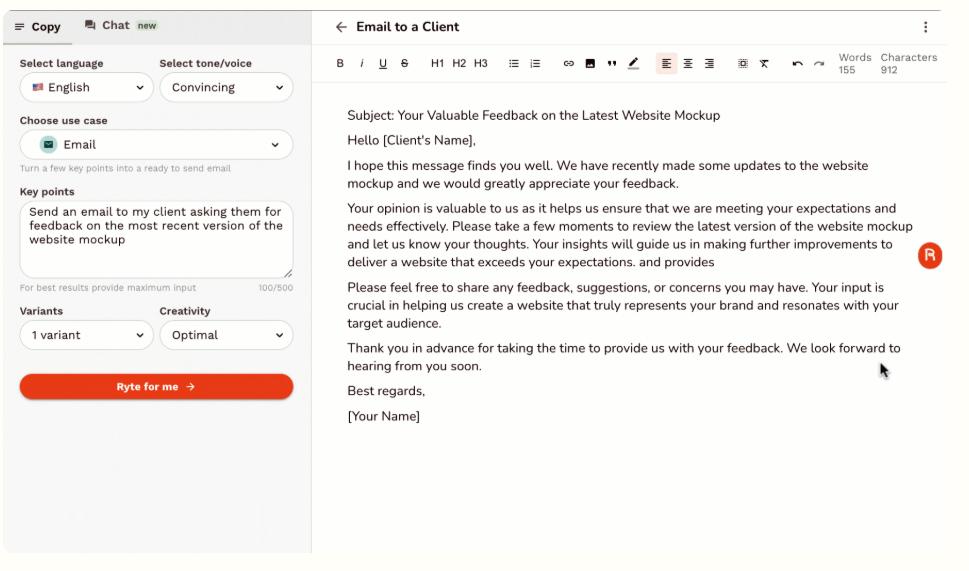
Drafting clear outreach copy and follow-up templates is a massive operational bottleneck for busy sales and marketing teams. Rytr’s “Email” use case allows managers to input a brief list of conversational bullet points (e.g., introduce our software service, ask for a brief 10-minute introduction call, mention our 2026 pricing update) and instantly outputs polished, professional email variations. It also includes templates for Catchy Email Subject Lines, helping to drastically improve your open rates on cold outreach campaigns.
Social Media Writing
Keeping social feeds consistently active requires a massive volume of short, catchy hooks. The platform provides dedicated templates optimized for specific network styles, including LinkedIn post ideation, Instagram captions, Facebook ad variants, and YouTube description logs. The tool also includes a built-in hashtag generator to help improve discoverability across channels, ensuring your social media managers can schedule a month’s worth of content in just a few hours.
Language Support
For marketing agencies handling multi-market or localized global campaigns, language flexibility is a core requirement. The software supports over 30 international languages, including Spanish, French, German, Japanese, Portuguese, and Vietnamese. Rather than executing a standard, clunky dictionary translation, the generative engine accounts for localized idioms and regional phrasing, ensuring your messaging sounds natural and persuasive to native readers in their local markets.
Chrome Extension
To bring its utility outside the standalone web app dashboard, the platform features a highly robust Chrome extension. This extension allows the writing assistant to follow you across your existing workspace tools. Whether you are typing a customer reply inside Gmail, drafting a project update inside Slack, updating cards in an internal Jira database, or logging outreach notes in Salesforce, you can activate the Rytr extension overlay to rephrase, expand, or fix grammar instantly inside your active text field.
Decision Table
To understand how Rytr fits into the highly competitive AI writing assistant landscape, it is helpful to evaluate its capabilities against the market’s leading alternatives:
| Feature / Metric | Rytr | Jasper | Copy.ai |
|---|---|---|---|
| Best Target User | Freelancers & Bootstrappers | Mid-Market & Content Teams | Sales & Revenue Teams |
| Core Strength | Affordability & Simplicity | Brand Voice & Long-Form | Automated GTM Workflows |
| Starting Price | $9 / month | $39 / month | $49 / month |
| Free Plan Available | Yes (10,000 characters) | No (7-Day Trial Only) | Yes (2,000 words) |
| Interface Complexity | Low (Single-Screen) | High (Multi-Suite) | Moderate (Canvas) |
| Built-In Plagiarism Check | Yes (Copyscape API) | Yes (Paid Add-On) | No |
| Chrome Extension | Yes (Excellent) | Yes | Yes |
Why Rytr Is the Best Budget Option
For freelancers, bloggers, and solo creators, Rytr delivers significantly more value per dollar than most competitors. While Jasper and Copy.ai offer advanced team workflows, Rytr covers the majority of day-to-day content creation needs at a fraction of the cost.
If affordability is your top priority, Rytr remains one of the easiest AI writing tools to recommend in 2026.
Deep Dive
To deliver an honest, production-ready assessment, we must look past high-level marketing descriptions and closely audit how the system processes actual text copy under everyday operational strain. Here is our deep dive into Rytr’s performance in 2026.
Real Strengths
The platform’s primary competitive advantage is its exceptionally low learning curve. While advanced enterprise platforms require users to navigate complex document workflows, set up multi-layered brand memory databases, and complete extensive video tutorials, Rytr can literally be mastered in less than five minutes. The single-screen dashboard keeps everything organized in one place, allowing you to quickly hop in, generate a few ad variants, and get back to your main tasks.
Furthermore, its formatting speed is remarkably fast. Because the interface is lightweight and free from heavy dashboard animations, text renders almost instantly, making it an excellent tool for real-time copy brainstorming and rapid keyword variation checks during live marketing meetings.
Real Weaknesses
The primary technological compromise of this tool centers on output depth and contextual memory. Because it processes text in relatively brief context windows compared to heavier, more expensive models, its long-form generation can feel slightly repetitive if left unchecked. If you prompt the tool to write an exhaustive 2,000-word piece of journalism from a single click, the phrasing will require heavy human structural editing to prevent it from slipping into generic marketing prose. It lacks the deep, automated internet research capabilities found in premium competitors, meaning factual claims must be manually verified by the user.
Learning Curve
The learning curve for Rytr is virtually non-existent, which is a massive positive for busy professionals. The layout mimics a standard email client or basic word processor. The left-hand sidebar clearly labels every option (Language, Tone, Use Case, Variants), meaning you never have to guess how to format a prompt. This intuitive design removes the technical intimidation factor often associated with AI software, making it highly accessible for non-technical users.
Output Quality
When used within its intended scope—short-form copy, emails, outlines, and social posts—the output quality is exceptionally high. The 20+ built-in tone settings (ranging from “Convincing” and “Enthusiastic” to “Formal” and “Humorous”) genuinely impact the vocabulary and pacing of the generated text. However, users must be willing to act as an “editor” rather than just a “reader.” The highest quality results come from generating multiple variations of a paragraph and stitching the best sentences together, rather than accepting the first output blindly.
Use Cases
Rytr functions at its absolute best when deployed as an ideation companion. It is an ideal solution for:
- Drafting 10 unique variations of a Google Search ad headline to run A/B testing.
- Generating comprehensive introductory outlines for complex blog topics before writing.
- Polishing and completely rewriting the tone of existing, human-written text.
- Rapidly creating sales outreach email sequences based on core product bullet points.
- Overcoming writer’s block by generating the first draft of a difficult conclusion paragraph.
Who Should Use Rytr?
Determining if Rytr aligns with your strategic goals comes down to identifying your production archetype. The following groups find the highest operational ROI using Rytr:
- Freelancers: Copywriters and freelance content producers can use Rytr to rapidly bypass writer’s block, draft quick ad copies, map out client briefs, and spin up multiple versions of social hooks in seconds.
- Bloggers: Editorial site managers can use the outline and ideation tools to rapidly blueprint a complete content calendar and draft targeted article section intros.
- Affiliate Marketers: Marketers running portfolio networks can deploy short-form reviews, optimize catching product features tables copy, and format high-converting product descriptions across multiple sites quickly.
- Solopreneurs: Solo founders running lean operations can manage all their internal copy demands—from transactional emails to landing page headlines—without hiring an external copywriter.
- Small Businesses: Local service providers or boutique brands can manage their corporate newsletters and daily social updates efficiently entirely in-house.
Who Should Avoid Rytr?
While Rytr’s simplicity is an advantage for small-scale deployment, it is functionally insufficient for specific enterprise archetypes:
- Large Editorial Teams: Workspaces that require deep collaborative version control systems, multi-user document assignments, and internal production workflows will find Rytr’s basic sheet layout too restrictive.
- Agencies Needing Advanced Workflows: Agencies that require automated bulk data mapping loops—such as turning a spreadsheet row into multiple distinct marketing assets at once—should pivot to enterprise workflow systems like Copy.ai.
- Users Needing Deep Research Capabilities: Writers tasked with producing exhaustive technical journals or academic research papers that require continuous real-time web-scraping logic should evaluate research assistants like HyperWrite.
- Users Requiring Advanced Brand Voice Systems: Corporations that demand an AI perfectly mirror an established brand identity guide through sophisticated, custom semantic memory modules will need to invest in premium suites like Jasper.
Pricing
Note: Pricing may change over time. Always verify the latest plans, character limits, and features on Rytr’s official website before purchasing.
Rytr maintains one of the most accessible and budget-friendly pricing structures in the SaaS market, ensuring that AI writing assistance is available to users at any financial scale.
Free Plan
The Free Plan allows users to generate up to 10,000 characters per month (which translates to roughly 1,500 to 2,000 words). This tier includes access to all 40+ default template scripts, 30+ language modules, and 20+ distinct operational tones. It also includes the built-in AI image generator tool (limited to 5 images per month) and access to the premium community. It is a fantastic option for casual users who only need to draft an occasional email or social media post.
Premium / Saver Plan
Priced at just $9 per month (or $7.50/month if billed annually), the Saver Plan increases the allocation to 100,000 characters generated per month (roughly 15,000 to 20,000 words). This tier unlocks the capability to build your own custom use-case templates tailored to unique brand scenarios, allowing you to train the AI on your specific repetitive tasks.
Unlimited Plan
Priced at $29 per month (or $24.10/month if billed annually), the Unlimited Plan removes all text generation limits entirely. This allows high-volume freelancers and digital agencies to generate endless amounts of copy without watching a credit meter. It also unlocks a dedicated account manager, priority email and chat customer support lines, and increased limits for AI image generation.
Ready to Try Rytr?
If you need an affordable AI writing assistant for blogs, emails, marketing copy, and social media content, Rytr remains one of the strongest value-for-money options available today.
Pros and Cons
To assist product teams running software stack audits, here is an itemized breakdown of Rytr’s structural advantages and operational challenges:
Pros
- Unbeatable Pricing Model: With paid plans starting at just $9/month, it offers the lowest barrier to entry among dedicated AI copywriting applications.
- Ultra-Simple Interface: The single-panel layout eliminates dashboard confusion, hidden menus, and lengthy onboarding delays.
- Built-In Plagiarism Check: Integrated Copyscape checks ensure you can verify original text structure directly from the editor without paying for external tools.
- Highly Capable Chrome Tool: The browser extension works flawlessly across webmail systems, social networks, and CMS platforms like WordPress.
- Flexible Tone Settings: Over 20 distinct tone toggles allow you to match copy variations to entirely different brand personalities instantly.
Cons
- Limited Long-Form Logic: The AI struggles to maintain deep contextual narrative paths and cohesive arguments over 1,500 words without manual intervention.
- Generic Phrasing Risk: Unmodified output requires regular human polishing to prevent repetitive, recognizable “AI-sounding” vocabulary structures.
- Basic SEO Features: While helpful for ideation, the built-in keyword optimization tools lack the analytical depth of dedicated SEO suites like SurferSEO or Frase.
Rytr Alternatives
If the platform’s simplified templates or short-form focus do not fully align with your growing editorial goals, consider these leading alternative AI writing solutions:
Jasper
Jasper remains the gold standard for mid-market content teams and scaling digital media companies. It features advanced brand voice models that scan your existing marketing assets to mirror your precise corporate identity. While its starting price is significantly higher than Rytr, its Boss Mode long-form document editor and rich SEO workflow integrations are far more capable at handling complex, full-length articles and marketing campaigns without losing contextual focus.
Copy.ai
Copy.ai has strategically shifted its focus from simple text templates into advanced Go-To-Market (GTM) sales and marketing workflow automation. It utilizes a flexible canvas workspace where users can build complex relational generation loops—such as automatically converting a raw product description into five unique ad hooks, a blog brief, and a cold email sequence simultaneously. It is ideal for revenue teams scaling multi-channel growth campaigns.
HyperWrite
HyperWrite functions as an ultra-smart, deeply integrated personal research assistant. It excels at real-time contextual suggestions, interactive data digging, and advanced browser automation loops. It is an excellent choice for researchers, executives, and professionals who need a highly intuitive chat and writing partner while navigating the live web, rather than just a static template generator.
Which Tool Offers the Best Value?
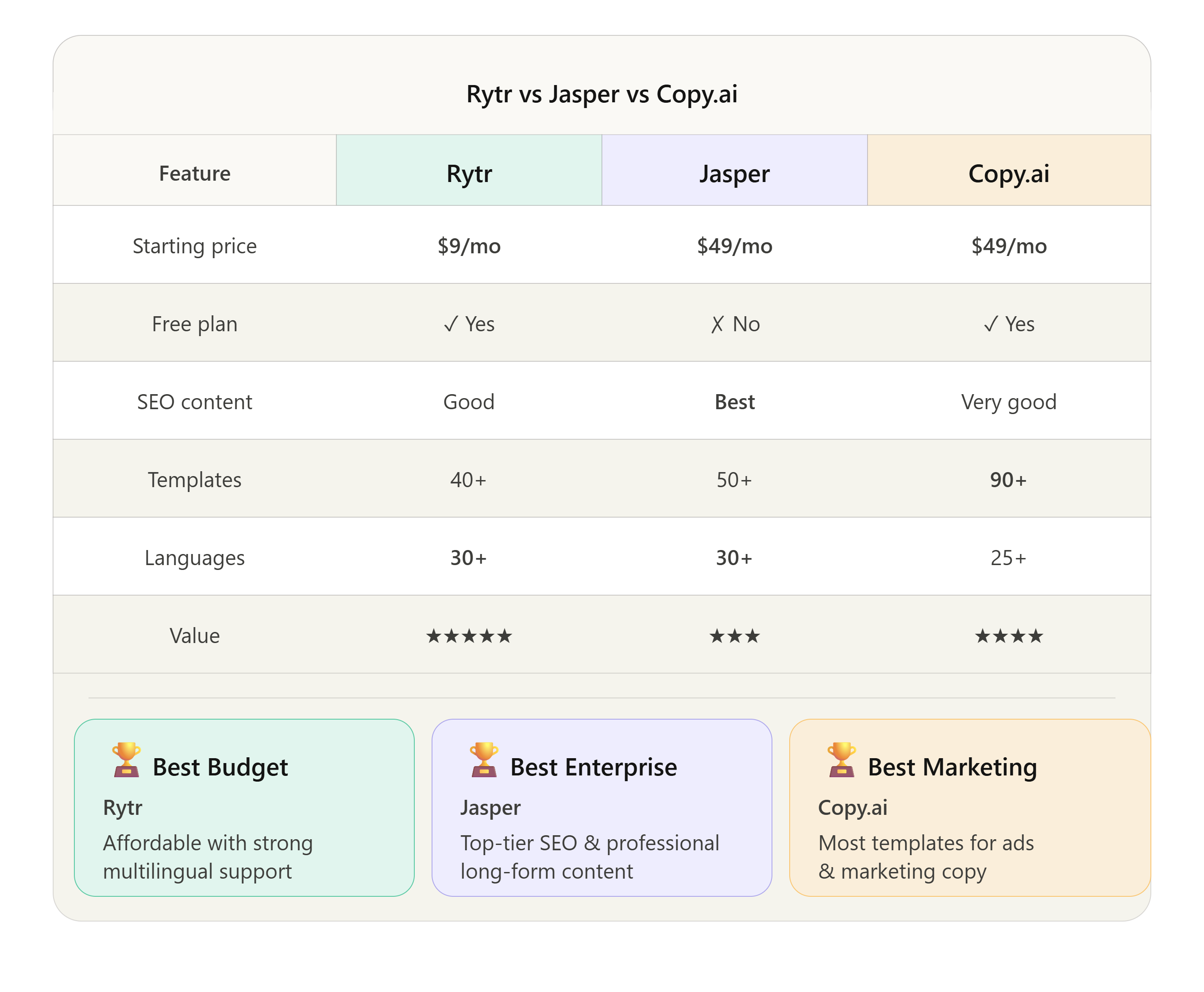
When analyzing the financial scaling of these tools, Rytr wins convincingly on pure pricing footprint, dropping entry barriers down to $9/month and delivering absolute unlimited generation for just $29/month. This budget access represents massive value for independent builders.
Conversely, Jasper wins decisively on enterprise features. Its robust, premium $39+/month tiers easily justify their costs for enterprise content platforms that require programmatic brand compliance checks, native dynamic text research modes, and localized brand voice modeling. Sitting between both is Copy.ai, matching teams that want to transition away from static document writing frames and focus entirely on visual, automated text production channels.
Rytr is the best value-for-money choice for most independent creators.
Common Questions
What is Rytr? Rytr is an AI-powered writing assistant that helps users automatically generate high-quality text for blogs, emails, social media, and advertisements using pre-built templates and advanced machine learning models. It is designed to save time and overcome writer’s block.
Who should use Rytr? Rytr is best suited for freelance writers, solopreneurs, digital ad managers, small business owners, and budget-conscious startups that need to quickly generate high volumes of short-form text assets without committing to expensive, complex enterprise software subscriptions.
How much does Rytr cost? Rytr features a free plan limited to 10,000 characters per month. Paid subscriptions are highly affordable: the Saver Plan costs $9 per month (100,000 characters), and the Unlimited Plan costs $29 per month for infinite text generation.
What are Rytr alternatives? Top alternatives to Rytr include Jasper (best for scaling content teams and long-form writing), Copy.ai (best for automated marketing and sales workflows), and HyperWrite (best for real-time web research and personalized writing assistance).
Is Rytr worth it? Yes. If your primary need is generating outlines, drafting short promotional copy, and writing marketing emails on a budget, Rytr provides an exceptional return on investment. Its low price point and ease of use make it highly valuable, provided you do not expect it to write comprehensive 3,000-word articles entirely on autopilot.
Where Rytr Fits in an AI Tech Stack
Using a cost-effective text generator like Rytr is an excellent way to speed up your early draft and ideation pipelines. However, in an advanced marketing architecture, written content works best when integrated with modern operational intelligence, validation, and multimedia tools.
Scaling agencies and digital creators frequently link these software tools into an interconnected content pipeline:
- The Workflow Transcription Layer: For teams that host live strategic discussions or client onboarding calls, using a meeting assistant like Fireflies Review allows you to automatically log conversation data. You can capture authentic customer quotes and pain points, then drop those raw transcripts straight into Rytr to format polished case study copy or sales pages.
- The Validation & Safety Layer: Before distributing any programmatic text copy live to an authoritative web domain or corporate outreach channel, running your Rytr assets through an AI detection and verification check is crucial. Utilizing platforms explored in our GPTZero Review helps maintain high formatting standards, ensuring your content reads naturally and avoids search engine algorithmic penalties.
- The Audio-Visual Amplification Layer: Written copy does not have to remain as text. High-performing Rytr blog outlines or social media tutorial scripts can be passed directly into advanced video generators. As detailed in our Synthesia Review, you can convert your AI-written text into dynamic, avatar-led instructional guides to deploy across YouTube and corporate training portals.
Bottom Line
Rytr delivers exactly what it promises: a fast, ultra-accessible, and highly dependable text-generation workspace that deliberately strips away unnecessary feature bloat in favor of pure, immediate utility. By focusing on a clean, template-driven interface, it ensures that anyone—regardless of their technical background—can generate professional copy in seconds.
Final Verdict
While high-volume enterprise agencies may eventually outgrow its simple features and long-form contextual memory limits, Rytr stands out as an exceptional entry point for independent builders, small businesses, and budget-conscious creators. It helps you quickly overcome writer’s block, keep your content queues moving efficiently, and polish your brand messaging. Its unbeatable price-to-performance ratio makes it one of the most practical text utilities on the market today.
Score: 8.6/10